Choosing the right CRM can help your team keep customer details organized, follow up on time, and manage sales more clearly.
Choosing the wrong one can create extra work.
This HubSpot vs Zoho CRM comparison explains the key differences in features, pricing, setup, ease of use, and best use cases. The goal is not to tell you that one tool is perfect for everyone. The goal is to help you choose the CRM that fits how your business actually works.
Table of Contents
Quick Answer: HubSpot vs Zoho CRM
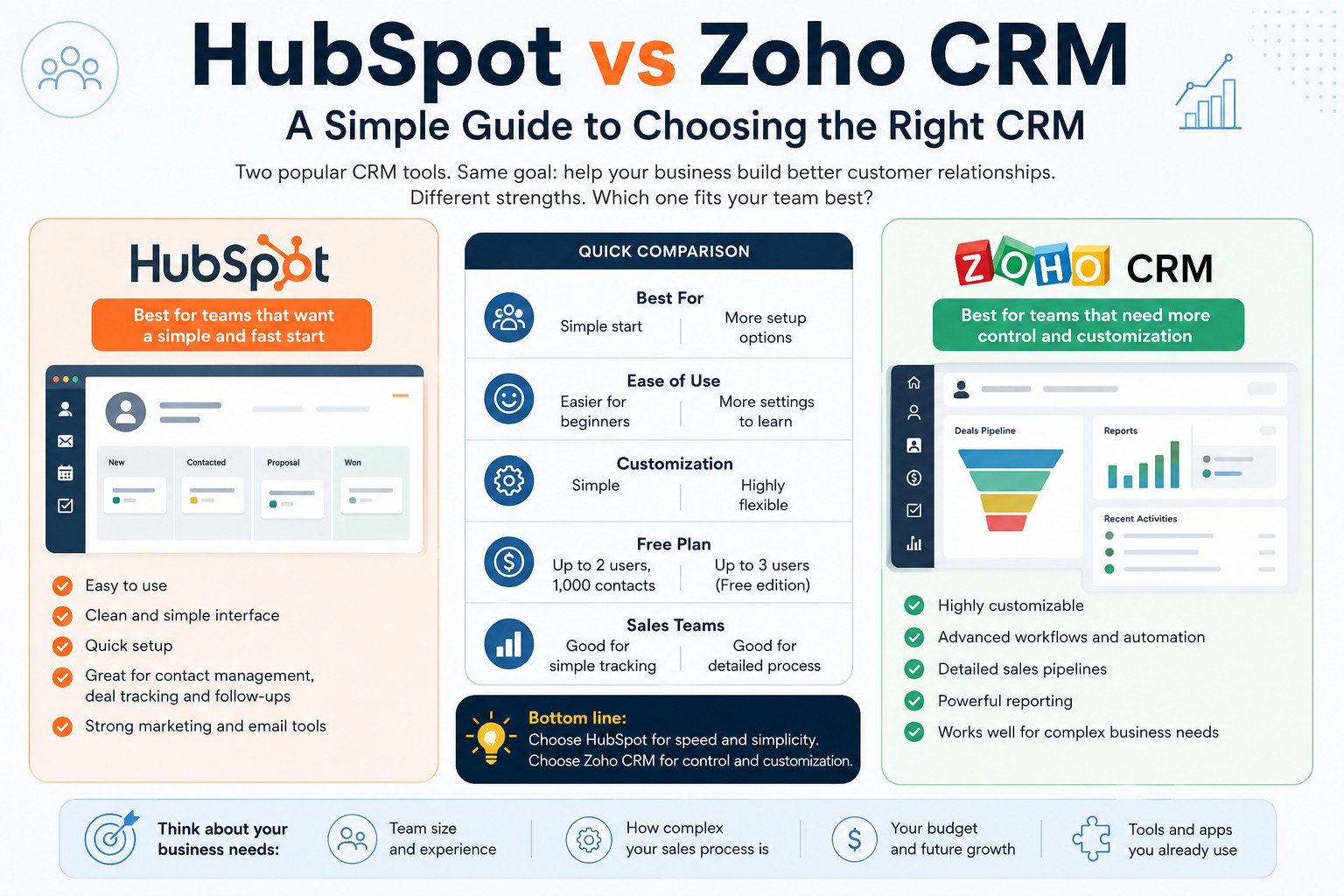
The main difference between HubSpot and Zoho CRM is simple: HubSpot is often easier to start with, while Zoho CRM gives you more ways to customize your setup.
HubSpot may be the better choice if your team wants a clean CRM for contact management, deal tracking, and follow-up tasks without a long setup process.
Zoho CRM may be better if your business needs custom fields, workflows, detailed sales pipelines, and more control over how customer data is organized.
| Category | HubSpot CRM | Zoho CRM |
|---|---|---|
| Best for | Teams that want a simple start | Teams that need more setup options |
| Ease of use | Easier for basic CRM tasks | More settings to learn |
| Free plan | Useful for basic CRM use | Useful for very small teams |
| Customization | Simple for beginners | More flexible for fields and workflows |
| Sales teams | Good for simple sales tracking | Good for detailed sales processes |
| Better choice if | You want speed and simplicity | You want more control over setup |
Before comparing features and pricing, it helps to understand why these two CRM platforms are often compared in the first place.
Why Businesses Compare HubSpot and Zoho CRM
HubSpot and Zoho CRM are popular because they solve a common business problem: customer information gets scattered.
A CRM, or Customer Relationship Management system, stores customer details in one place. This can include names, emails, phone numbers, notes, deals, calls, meetings, and past conversations.
Without a CRM, your team may depend on spreadsheets, inboxes, notebooks, or personal memory. That can work for a short time, but it becomes risky as your leads, clients, and follow-ups grow.
HubSpot CRM is known for being simple to start with. Many small teams choose it because they can add contacts, create deals, and track follow-ups without spending much time on setup.
Zoho CRM is known for giving teams more ways to adjust the system. You can create custom fields, set workflows, manage pipelines, and build reports that match your sales process.
For example, imagine a small digital agency with five people. One person stores client notes in email. Another uses a spreadsheet. A third keeps proposal updates in personal notes.
When a client asks about a past quote, the team wastes time searching.
With a CRM, the team can open one contact record and see past emails, notes, meetings, tasks, and active deals in one place. That saves time and reduces confusion.
Both tools help with the same core problem. HubSpot focuses on a faster start. Zoho CRM gives more room to shape the system around your process.
Once you understand that difference, the next step is to compare what your team will use every week.
HubSpot vs Zoho CRM: Features, Pricing, and Ease of Use Compared
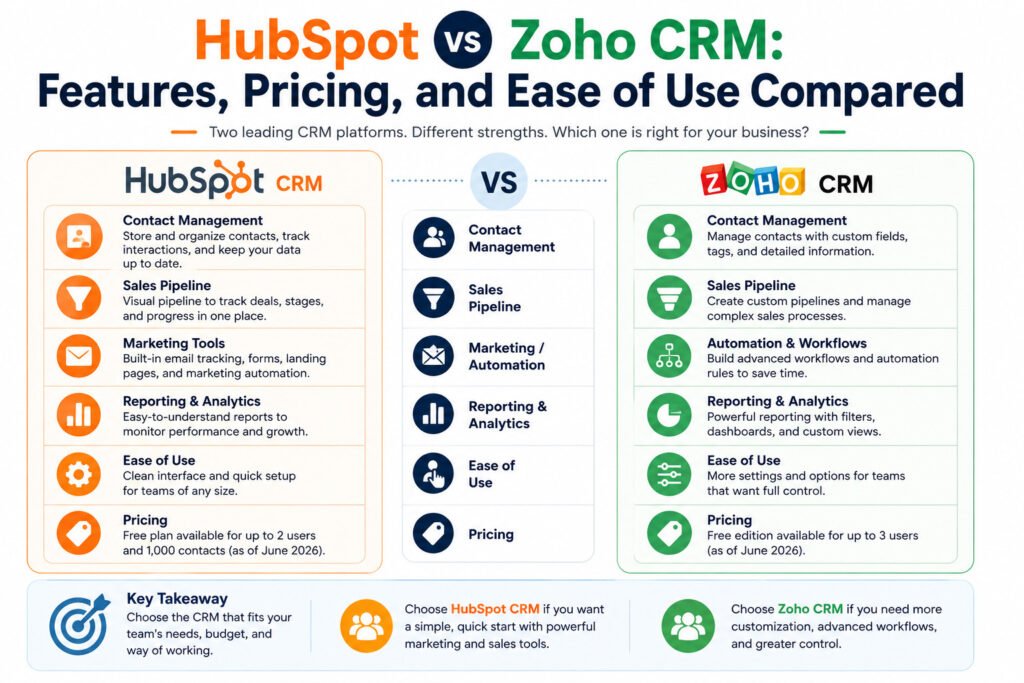
When comparing HubSpot vs Zoho CRM, focus on practical areas: contact management, deal tracking, reporting, automation, integrations, pricing, and setup.
HubSpot gives small teams the basic CRM tools they usually need first. You can store contacts, track deals, log emails, schedule meetings, create tasks, and view reports.
Zoho CRM also covers core CRM tasks, but it gives more options for custom setup. You can create custom fields, build different sales pipelines, set workflow rules, and connect the CRM with other business apps.
A custom field is a space you create to store specific information. For example, a web design agency may add fields for “website budget,” “project type,” or “preferred launch date.”
Automation means the CRM completes a repeated task for you. For example, when a deal moves to “Proposal Sent,” the system can create a reminder to follow up after three days.
Pricing is an important part of the decision.
As of June 2026, HubSpot lists free CRM tools for up to 2 users and up to 1,000 contacts. Zoho CRM lists a free edition for up to 3 users. Pricing and plan limits can change, so check the latest pricing pages before choosing a paid plan.
For ease of use, HubSpot may feel simpler for teams using a CRM for the first time. The main tools are easy to find, and basic setup usually does not take long.
Zoho CRM may take more time to set up because it offers more settings. That can be useful if your business has different sales stages, service types, reporting needs, or user roles.
Choose HubSpot if your team wants to start quickly and keep the CRM simple.
Choose Zoho CRM if your team needs more setup options and is willing to spend more time configuring the system.
But feature lists and pricing pages do not show everything. Some differences only become clear when your team starts using the CRM every day.
Hidden Differences: Setup Time, Costs, and Daily Use
A CRM can look good on paper and still be difficult to use in real work.
Setup time is one hidden difference.
HubSpot may be easier for basic use because teams can add contacts, create deals, and track follow-ups with fewer setup steps. This helps small teams that do not have a dedicated CRM manager.
Zoho CRM can take longer to set up, but that extra time can be useful. Teams can adjust fields, sales stages, workflows, reports, and user permissions to match how they sell.
Cost is another point to think about.
A free plan may look attractive at the start, but your needs may change. As your team grows, you may need advanced reports, more automation, marketing tools, extra users, or deeper integrations.
That is why you should not compare only the starting price. Think about what your team may need in six months or one year.
Daily use matters even more.
A CRM only works if your team updates it. If salespeople do not add notes, move deals, or check follow-up tasks, customer information will still get lost.
For example, a consulting business with two salespeople may only need lead tracking and reminders today. HubSpot may be enough.
Six months later, the same business may need custom reports, client types, and different follow-up rules for each service. At that point, Zoho CRM may fit better.
The best CRM is not the one with the longest feature list. It is the one your team can set up, afford, and use every week.
These differences matter because every business uses a CRM differently. A solo founder, sales team, agency, and support team may not need the same setup.
Which CRM Fits Your Business Type?
The right CRM depends on your team, sales process, and budget. HubSpot and Zoho CRM can both work well, but they fit different situations.
For Startup Founders and Solo Entrepreneurs
HubSpot may be the better starting point if you want a simple CRM for contacts, deals, and follow-ups.
It can work well when one person handles sales, marketing, and customer communication.
Zoho CRM can also work, especially if you already know you need custom fields or detailed sales stages from the beginning.
For Small Businesses
Small businesses can use either platform.
Choose HubSpot if your team wants a CRM that is easy to learn and quick to use.
Choose Zoho CRM if your business needs more ways to organize customer data, manage different sales stages, or create detailed reports.
For Sales Teams
Sales teams should focus on the sales pipeline.
A pipeline is the set of stages a deal moves through, such as “New Lead,” “Contacted,” “Proposal Sent,” and “Closed.”
If your sales process is simple, HubSpot may be enough.
If your team sells different products or services with different sales steps, Zoho CRM may give you more room to build that process.
For Marketing Teams
Marketing teams may prefer HubSpot if they want CRM, forms, email marketing, landing pages, and campaign tracking in one platform.
Zoho CRM can support marketing work too, but some teams may need to connect it with other Zoho apps or third-party tools.
For Agencies and Consultants
Agencies and consultants should think about client types, service packages, and follow-ups.
A freelance consultant may only need leads, notes, and reminders. HubSpot may work well.
A growing digital agency may need separate pipelines for web design, SEO, ads, and consulting clients. In that case, Zoho CRM may offer more useful setup options.
Now that you have seen the common use cases, it is worth asking a few practical questions before making a final choice.
Read this article : https://sagaaro.com/hubspot-vs-zoho-crm-a-simple-guide/
Questions to Ask Before Choosing HubSpot or Zoho CRM
Before choosing between HubSpot and Zoho CRM, start with your real business needs.
How many people need access? If only one or two people will use the system, a simple setup may be enough. If your whole sales or support team needs access, user limits and permissions matter.
What problem are you trying to fix? Are leads getting lost? Are follow-ups late? Are customer notes spread across inboxes and spreadsheets?
Your answer should guide your CRM choice.
How much setup can your team handle? HubSpot may be better if you want to start fast. Zoho CRM may be better if your team needs custom fields, reports, and workflows.
What will your team use every day? A powerful CRM will not help if people avoid opening it.
What will you need later? Think about extra users, reports, automation, integrations, marketing tools, and support features.
Before paying for a long-term plan, test both platforms with dummy contacts or non-sensitive real records. Add sample deals, create tasks, and ask your team which CRM they would actually use.
Your answers should make the decision clearer. The final step is matching those answers to the CRM that fits your team best.
Final Verdict: Should You Choose HubSpot or Zoho CRM?
Choose HubSpot CRM if you want a simple setup, easy contact tracking, and a beginner-friendly sales process.
It can work well for startups, freelancers, small businesses, and teams that want to start quickly.
Choose Zoho CRM if you need more ways to adjust fields, workflows, reports, sales stages, and user permissions.
It can work well for growing teams, agencies, and businesses with more detailed sales processes.
The best answer in the HubSpot vs Zoho CRM decision is not the same for every business.
If your team needs speed and simplicity, start with HubSpot.
If your team needs more custom setup and can spend more time configuring the system, look closely at Zoho CRM.
The smartest next step is to test both tools with real business examples. Add a few contacts, create sample deals, assign follow-up tasks, and compare how each CRM feels in daily use.
Then choose the CRM that matches your budget, sales process, and team habits.
According to lovable :https://lovable.dev/guides/hubspot-vs-zoho-crm-comparison
Frequently Asked Questions
Is HubSpot better than Zoho CRM?
HubSpot is better for teams that want a simple CRM with quick setup. Zoho CRM is better for teams that need more custom fields, workflows, pipelines, and reports. The better choice depends on how your team sells and how much setup you need.
Is Zoho CRM cheaper than HubSpot?
Zoho CRM may be cheaper for some teams, especially when they need more CRM settings in paid plans. But pricing changes often, so compare the latest pricing pages before deciding.
Which CRM is better for small businesses?
HubSpot may be better for small businesses that want simple contact and deal tracking. Zoho CRM may be better for small businesses that need more custom setup, detailed reports, and different sales stages.
Which CRM is easier to use?
HubSpot may be easier for first-time CRM users because basic actions like adding contacts, creating deals, and tracking follow-ups are simple to start. Zoho CRM may take longer to learn because it has more settings.
Does HubSpot have a free CRM plan?
Yes. As of June 2026, HubSpot lists free CRM tools with user and contact limits. Check HubSpot’s latest pricing page before publishing or choosing a plan.
Does Zoho CRM have a free plan?
Yes. As of June 2026, Zoho CRM lists a free edition for up to 3 users. Check Zoho’s latest pricing page because plan details can change.
What is the main difference between HubSpot and Zoho CRM?
The main difference is setup style. HubSpot focuses on simple daily CRM work. Zoho CRM gives teams more ways to adjust fields, workflows, pipelines, reports, and permissions.
Can I switch from HubSpot to Zoho CRM later?
Yes, but switching takes planning. You may need to export contacts, deals, companies, notes, and tasks, then import them into the new CRM. Before switching, clean your data and test the import with a small sample first.