Finding cheap marketing software for startups is not simply about choosing the lowest monthly price.
A free or low-cost plan can become expensive when you add contacts, users, email volume, automated tasks, or social accounts. The better approach is to choose tools that cover what your business needs now without forcing an early upgrade.
This guide compares affordable tools for email, CRM, social media, SEO, design, automation, and website analytics. It also includes complete marketing stacks for budgets of $0, under $25, and around $50 per month.
Table of Contents
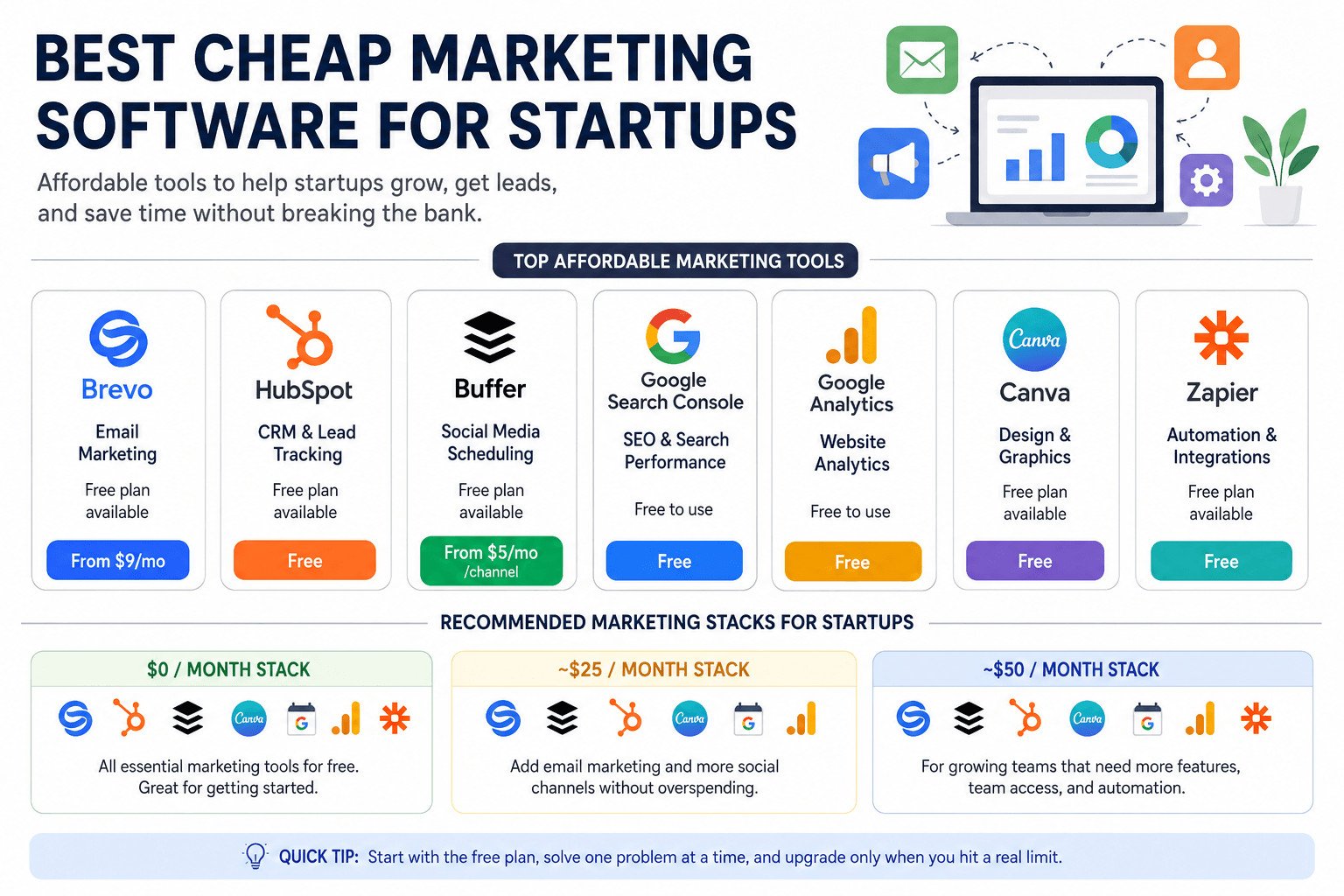
Quick answer: Brevo is a practical choice for affordable email marketing. HubSpot works well for free CRM and lead tracking, while Buffer is suited to social scheduling. Google Search Console and Google Analytics cover basic search and website data. Canva helps with graphics, and Zapier connects simple tasks between your tools.
Prices and plan limits were checked on July 14, 2026. Providers may change their prices, features, taxes, regional charges, and billing conditions.
Best Cheap Marketing Software for Startups: Quick Comparison
| Software | Best for | Free option | Paid plans from | Main limitation |
|---|---|---|---|---|
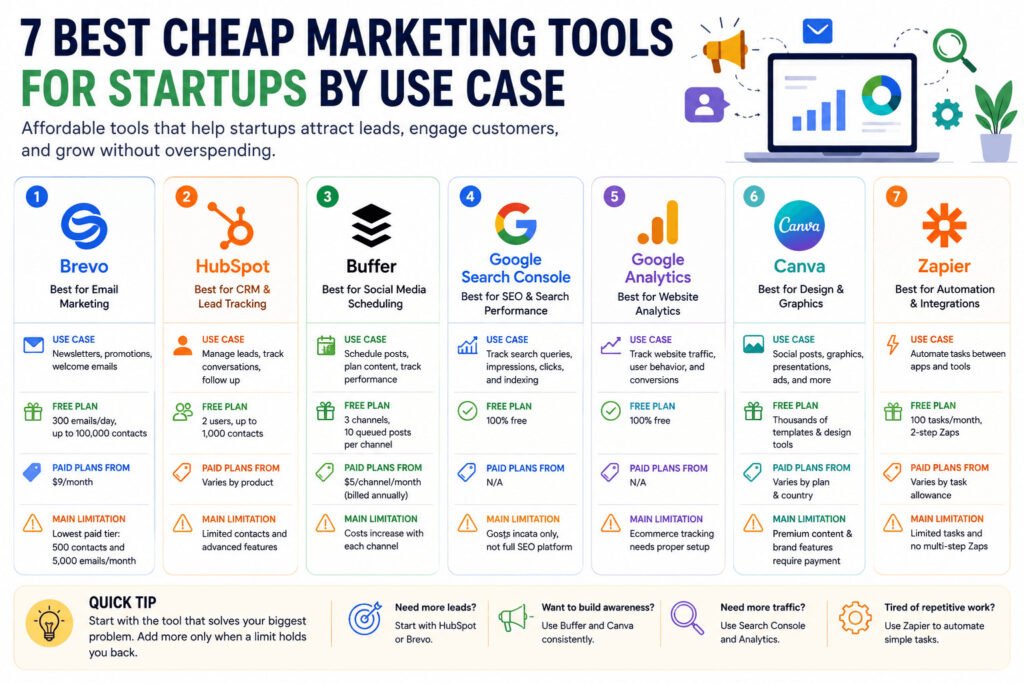
| Brevo | Email marketing | Yes | $9 per month | Lowest paid tier covers 500 contacts and 5,000 monthly emails |
| HubSpot | CRM and lead tracking | Yes | Varies by product | Free account supports two users and 1,000 contacts |
| Buffer | Social media scheduling | Yes | $5 per channel monthly with annual billing | Costs rise with each connected social account |
| Google Search Console | Google Search performance | Yes | Free | Covers Google Search data rather than every marketing channel |
| Google Analytics | Website activity | Yes | Free | Sales tracking requires correct event setup |
| Canva | Marketing graphics | Yes | Varies by country | Many brand and premium content features require payment |
| Zapier | Simple automation | Yes | Varies by task allowance | Free workflows have one trigger and one action |
Brevo Free includes 300 email sends per day and storage for up to 100,000 contacts. HubSpot Free supports two users and 1,000 contacts. Buffer Free supports three channels and ten queued posts per channel. Zapier Free includes 100 tasks per month. (help.brevo.com)
What Makes Marketing Software Affordable for a Startup?
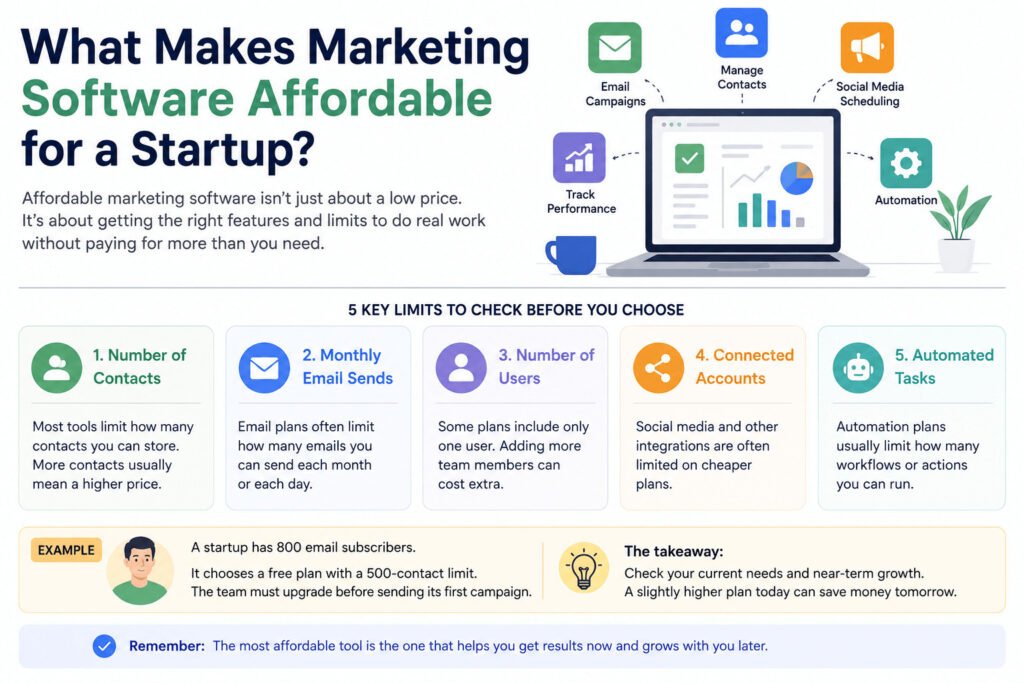
A low starting price does not automatically make software affordable.
A useful tool should let you complete real work before you need to upgrade. Email software should help you create campaigns, manage contacts, check results, and send basic follow-up messages.
A CRM should help you record customer details, track conversations, assign tasks, and follow potential sales. CRM means customer relationship management. It keeps customer and sales information in one place.
Social media software should let you prepare posts in advance, connect the accounts you use, and review basic performance data.
SEO and analytics tools should answer practical questions:
- Which searches bring people to your website?
- Which pages receive traffic?
- Where do visitors come from?
- Are important pages appearing in Google?
- Are visitors completing useful actions?
Before choosing a plan, check five limits:
- Number of contacts
- Monthly email sends
- Number of users
- Connected social accounts
- Automated tasks
Providers charge in different ways. Brevo combines contact capacity with monthly email volume. Buffer charges per connected social channel on paid plans. Zapier bases usage partly on successful automated actions. (help.brevo.com)
For example, Brevo Starter begins at $9 per month, but that starting tier covers up to 500 contacts and 5,000 monthly emails. A startup with 800 contacts would need a higher tier, even if it sends only a few campaigns. (help.brevo.com)
The cheapest useful tool is not always the one with the lowest headline price. It is the one that covers your current workload without pushing you into an immediate upgrade.
Read more info: https://sagaaro.com/what-are-marketing-tools-a-simple-beginners-guide/
7 Best Cheap Marketing Tools for Startups by Use Case
1. Brevo: Best Cheap Email Marketing Software
Best for: Newsletters, promotional emails, welcome messages, and small campaigns
Brevo is a practical option for startups that want to begin email marketing without paying for a large contact database.
The free plan includes 300 email sends per day, one user seat, basic reporting, campaign tools, and storage for up to 100,000 contacts. It also supports marketing automation for up to 2,000 contacts. (help.brevo.com)
The daily sending limit is the main restriction.
Suppose you have 800 subscribers. Brevo Free will send to only 300 recipients on the scheduled day. You must requeue the campaign on later days to reach the remaining contacts. Unused daily sends do not carry over. (help.brevo.com)
Brevo Starter removes the daily limit and begins at $9 per month. The lowest Starter tier covers 500 contacts and 5,000 monthly emails.
Standard begins at $18 per month. It adds broader automation, one landing page, testing, and more detailed reports, but its lowest tier has the same contact and email limits. (help.brevo.com)
Choose Brevo when: Email is an important channel and one person mainly manages the account.
Avoid it when: Several team members need access or your contact list already exceeds the lowest paid tiers.
2. HubSpot: Best Free CRM for Startups
Best for: Recording enquiries, organising leads, assigning follow-ups, and tracking potential sales
HubSpot Free is useful for founders who have outgrown spreadsheets but are not ready to pay for a full sales platform.
Its free tools support up to two users and 1,000 contacts, with no expiry date on free access. The CRM stores contact records, while HubSpot’s wider free tools include forms, basic reports, meeting links, sales features, and limited marketing functions. (hubspot.com)
For freelancers and service businesses, the main benefit is clearer follow-up.
Instead of leaving customer details across email, WhatsApp, notebooks, and spreadsheets, you can keep each lead’s name, request, notes, and next action in one record.
Choose HubSpot when: Your main problem is forgotten leads or scattered customer information.
Avoid it when: You expect to pass 1,000 contacts soon or need advanced automation without paying for additional HubSpot products.
3. Buffer: Best Affordable Social Media Scheduler
Best for: Preparing posts in advance across a small number of social accounts
Buffer Free supports three connected channels, one user, and ten scheduled posts per channel at one time. When a scheduled post publishes, you can add another to the queue. (buffer.com)
In Buffer, one channel means one connected social account. A Facebook Page, Instagram account, and LinkedIn Page would count as three channels.
Buffer Essentials costs $5 per channel per month when paid yearly. It includes one user and a much larger scheduling allowance.
Buffer Team costs $10 per channel per month when paid yearly. It includes unlimited team members, access controls, and approval workflows. (buffer.com)
The per-channel pricing is simple, but costs rise as you add accounts.
A business using Facebook, Instagram, LinkedIn, and TikTok would pay for four channels. At the annual Essentials rate, that comes to $20 per month.
Choose Buffer when: You post on a few important platforms and want a simple publishing calendar.
Avoid it when: You manage many client accounts or want one fixed price for a large number of channels.
4. Google Search Console: Best Free SEO Tool for Startups
Best for: Understanding how your website appears in Google Search
Google Search Console shows which searches produce impressions and clicks.
An impression means a link to your website appeared in Google Search results. A click means someone selected that link.
The Performance report shows data such as search queries, pages, clicks, and impressions. (support.google.com)
Search Console also provides indexing information. This helps you see which known pages Google has indexed and investigate why some URLs may not appear in its index.
It is not a complete keyword-research platform. It mainly shows data connected to your website and Google Search.
Choose Search Console when: You publish articles or landing pages and want to know what already receives Google visibility.
Avoid relying on it alone when: You need competitor research, large keyword databases, or data from search engines other than Google.
5. Google Analytics: Best Free Website Analytics Tool
Best for: Measuring website visits, traffic sources, and on-site actions
Google Analytics helps you understand what visitors do after they reach your website.
It can show traffic sources, pages viewed, user activity, and events sent from your website. However, online stores must set up ecommerce events correctly before Analytics can report product views, cart additions, and purchases.
Ecommerce events are not collected automatically. (support.google.com)
This difference matters.
Installing the main Analytics tag does not guarantee accurate sales reports. Your website or ecommerce platform must send events such as add_to_cart and purchase.
Choose Google Analytics when: You need free website data and can complete the initial setup.
Avoid treating it as complete when: Important forms, sales, downloads, or purchases have not been configured as events.
6. Canva: Best Free Tool for Marketing Graphics
Best for: Social images, article graphics, presentations, simple advertisements, and basic brand materials
Canva Free gives individuals access to free templates, design tools, and a library of free content. It is often enough for a founder who needs simple graphics without hiring a designer for every post. (canva.com)
Paid Canva plans provide wider access to premium content and features such as stronger brand controls and Magic Resize. Pricing and included features may differ by plan and region. (canva.com)
Choose Canva when: You need regular graphics but do not have advanced design requirements.
Avoid assuming everything is free when: You depend on premium photos, advanced brand management, or paid design features.
7. Zapier: Best for Simple Marketing Automation
Best for: Connecting forms, spreadsheets, email tools, and CRM systems
Zapier lets one event start another action.
For example, when someone submits a website form, Zapier could create a new contact in another supported app.
Zapier Free includes 100 tasks per month, one user, a 15-minute polling interval, and two-step workflows with one trigger and one action. Premium apps and workflows with more than one action require a paid plan. (help.zapier.com)
A task is usually one successful action completed by a Zap workflow. Triggers, filters, and certain built-in steps do not count as tasks. (help.zapier.com)
The free plan works well for testing a simple connection. It may not last long if you receive frequent leads.
Choose Zapier when: One repeated copying task wastes time each week.
Avoid it when: You need complex workflows, premium app connections, or several automated actions for every lead.
Hidden Costs to Check Before Choosing Marketing Software
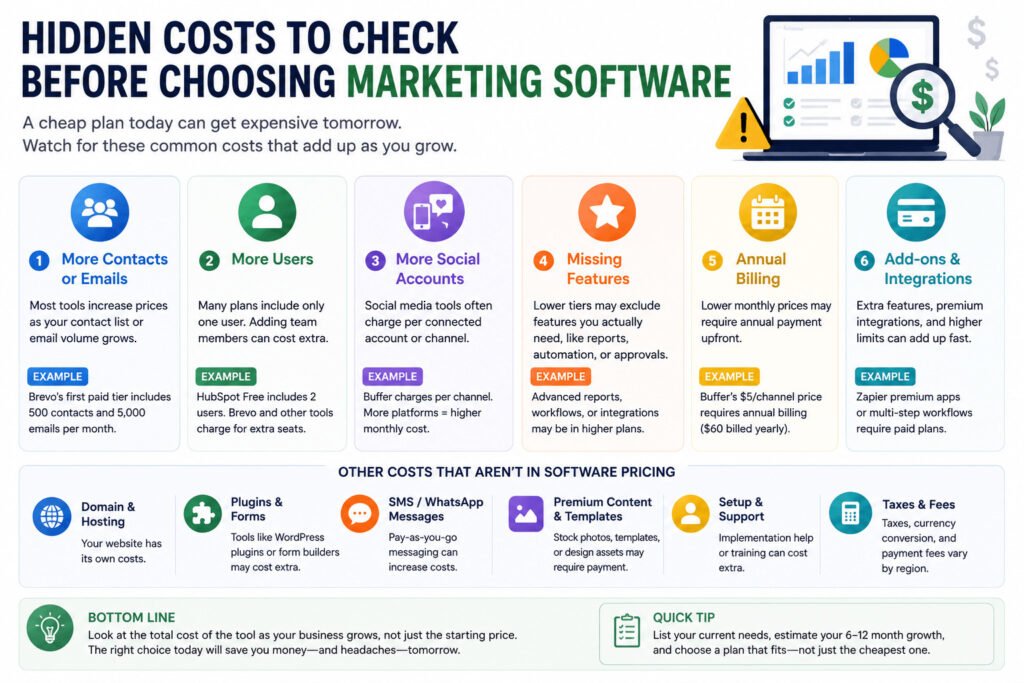
Cheap marketing software often becomes more expensive in predictable ways.
More contacts or emails
Brevo’s paid tiers increase according to contact capacity and monthly email volume. The first paid tier includes 500 contacts and 5,000 sends, while higher tiers cover larger lists and sending needs. (help.brevo.com)
Estimate how many contacts you may have in six to twelve months, not only how many you have today.
More users
HubSpot Free supports two users. Buffer Essentials includes one user, while Buffer Team includes unlimited team members. Brevo lists additional Standard-plan user seats as add-ons. (hubspot.com)
Count everyone who needs to create, review, approve, or report on marketing work.
More social accounts
Buffer charges separately for each channel on paid plans. Adding another platform increases the bill, even when the same employee manages every account. (buffer.com)
Missing features
The lowest plan may leave out the feature you need most, such as multiple users, advanced reporting, longer automation workflows, premium integrations, or approval controls.
Read the exact plan table rather than assuming every feature shown on the main product page is included.
Annual billing
Buffer’s advertised $5 Essentials and $10 Team rates require yearly billing. That means paying $60 or $120 per channel for the year. Month-to-month prices are higher. (buffer.com)
Compare the amount charged today, not only the monthly equivalent shown in large text.
Setup and supporting costs
A $0 software stack does not mean your full marketing system is free.
You may still pay for:
- A domain and website hosting
- Form or WordPress plugins
- SMS or WhatsApp messages
- Premium templates and images
- Additional user seats
- Technical setup
- Taxes or currency conversion
Free tools can also create extra work because your customer data is spread across several accounts.
Best Startup Marketing Stacks for $0, $25, and $50 Budgets
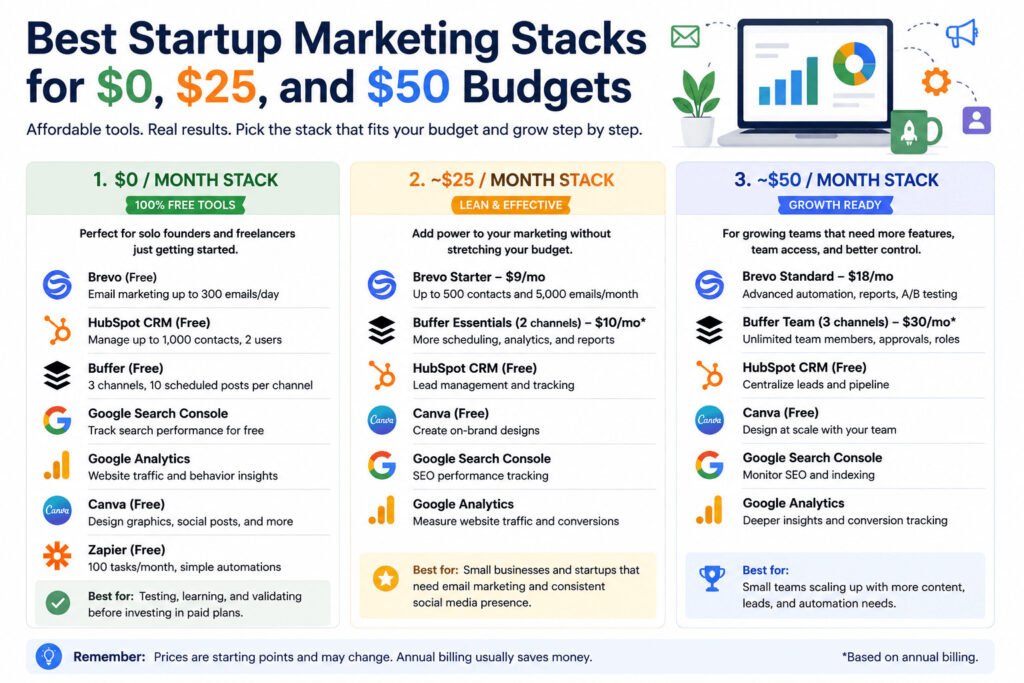
These totals cover selected software subscriptions. They do not include domains, hosting, taxes, add-ons, regional price differences, premium content, or setup work.
Free Marketing Stack: $0 in Software Subscriptions
A solo founder could use:
- Brevo Free for small email campaigns
- HubSpot Free for contacts and follow-up
- Buffer Free for up to three social channels
- Canva Free for basic graphics
- Search Console for Google Search data
- Google Analytics for website activity
- Zapier Free for basic automation
The main limits are Brevo’s 300 daily email sends, HubSpot’s two users and 1,000 contacts, Buffer’s ten queued posts per channel, and Zapier’s 100 monthly tasks. (help.brevo.com)
Do not create every account immediately. Start with tools linked to work you already do.
A freelancer who does not send newsletters does not need email software yet. HubSpot, Canva, Buffer, and Google’s tools may be enough.
Lean Marketing Stack: About $19 per Month
A startup with no more than 500 contacts and 5,000 monthly emails could use:
- Brevo Starter: from $9 per month
- Buffer Essentials for two channels: $10 per month with annual billing
- HubSpot Free
- Canva Free
- Search Console
- Google Analytics
The combined starting cost is about $19 per month. This estimate applies only when the business fits Brevo’s lowest Starter tier and uses two Buffer channels with annual billing. (help.brevo.com)
This stack may suit a small service business that sends regular emails, posts on two platforms, and manages leads through a free CRM.
Small-Team Marketing Stack: From About $48 per Month
A small team could start with:
- Brevo Standard: from $18 per month
- Buffer Team for three channels: $30 per month with annual billing
- HubSpot Free
- Canva Free
- Search Console
- Google Analytics
The combined starting cost is about $48 per month.
Buffer Team includes unlimited team members, but Brevo’s $18 starting tier covers only 500 contacts and 5,000 monthly emails. Additional Brevo user seats are add-ons. (help.brevo.com)
The actual cost will rise if the business adds Brevo users, exceeds 500 contacts, sends more email, or connects additional Buffer channels.
Which Marketing Stack Fits Your Business Type?
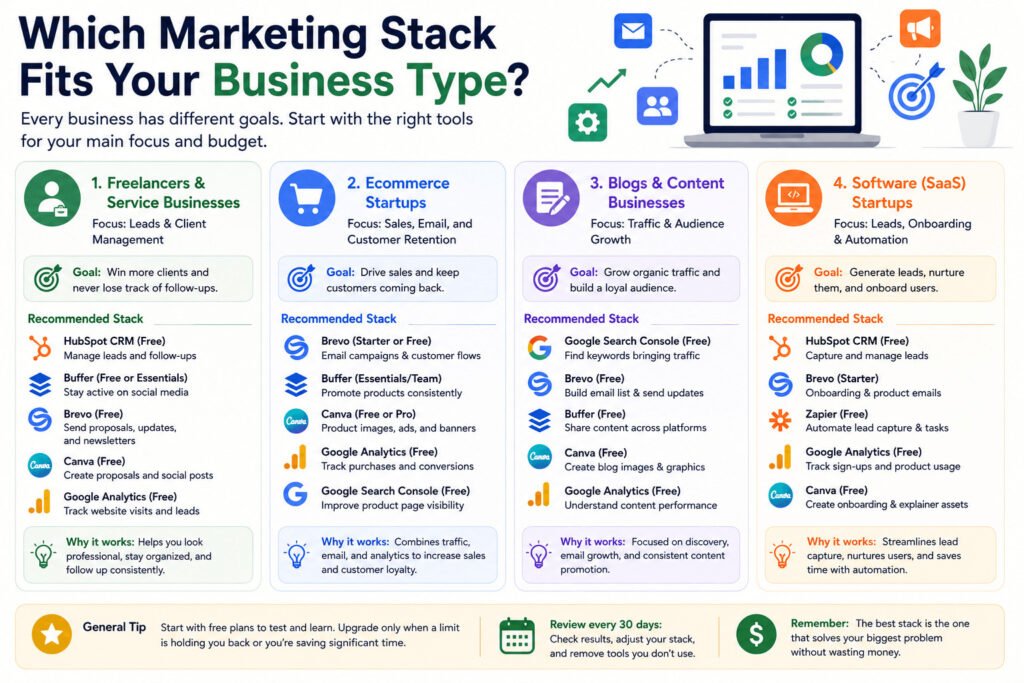
Best Stack for Freelancers and Service Businesses
Start with lead tracking.
Use HubSpot to record enquiries and follow-up tasks. Add Buffer when you need consistent social posting. Add Brevo when you have permission to email prospects or customers regularly.
For a freelance web designer, a CRM may prevent more lost business than an advanced email platform.
Best Stack for Ecommerce Startups
Online stores usually need graphics, email campaigns, social content, and accurate purchase data.
Canva can cover basic promotional graphics. Brevo can handle newsletters and customer emails. Buffer can schedule product posts.
Google Analytics can report ecommerce activity only after the correct events are sent from the store. (support.google.com)
Before paying for more software, confirm that your store records product views, cart actions, and purchases correctly.
Best Stack for Blogs and Content Businesses
Content businesses should focus on search visibility and returning readers.
Search Console shows the queries and pages producing Google impressions and clicks. Brevo can collect subscribers and send new-content updates. Canva can help create feature images and social graphics. (support.google.com)
Buffer Free may be enough until your publishing schedule regularly fills the ten-post queue.
Best Stack for Software Startups
Software startups often need lead records, forms, onboarding emails, and basic connections between tools.
HubSpot can hold lead information. Brevo can send customer emails. Zapier can move information between supported apps.
Start by connecting one important form or lead source. Do not automate every internal task before the process is stable.
How to Choose Cheap Marketing Software for Your Startup
Follow these six steps:
- Identify the main problem. Decide whether you are missing leads, publishing inconsistently, spending too long on follow-up, or failing to measure website activity.
- Choose one tool. Select the software that addresses that problem.
- Check the limits. Review contacts, users, email sends, social channels, and automated tasks.
- Test it with real work. Add actual leads, send a campaign, schedule posts, or connect one form.
- Review it after 30 days. Check whether the tool reduced missed follow-ups, manual work, or publishing delays.
- Upgrade only when necessary. Pay more when a clear plan limit blocks important work.
A small consulting business may believe it needs email software, social scheduling, and automation immediately.
But if forgotten enquiries are the real problem, a free CRM may help more than three paid subscriptions.
Frequently Asked Questions
What is the best cheap marketing software for startups?
There is no single best option for every startup.
Brevo is a strong low-cost choice for email. HubSpot works well for free CRM, while Buffer is suited to social scheduling. Google Search Console and Google Analytics cover basic search and website data.
Choose the tool tied to your biggest current problem.
Can a startup use only free marketing software?
Yes, especially during the early stage.
Free plans can cover email, CRM, social scheduling, graphics, analytics, SEO data, and simple automation. However, they usually limit contacts, users, email volume, scheduled posts, or automated tasks.
How much should a startup spend on marketing software?
A solo founder can begin with $0 in software subscriptions.
A business that sends regular emails and manages two social channels may spend around $19 per month. A small team needing shared social access may begin near $48 per month, although contact growth and extra users can raise the cost.
What marketing tools does a new startup need first?
Most startups need website measurement and one tool connected to their main customer-acquisition channel.
A service business may start with a CRM. A content website may begin with Search Console and email software. An ecommerce store may need analytics and email before automation.
Are all-in-one marketing platforms cheaper than separate tools?
Not always.
An all-in-one platform can reduce account management and keep data in one place. Separate free tools may lower subscription costs but require more setup and manual organisation.
Compare the total cost and workload, not only the number of subscriptions.
When should a startup upgrade from free marketing software?
Upgrade when a specific limit starts affecting real work.
Examples include being unable to email your full contact list, needing another user, regularly filling the social queue, exceeding automation tasks, or spending too much time moving data manually.
Final Recommendation: Start With One Marketing Problem
Cheap marketing software for startups should solve a real problem without adding unnecessary cost or complexity.
Choose HubSpot when leads are being forgotten. Choose Brevo when you need regular email campaigns. Choose Buffer when social posting is inconsistent. Start with Search Console and Google Analytics when you cannot explain how people find or use your website.
Use the free stack while its limits fit your business. Move to a paid plan only when a restriction delays campaigns, blocks team access, or causes missed opportunities.
The right first tool is not the one with the longest feature list. It is the one your team will use to solve a real problem this month.