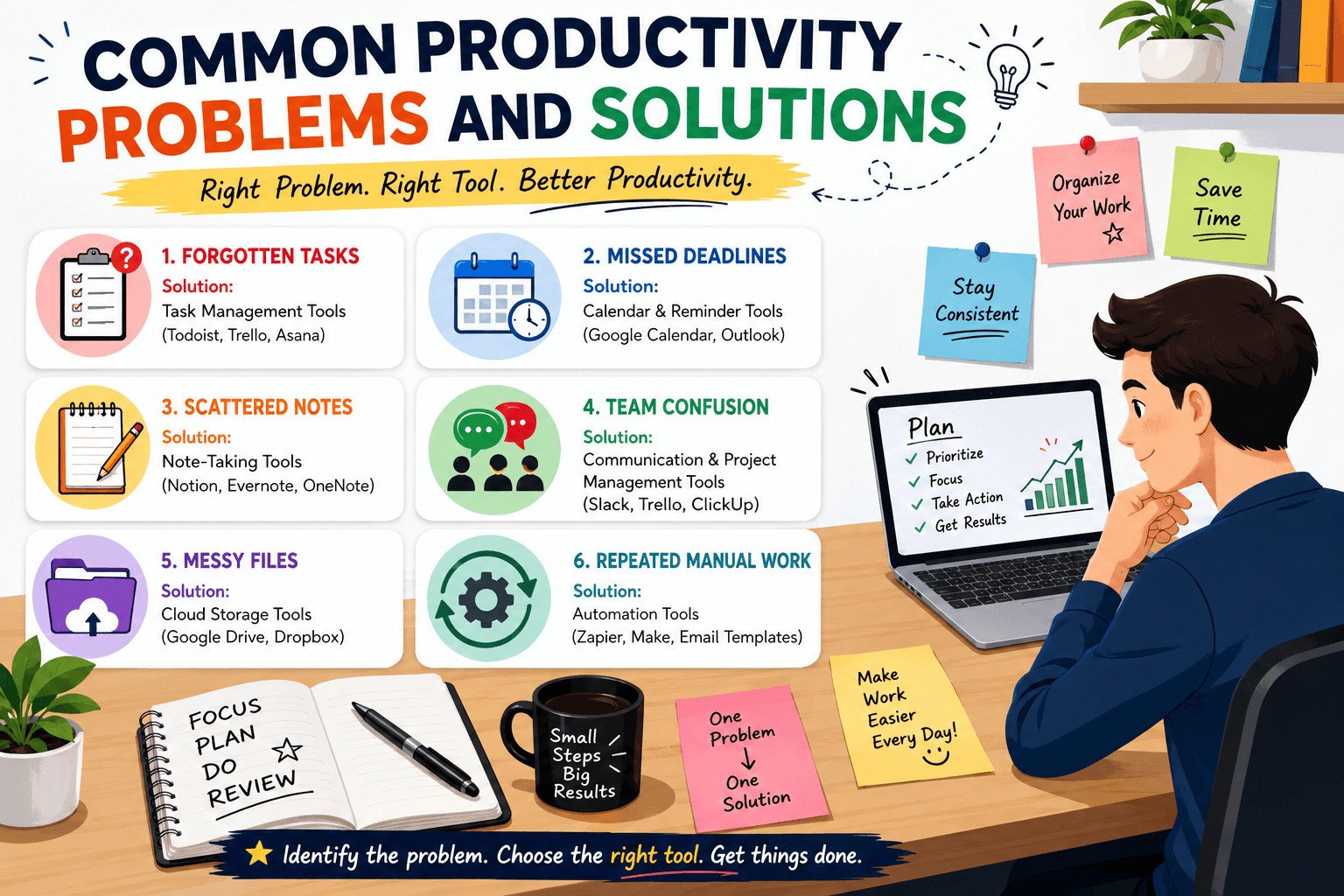
Most productivity problems do not happen because people are lazy. They happen because tasks, deadlines, notes, files, and messages are spread across too many places.
The right tool can help, but only when it matches the real problem. This guide explains common productivity problems and solutions for beginners, students, freelancers, small business owners, remote workers, and small teams who want to make daily work easier to manage.
Table of Contents
Start With the Productivity Problem, Not the App
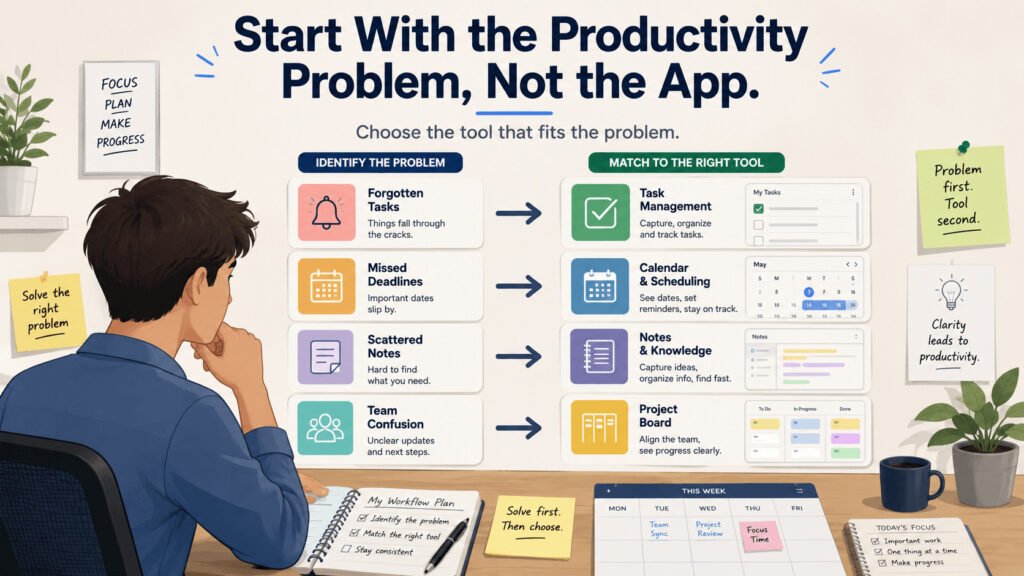
Do not choose a productivity tool just because it is popular. Choose it because it solves a problem you deal with often.
Many people download an app, set up boards, create labels, test different views, and still forget tasks by the end of the week. The app becomes another place to check instead of a tool that helps them work better.
A productivity tool works best when you use it for one clear job: tasks, dates, notes, files, messages, or repeated steps.
For example, a task management tool helps you write down work that needs to be done. A calendar tool helps you see dates, meetings, reminders, and planned work blocks. A note-taking tool helps you keep ideas, meeting notes, links, and instructions in one place.
The mistake is expecting one app to fix everything.
Imagine a freelance designer who keeps client requests in WhatsApp, email, and memory. One client asks for a logo change. Another sends feedback on a poster. A third asks about an invoice. By Friday, one request is missed.
The designer may not need a complex project system. They may only need one clear place for client tasks. A simple task list can hold the client name, task, due date, and next step.
That helps the designer reply on time, avoid missed requests, and reduce apology messages.
Before choosing any app, ask one question:
What problem do I need this tool to fix?
Once you know the problem, the next step becomes easier: look at where work gets lost most often. For many people, that starts with forgotten tasks.
Problem: Forgotten Tasks — Solution: Task Management Tools
Forgotten tasks usually start with one small thought: “I will remember this later.”
Then emails, messages, calls, classes, meetings, and customer requests pile up. By the end of the day, the task is gone.
Missed tasks can affect real work. A missed follow-up can lose a sale. A forgotten invoice can delay payment. A late client revision can damage trust. In a team, one forgotten task can also slow down other people.
This is where a task management tool can help.
A task management tool gives every task one clear place to live. You can write the task, add a due date, include notes, and mark it complete when it is done. Common examples include Todoist, Microsoft To Do, Trello, and Asana.
The goal is not to build a perfect system. The goal is to stop depending on memory.
Imagine a small online shop owner. Customers ask about delivery, stock, refunds, and payments throughout the day. If these requests stay inside chat messages, some will disappear.
A simple task list can turn each request into an action:
- “Check payment from Amina — today.”
- “Send delivery update to customer — 3 PM.”
- “Order more packaging bags — Friday.”
Now the owner does not need to scroll through old messages to remember what comes next.
Keep the system simple. Add tasks when they appear. Start each task with a clear action word, such as send, call, check, reply, order, or update. Review the list once or twice a day.
A task tool will not do the work for you. It simply gives your work one place to sit, so fewer tasks slip through the cracks.
But remembering tasks is only one part of the problem. A task can be written down and still be late if the date is not visible.
Problem: Missed Deadlines — Solution: Calendar and Reminder Tools
A deadline is easy to miss when it only lives in memory.
You may remember that an assignment is due next week, a client report is due Friday, or a follow-up should go out tomorrow. But daily work can push invisible deadlines out of sight.
Deadlines become harder when one due date has smaller steps behind it.
For example, a freelancer may need to deliver a blog article on Friday. The job includes research, writing, editing, adding images, and sending the final version. If the freelancer only remembers Friday, they may start too late.
A calendar tool helps make dates visible. You can add meetings, deadline reminders, and work blocks so important dates are easier to see.
For the blog article, the freelancer could add:
- Research notes — Monday
- First draft — Tuesday
- Edit article — Wednesday
- Add images — Thursday
- Send final article — Friday morning
Now the deadline is broken into daily actions.
This changes how the work feels. The freelancer can start earlier, avoid rushing, and update the client before being asked. For teams, visible dates also reduce repeated questions like “When is this due?” or “Are we still on time?”
Use one simple habit: when you create a task, add the date immediately.
A deadline that is not written in a calendar, task list, or reminder is easy to forget. A visible deadline gives you time to act before the work becomes urgent.
Still, not every productivity problem is about tasks or dates. Sometimes the real issue is that the information needed to do the work is scattered everywhere.
Why the Right Productivity Tool Is Not Always Obvious

A “productivity problem” often hides a more specific problem.
You may think you need a better productivity app. But the real issue may be scattered notes, lost files, unclear messages, or too many places to check before work can begin.
Choosing the first tool you notice can waste time.
If your notes sit in notebooks, phone reminders, email drafts, screenshots, and browser tabs, a task app may not help. You may need a note-taking tool instead.
A note-taking tool helps you store information in one place. This can include ideas, meeting notes, links, checklists, research, and instructions.
Imagine a student working on a group presentation. The topic is in WhatsApp. Research links are open in browser tabs. Class notes are in a notebook. The deadline is only in memory.
When the group starts working, they spend more time searching than preparing.
A project management tool may look useful, but the bigger problem is scattered information. A shared document or simple note-taking app may solve most of it. The group can keep the topic, links, outline, member tasks, and final checklist in one place.
That saves time and cuts repeated questions.
Before choosing a tool, ask where the work gets stuck.
If tasks are forgotten, use a task tool. If dates are missed, use a calendar. If information is hard to find, use notes or file storage. If team updates get buried in chat, use a project management board where each task has an owner, due date, files, and comments.
When work involves more than one person, scattered information becomes even harder to manage. That is where teamwork problems usually begin.
Problem: Team Confusion — Solution: Communication and Project Management Tools

Teamwork gets messy when people work from different information.
One person thinks a task is finished. Another waits for an update. A file gets sent in chat, then buried under new messages. Someone asks, “Who is handling this?” and nobody knows.
The team may not have a people problem. They may have a tracking problem.
Small teams and remote workers often need two tool types: communication tools and project management tools.
A communication tool is where people send quick messages. Examples include Slack, Microsoft Teams, and WhatsApp. These tools work well for short updates, questions, and fast replies.
A project management tool is where the work is tracked. It can show tasks, owners, due dates, comments, files, and progress. Examples include Trello, Asana, ClickUp, Basecamp, and monday.com.
The mistake is using chat for everything.
Imagine a small marketing team creating a product launch post. The designer sends an image in chat. The writer shares the caption in another message. The owner gives feedback later. Then someone asks which version is final.
Now the team has to scroll through old messages to find the answer.
A project management board makes the work clearer. One task called “Product launch post” can hold the owner, due date, caption, image file, feedback, and final approval.
That helps the team ask fewer repeated questions, miss fewer details, and finish work with less back-and-forth.
Chat is useful, but it should not be the only place where work lives.
Once tasks, dates, files, and team updates have a clear place, another problem becomes easier to spot: work that repeats again and again.
Problem: Repeated Manual Work — Solution: Simple Automation Tools

Some productivity problems come from doing the same small task again and again.
You copy the same customer reply. You create the same weekly task list. You move information from one app to another. You send the same reminder message to clients. Each task may feel small, but together they can take hours every week.
Automation tools can help with repeated work, but they should come after the steps are clear.
An automation tool follows a simple rule: when this happens, do that. For example, when someone fills out a contact form, the system can send a reply email. Other beginner-friendly examples include email templates, recurring tasks, and scheduled social media posts.
Start with simple options before using more advanced tools like Zapier or Make.
Imagine a freelance writer who sends the same reply every time a client fills out a contact form. Without a system, the writer checks the form, copies the email, writes the same message, and sends it manually.
A simple email template can save time. The writer can prepare one clear response with next steps, pricing details, and expected reply time. If the form tool supports automatic replies, the message can be sent after the form is submitted.
That helps the business. New leads get a faster reply. The writer sends the same important details every time. Fewer requests get missed.
Only automate a task after you can write the steps clearly.
Do not automate a messy process. First, write down the steps. Then check if the task happens often. If the same steps repeat many times, a tool may help.
Repeated manual work is easy to ignore because it feels small. But when the same task keeps coming back, the right tool can save real working time.
By this point, it may be tempting to fix everything at once. That is where many beginners create a new problem: too many tools.
Related article: https://www.zoho.com/workdrive/digest/fix-productivity-problems.html
How to Choose the Right Solution for Your Productivity Problem
Beginners often try to fix everything at once.
They download a task app, calendar app, notes app, file storage tool, chat app, and automation tool. After a few days, work is spread across even more places.
Choose one problem first.
Ask: what causes the most delays, stress, or missed work right now?
If you forget tasks, start with a task management tool. If you miss deadlines, start with a calendar. If your notes are scattered, start with a note-taking app. If your team keeps asking the same questions, start with a simple project board.
The goal is not to build a perfect system. The goal is to remove one daily problem.
Imagine a remote worker who keeps losing meeting notes and task updates. Some notes are in a notebook. Some are in chat. Some are saved as screenshots. The first problem is not time management. The first problem is scattered information.
A simple note-taking app can help. The worker can create one note for each meeting, add action items, save useful links, and review the notes at the end of the day.
Use that as the test.
Did the tool reduce forgetting, searching, delays, or repeated work?
If yes, keep using it. If no, the tool may be solving the wrong problem.
Start small. Pick one problem. Use one tool. Test it for one week.
Add another tool only when one problem keeps coming back and your current setup cannot handle it. A useful productivity system should help you find work faster, remember dates, and know what to do next.