Choosing between HubSpot and Zoho CRM is not just about features. The better question is simple: which CRM will your team use every week, pay for comfortably, and still need 12 months from now?
This HubSpot vs Zoho CRM comparison breaks down the real differences in features, pricing, ease of use, and best use cases so you can choose the right CRM for your business.
Table of Contents
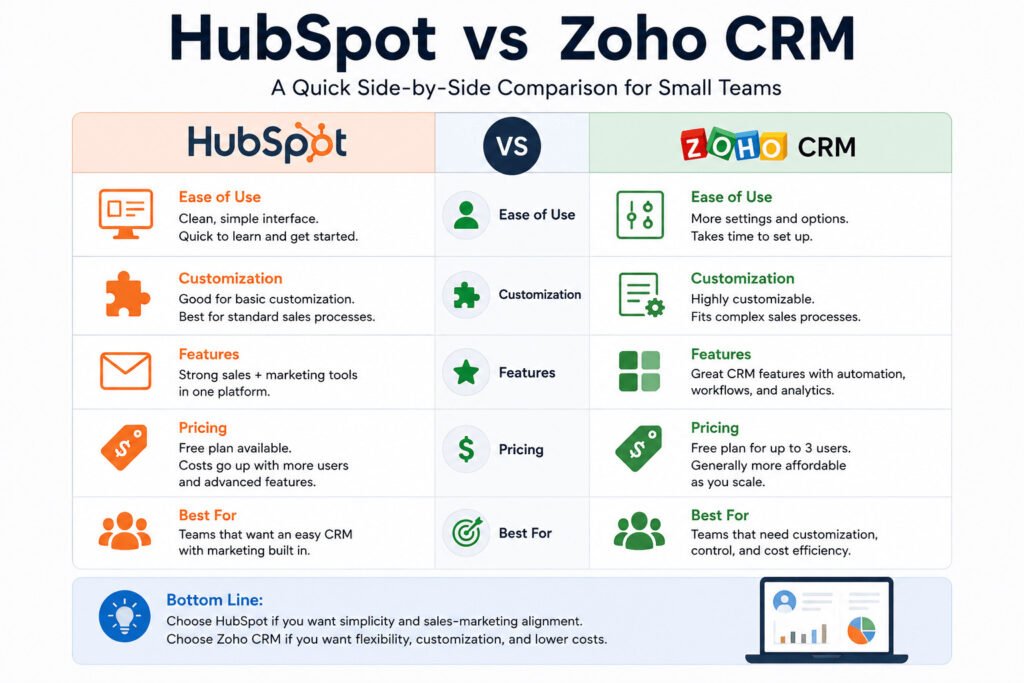
HubSpot vs Zoho CRM: Quick Verdict for Small Teams
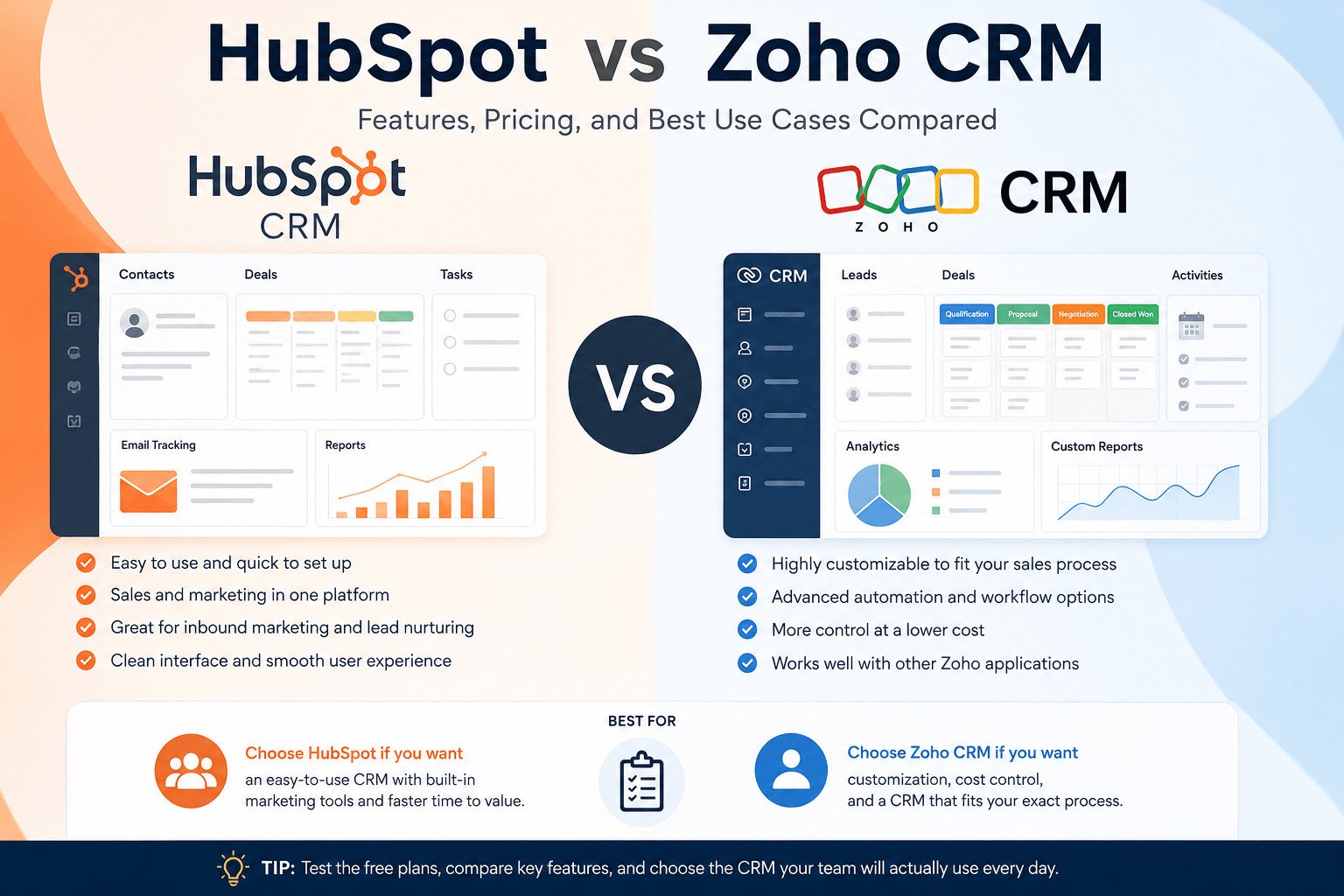
HubSpot is usually the better choice if you want an easier CRM with sales and marketing tools in one place.
Zoho CRM is usually the better choice if you want more control over your sales process and want to manage costs carefully as your team grows.
Here is the simple version:
| Need | Better choice |
|---|---|
| Easier setup | HubSpot |
| Beginner-friendly CRM experience | HubSpot |
| Sales and marketing in one place | HubSpot |
| Custom fields and detailed sales stages | Zoho CRM |
| Lower-cost CRM control | Zoho CRM |
| Small team moving from spreadsheets | Zoho CRM |
| Business already using Zoho apps | Zoho CRM |
Neither CRM is best for everyone. The right choice depends on your team size, budget, sales process, and how much setup work you are willing to do.
A quick table helps, but it does not show the full picture. To make the right choice, you need to understand how each CRM behaves in real daily work.
HubSpot vs Zoho CRM: The Real Difference for Small Teams
HubSpot and Zoho CRM both help businesses manage leads, contacts, deals, and follow-ups. The real difference is how each tool fits into daily work.
HubSpot works well for teams that want a clean CRM with sales and marketing tools in one place. A beginner can add contacts, track deals, send emails, and see what needs attention without building a detailed setup first.
Zoho CRM works better for teams that want to shape the CRM around their own sales process. Teams can change fields, stages, layouts, reports, and workflows so the system matches how they already sell.
That control helps, but it also takes more setup time.
Imagine a small web design agency.
If the agency wants to collect website leads, track calls, send follow-up emails, and see open deals, HubSpot may feel easier. The team can start quickly and keep customer details in one place.
If the same agency sells website projects, monthly support plans, and long-term contracts, Zoho CRM may fit better. The team can create separate pipelines, custom fields, and reports for each service type.
So the better CRM depends on how your business sells.
Choose HubSpot when you want a CRM your team can start using quickly. Choose Zoho CRM when your sales process needs more detail, more control, and more custom tracking.
Once that difference is clear, the next step is not to compare every feature. It is to compare the features your team will actually use.
HubSpot vs Zoho CRM Features: Contacts, Pipelines, Email, and Reports
Small teams do not need every CRM feature. They need tools that help them capture leads, follow up on time, and see what is happening with customers.
Start with contact management. Contact management means storing customer names, emails, phone numbers, notes, tasks, and past conversations in one place.
HubSpot’s free CRM tools are built to help teams organize, track, and manage relationships with leads and customers. HubSpot also says its free CRM tools can connect with Gmail, G Suite, and many versions of Outlook.
Zoho CRM also supports core contact and lead management. Zoho says its free CRM edition includes leads, deals, workflows, reports, and a mobile app.
Next, compare the sales pipeline. A sales pipeline shows where each deal stands. A deal might move from “New Lead” to “Call Booked,” then “Proposal Sent,” then “Won” or “Lost.”
Both tools can help teams track deals, but they feel different in daily use. HubSpot is often easier to read quickly. Zoho CRM gives teams more room to adjust fields, sales stages, and reports when the sales process has more steps.
Email tools also matter. HubSpot can connect CRM records with email activity, forms, and follow-ups, depending on the plan. Zoho CRM can support sales tasks, follow-ups, lead tracking, and connections with other Zoho products.
Reporting is another area to check. A report shows what happened in your sales process. For example, a small agency may want to see how many leads came in this month, how many became clients, and which deals are stuck.
Do not compare features only by counting them. Compare the tasks your team does every day.
Features matter, but they are only half of the decision. The bigger surprise often comes later, when a free or low-cost CRM no longer covers the way your team works.
HubSpot vs Zoho CRM Pricing: What Small Teams Should Check First
The pricing problem with CRM tools is not only the starting price. It is what happens after your team starts using the CRM every day.
HubSpot offers free CRM tools. HubSpot says users can add 1,000 contacts to a free account, and free access has no time limit. HubSpot’s Sales Hub pricing page also lists a free plan for up to 2 users.
Zoho CRM also has a free edition. Zoho says its free edition is free for 3 users and includes leads, deals, workflows, reports, and a mobile app.
These free plans can work for freelancers, founders, and very small teams that only need basic lead and contact tracking.
The trap appears when your needs grow.
At first, you may only store contacts and track calls. Later, you may need more users, sales automation, email sequences, reports, permissions, marketing tools, or extra integrations.
That is when the real cost becomes clearer.
Picture a small agency with two people using a free CRM. At first, they track leads and client calls. Six months later, they hire two sales assistants. Now they need automatic follow-up reminders, reports by service type, and better deal tracking.
The free plan no longer fits how they work.
HubSpot may be easier to start with, but some advanced sales and marketing tools sit in paid plans. HubSpot’s pricing pages organize plans by tier and seat, so costs can rise when teams add users or need more advanced tools.
Zoho CRM is often positioned as the lower-cost option for small teams, but the cheapest plan may not cover everything you need. If you need advanced automation, analytics, or custom sales processes, compare the current plan limits before choosing.
Before choosing a paid CRM plan, check:
- How many users are included
- How many contacts you can store
- Whether automation is included
- Whether reports are limited
- Whether email features match your needs
- Whether you need marketing tools too
- Whether support or onboarding costs extra
Do not ask only, “Which CRM is cheaper today?”
Ask, “What will this cost when we add users, reports, automation, and marketing tools?”
That question gives you a more realistic answer.
Cost is important, but a cheaper CRM can still fail if your team finds it confusing. That is why ease of use deserves its own look.
Ease of Use: Is HubSpot or Zoho CRM Better for Beginners?
For beginners, the easier CRM is the one your team can understand without a long setup process.
HubSpot often feels easier at the start because the main actions are simple: add contacts, create deals, write notes, send emails, and move deals through a pipeline.
That matters because a CRM only works when people use it.
If your team does not update contacts, add notes, or move deals through the pipeline, the CRM becomes another unused tool.
Zoho CRM can also work for beginners, but it usually needs more planning. It gives users more settings, more ways to change the system, and more control over how sales data is organized.
That flexibility can help, but it can also feel busy for someone using CRM software for the first time.
Think of a small cleaning company that wants to track customer enquiries.
With HubSpot, the owner can add contacts, create deals, and move each customer from “New Enquiry” to “Quote Sent” to “Booked.” The team can understand the process without much training.
With Zoho CRM, the same company could build a more detailed setup. They could add fields for property size, cleaning type, preferred visit time, and repeat service status.
That extra detail can help later, but it takes more planning.
Choose HubSpot if you want a CRM your team can start using quickly.
Choose Zoho CRM if you can spend more time setting up the system so it matches your sales process.
Ease of use is not just about the screen design. It is about whether your team can use the CRM every week without confusion.
From here, the choice becomes more practical. Some teams need speed and simplicity. Others need more control and can handle more setup. That is where the best-use cases become clearer.
Choose HubSpot If You Need Simple Sales and Marketing Tools
HubSpot is a strong choice when your team wants an easier CRM that connects sales and marketing work.
This matters for small businesses that do more than track sales calls. Many also need to collect website leads, send emails, manage contacts, book meetings, and see where each customer came from.
HubSpot can help when your business depends on inbound leads. Inbound leads are people who contact you through your website, blog, social media, ads, forms, or email signups.
For example, imagine a small online course business.
Someone visits the website and downloads a free guide. HubSpot can save that person as a contact, connect the contact to form activity, and help the team follow up.
If that person later books a call, the sales team can review the contact history before speaking with them.
That helps the team write a better follow-up. Instead of sending the same message to every lead, they can mention the guide, the form, or the booked call.
HubSpot also makes sense for beginners who want a cleaner starting point. If your team is new to CRM software, a simpler setup can reduce mistakes and help people build the habit of updating records.
HubSpot is not the best fit for every business. If your budget is tight and you need deeper customization at a lower cost, Zoho CRM may be a better choice.
So HubSpot is strongest when ease, speed, and sales-marketing connection matter most. But if your sales process has more moving parts, Zoho CRM may be the better fit.
Choose Zoho CRM If You Need Customization and Cost Control
Zoho CRM is the smarter pick when your team needs more control over the sales process and wants to manage costs carefully.
This can matter for startups, small businesses, and sales teams with limited budgets. HubSpot may feel easier at the beginning, but Zoho CRM can make more sense when your team has time to set it up properly.
Zoho CRM is useful when your sales process has extra details.
For example, you may need custom fields. A custom field is a space you create inside the CRM to track information that matters to your business, such as project type, budget range, service area, lead source, or contract status.
That helps your team avoid forcing every customer into the same basic sales path.
Imagine a small real estate agency.
The team may want to track buyer leads, rental enquiries, property owners, viewing dates, follow-up calls, and deal status. A basic CRM setup may not be enough.
With Zoho CRM, the agency can create fields for property type, preferred location, budget, viewing schedule, and assigned agent. This gives the team a clearer view of each lead.
Zoho CRM also makes sense for businesses already using Zoho apps such as Zoho Books, Zoho Desk, Zoho Campaigns, or Zoho Projects. Zoho describes CRM features across automation, customization, and business intelligence, which can help teams that want more control over sales data.
The trade-off is setup time.
Zoho CRM may take longer to adjust, and beginners may need more time to learn where everything is.
But for teams that want lower pricing, more customization, and better control over sales information, Zoho CRM can be the better long-term choice.
At this point, the decision is less about which CRM has more features and more about what your business will need next. A tool that fits today may not fit six months from now.
Final Verdict: HubSpot vs Zoho CRM for Your Next 12 Months
Do not choose a CRM only for what your business needs today. Choose based on what your team will need over the next 12 months.
Start with one question: will your sales process stay simple, or will it become more detailed?
Choose HubSpot if your main goal is to manage contacts, track deals, send follow-up emails, and connect sales with marketing. HubSpot often fits beginners and teams that want a faster start.
It also fits teams that want customer information, email activity, forms, and sales conversations in one place.
Choose Zoho CRM if your team needs more control over fields, sales stages, reports, and workflows. Zoho CRM often fits teams that want to shape the CRM around their own process and keep costs under control as they grow.
For example, a small coaching business may choose HubSpot if it collects leads from a website, sends emails, and books calls. The owner does not need a complex setup. They need a CRM that helps them follow up without losing leads.
A small B2B service company may prefer Zoho CRM if it has several sales steps, different service packages, and multiple team members. The setup time may pay off if the team needs to track different services, deal types, or customer details.
The mistake is choosing only based on the free plan.
A free CRM can be useful, but your real decision should include users, automation, reports, integrations, and future marketing needs.
Choose HubSpot if ease of use and sales-marketing connection matter most.
Choose Zoho CRM if pricing control and customization matter more.
Before deciding, compare the current plans, test the free version, and ask which tool your team can realistically use every week.
Related article: https://sagaaro.com/hubspot-vs-zoho-crm-a-simple-guide/
Frequently Asked Questions About HubSpot vs Zoho CRM
Is HubSpot better than Zoho CRM?
HubSpot is better if your team wants an easier CRM with sales and marketing tools in one place. Zoho CRM is better if your team wants more customization, more control over sales stages, and careful cost management.
Is Zoho CRM cheaper than HubSpot?
Zoho CRM is often positioned as the lower-cost option for small teams, especially when teams need more CRM control. But pricing can change by plan, region, billing cycle, and features. Always compare the current HubSpot and Zoho CRM pricing pages before deciding.
Which CRM is easier for beginners, HubSpot or Zoho CRM?
HubSpot is usually easier for beginners because the setup feels simpler and the main CRM actions are easy to understand. Zoho CRM can also work for beginners, but it may take more planning if you want custom fields, custom reports, and detailed workflows.
Which CRM is better for small businesses?
HubSpot is better for small businesses that want a simple CRM connected with marketing. Zoho CRM is better for small businesses that want lower-cost control, custom sales stages, and more detailed tracking.
Does HubSpot have a free CRM plan?
Yes. HubSpot offers free CRM tools. HubSpot says free users can add 1,000 contacts, and free access has no time limit.
Does Zoho CRM have a free plan?
Yes. Zoho CRM has a free edition for 3 users. Zoho says the free edition includes leads, deals, workflows, reports, and a mobile app.
Which CRM is better for sales teams?
HubSpot works well for sales teams that want simple deal tracking, contact history, email activity, and marketing connection. Zoho CRM works well for sales teams that need custom fields, detailed pipelines, custom reports, and more control over sales data.
Which CRM is better for marketing teams?
HubSpot is usually stronger for marketing-led teams because it connects CRM data with forms, emails, lead activity, and marketing tools. Zoho CRM can still work well, especially if the business already uses other Zoho apps.