Many beginners compare security tools vs privacy tools because they want to know whether a VPN, antivirus app, password manager, or private browser is enough to protect them online.
That is the mistake.
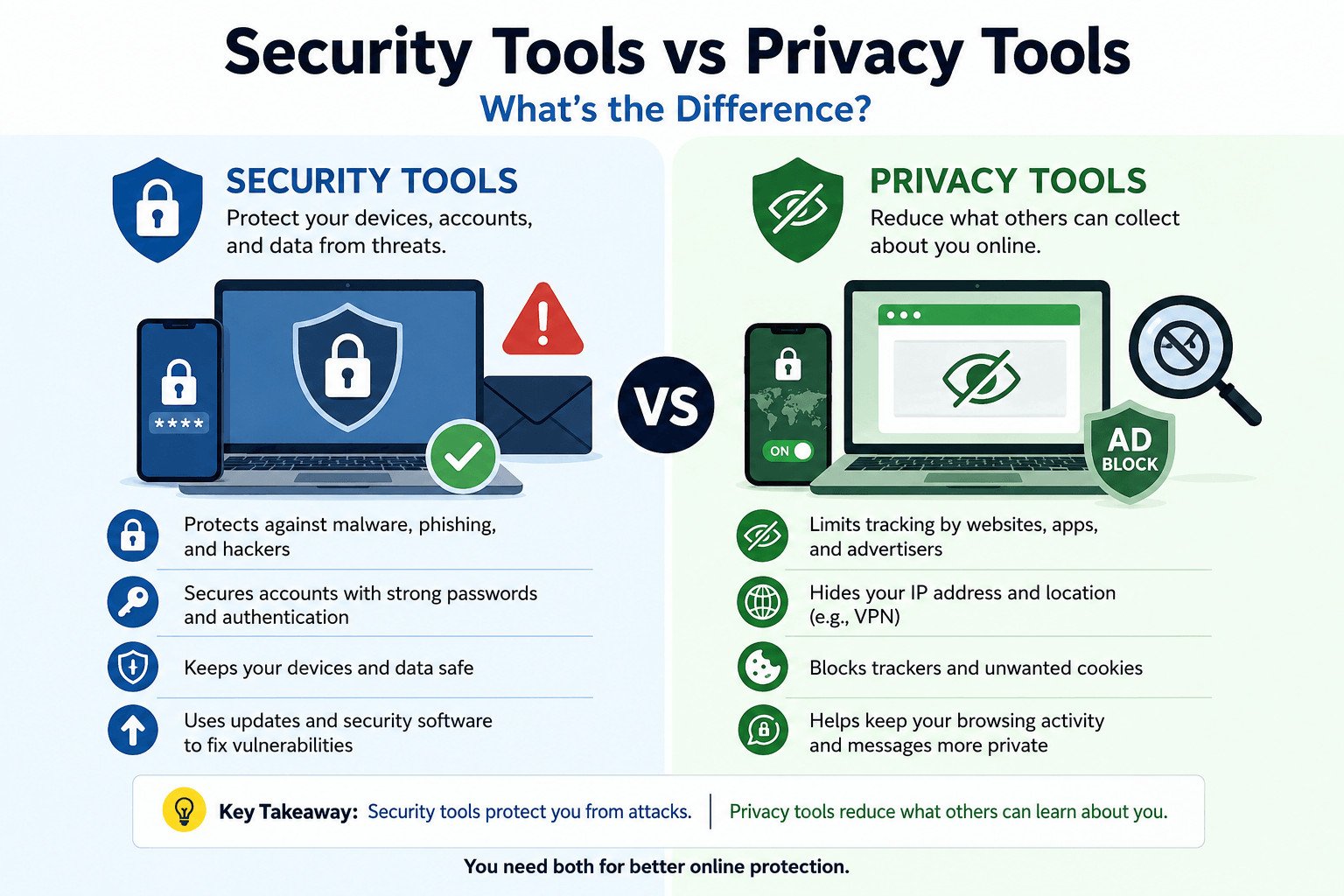
If you are comparing security tools vs privacy tools, the simple difference is this: security tools help protect your devices, accounts, and data from threats. Privacy tools help reduce what websites, apps, advertisers, and networks can collect about you.
Both matter, but they do different jobs.
To choose the right tools, start with the problem you want to reduce.
Table of Contents
Security Tools vs Privacy Tools: The Simple Difference
Security tools and privacy tools are often grouped together, but they are not the same.
A security tool helps protect your devices, accounts, and data from threats. These threats can include malware, phishing emails, weak passwords, unsafe downloads, and unauthorized account access.
A privacy tool helps limit how much personal information websites, apps, advertisers, internet providers, and other companies can collect about you. This can include your browsing activity, search history, IP address, location, and online behavior.
Use this simple rule:
Security tools protect you from attacks. Privacy tools reduce what others can learn about you.
For a small business, this difference matters.
A business owner who reuses passwords, skips updates, and does not use multi-factor authentication has a security problem. Someone could break into an email account, read customer messages, reset passwords, or steal files.
A business that allows too many trackers, shares customer data with too many apps, or collects information it does not need has a privacy problem. It may not be hacked, but it may still expose more customer information than necessary.
Security and privacy support each other, but they are not the same. A secure account can still share too much data. Private browsing mode does not protect you from a stolen password.
Now that the basic difference is clear, it helps to compare both types side by side.
Quick Comparison: Security Tools vs Privacy Tools
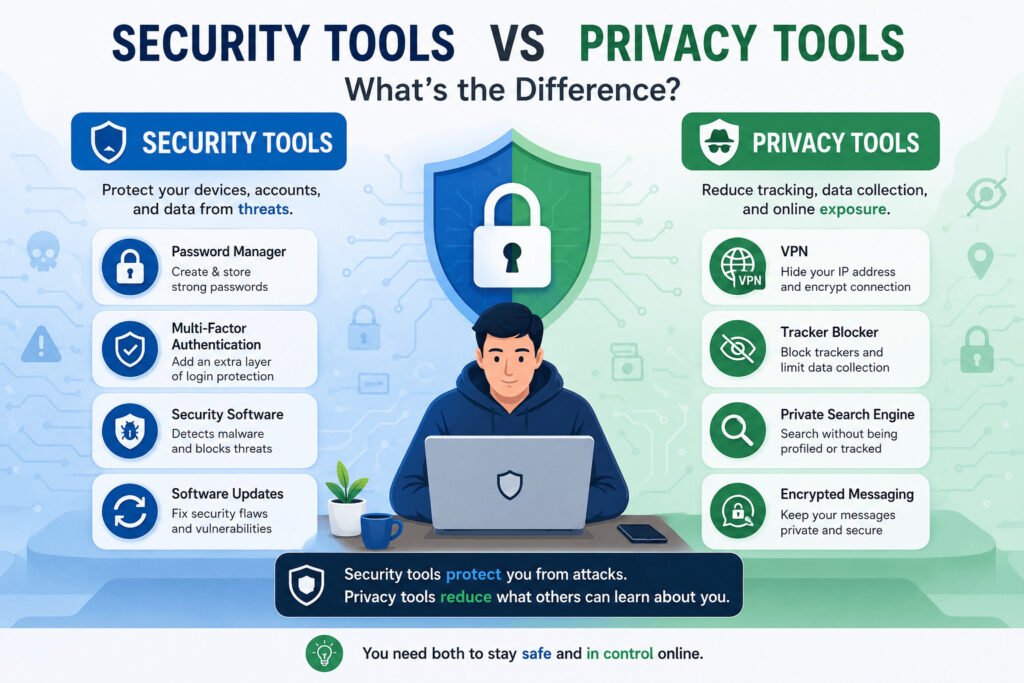
This quick security tools vs privacy tools comparison shows where each type of tool fits.
| Question | Security tools | Privacy tools |
|---|---|---|
| Main job | Protect accounts, devices, and data from threats | Reduce tracking, data collection, and online exposure |
| Main risk | Malware, phishing, weak passwords, account theft | Online tracking, exposed browsing activity, unnecessary data sharing |
| Common examples | Password manager, multi-factor authentication, security software, updates | VPN, tracker blocker, privacy-focused browser, private search engine, encrypted messaging |
| Best for | Protecting accounts, devices, files, and business systems | Limiting what websites, apps, advertisers, and networks can collect |
| What they do not do | They do not stop all tracking | They do not stop every scam, virus, or account break-in |
The best choice depends on the problem.
If someone may break into your account, you need security tools. If websites and apps collect too much information about you, you need privacy tools. In many real situations, you need both.
The table gives you the quick answer. But to choose the right tools, you also need to know what each one protects in everyday use.
What Security Tools Protect You From
Security tools help stop people, harmful software, or simple mistakes from damaging your device, stealing your data, or breaking into your accounts.
Beginners often face risks such as malware, phishing, weak passwords, unsafe downloads, and account takeovers.
Malware is harmful software. It can infect your computer, steal files, slow down your device, or spy on your activity. Security software can help detect and remove some malware, especially when it is kept updated.
Phishing happens when someone tricks you into sharing private information, such as a password, bank detail, or login code. It often appears as a fake email, fake login page, or message that looks official.
Weak passwords are another common risk. If you use the same password for many accounts, one leaked password can put your email, website, payment tools, and customer data at risk.
A password manager helps you create and store strong passwords, so you do not have to remember every password yourself.
Multi-factor authentication adds another login step, such as a code from an app or a prompt on your phone. This makes it harder for someone to enter your account, even if they know your password.
Updates also matter. Software updates often fix security weaknesses in apps, browsers, and operating systems. Skipping them can leave your device open to problems that already have fixes.
Imagine a small online shop owner who manages orders through email and stores customer details in cloud tools. If their email account is hacked, the attacker could read customer messages, reset passwords, view payment alerts, or send fake invoices.
In that case, a password manager, multi-factor authentication, security software, and regular updates can help protect the business from account theft, data loss, and customer trust problems.
Security tools are not only for large companies. They protect everyday work.
That covers the attack side. The next question is different: what if the issue is not someone breaking in, but websites and apps collecting too much?
What Privacy Tools Help You Limit Online
Privacy tools help reduce how much information websites, apps, advertisers, internet providers, and other third parties can collect about you.
They do not make you invisible online. They help limit exposure.
A VPN can hide your IP address from websites and reduce what a public Wi-Fi network can see. Your IP address is linked to your internet connection and can show general location details. A VPN can be useful on untrusted networks, but it does not make you anonymous or protect you from fake websites.
A tracker blocker helps block some websites and advertisers from following your activity across different pages. Many websites collect data about what you read, click, search, and buy.
A privacy-focused browser can reduce some tracking by blocking certain cookies, trackers, and fingerprinting methods. Cookies are small files websites use to remember you. Some cookies help websites work properly. Others are used for advertising and tracking.
A private search engine can reduce search-based data collection. Some search engines use your searches to build a profile around your interests. Privacy-focused options usually collect less personal information.
Encrypted messaging apps also protect privacy. Encryption scrambles messages so outsiders cannot easily read them. This helps when you send customer questions, business details, personal documents, or private plans.
Think of a freelance designer researching client competitors, checking pricing pages, and sending project updates from a shared workspace. A VPN can reduce what the shared network can see. A tracker blocker can limit some advertising tracking. An encrypted messaging app can keep client conversations more private.
For a business, privacy affects trust. Customers may lose trust if a business collects more data than needed or shares it with too many apps.
Privacy tools help you limit what websites, apps, advertisers, and networks can collect while you browse, search, message, or use online services.
At this point, the difference may sound simple. The problem starts when beginners expect one tool to do every job.
Common Mistake: Thinking One Tool Protects Everything
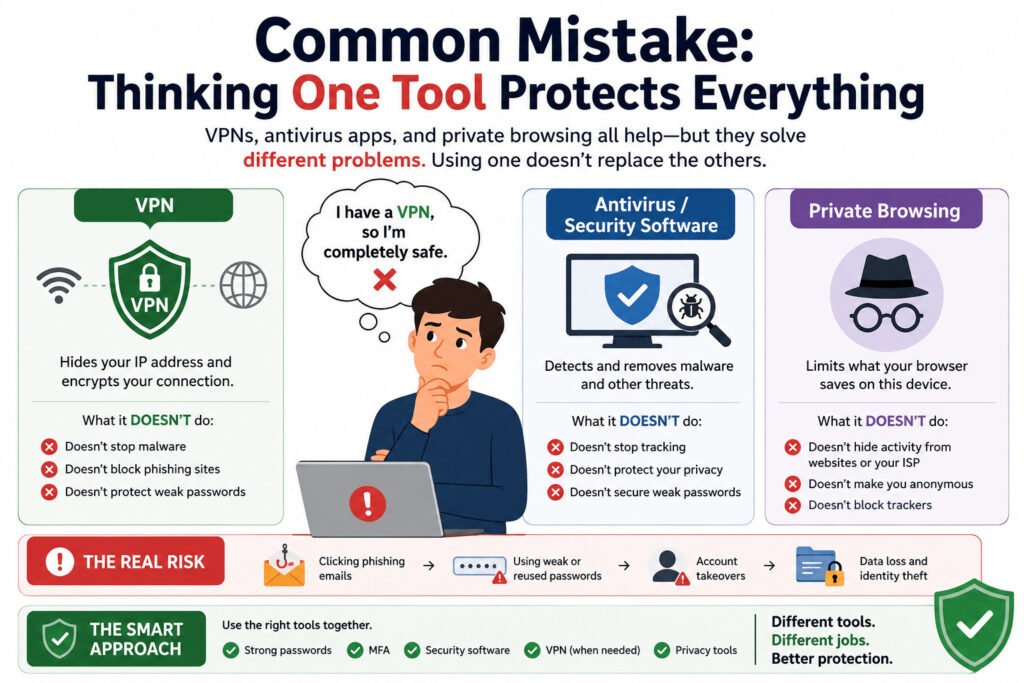
The biggest mistake is thinking one tool can protect everything.
A VPN, security software, and private browsing mode all help, but they solve different problems. Using one does not replace the others.
A VPN can hide your IP address from websites and reduce what a public Wi-Fi network can see. It does not stop malware from infecting your device. It also does not protect you if you type your password into a fake website.
Security software helps detect harmful files and suspicious programs. It can protect your device from some malware, but it does not stop websites, advertisers, or apps from tracking your online activity.
Private browsing mode mainly reduces what your browser saves on your device after the session ends. For example, it may not save browsing history, cookies, or form details in the same way as a normal browsing session.
But it does not make you anonymous. Websites, schools, employers, internet providers, and apps may still see parts of your activity, depending on how you connect.
False confidence creates business risk.
Picture a small business owner who installs a VPN and assumes everything is safe. They log in to their business email with a weak password. Then they click a fake invoice email and enter their login details on a fake page.
The VPN did not cause the problem, but it could not stop it. The real issue was account security. A password manager and multi-factor authentication would have helped more.
The same applies to privacy. A business may use security software and strong passwords but still allow too many trackers on its website or give apps unnecessary access to location, contacts, camera, microphone, or files.
Do not ask, “Which tool is best?” Ask, “What problem am I trying to reduce?”
Security tools protect against attacks. Privacy tools reduce exposure. Beginners need both, but each one has a different job.
Once you stop looking for one perfect tool, choosing becomes much easier.
Which Tool Do You Need for Each Online Problem?
Choose tools by problem, not popularity.
If your problem is weak passwords, use a password manager. It helps you create strong passwords and save them safely, so you do not reuse the same password across many accounts.
For account break-ins, turn on multi-factor authentication. It adds a second login step, such as a code from an app or a prompt on your phone. Even if someone gets your password, they still need that second step.
When malware or unsafe downloads are the concern, use built-in security tools or trusted security software, and keep your device updated. Malware can steal files, damage your device, or spy on your activity.
For online tracking, use a tracker blocker, privacy-focused browser, or private search engine. These tools can reduce how much websites and advertisers follow your activity across the internet.
On public Wi-Fi, combine security habits with privacy tools. A VPN can reduce what the network can see and hide your IP address from websites. You should still check website links carefully, use HTTPS websites, and protect important accounts with multi-factor authentication.
Imagine a small business owner who works from home and sometimes from cafés. Their first step should be a password manager and multi-factor authentication for email, banking, and website accounts. Then they can use built-in security tools or trusted security software for their device.
If they often use public Wi-Fi, a VPN can help. If they browse many websites, a tracker blocker can reduce some tracking.
This approach gives each tool a clear job.
Start with your biggest risk. Then choose the tool that reduces that risk.
The next step is turning that idea into a simple setup you can actually use.
A Beginner-Friendly Security and Privacy Setup
A good setup does not need to be complicated. Cover the biggest risks first.
Start with this simple checklist:
- Use a password manager
Create strong, unique passwords for email, banking, website admin pages, cloud storage, and business tools. One reused password can put many accounts at risk. - Turn on multi-factor authentication
Add a second login step for your most important accounts. Start with email, banking, cloud storage, website accounts, and payment tools. - Keep devices, browsers, and apps updated
Updates often fix security weaknesses that attackers may target. This applies to your phone, computer, browser, plugins, and apps. - Use built-in security tools or trusted security software
Many devices already include built-in protection. Keep it turned on and updated. Add extra security software only when you need it. - Add a tracker blocker
A tracker blocker can reduce some advertising and website tracking while you browse. - Review app permissions
Do not give apps access to your location, camera, microphone, contacts, or files unless they truly need it. - Use a VPN on untrusted public Wi-Fi when needed
A VPN can reduce what the network can see and hide your IP address from websites. It is useful in some situations, but it is not a complete safety solution.
A small business owner who manages orders, emails customers, and uses online payment tools should start with strong passwords, multi-factor authentication, updates, and careful app permissions.
If they often work outside the office, adding a VPN makes sense. If they browse many websites for research, a tracker blocker can help reduce tracking.
The best setup is the one you use every day. Start simple. Cover the main risks. Add more tools only when you know what problem they solve.
From there, the goal is not to keep adding tools. The goal is to choose the few that match your real risks.
Final Takeaway: Choose Tools by Risk, Not Popularity
A tool stack is simply the set of tools you use together. For security and privacy, your setup should match how you work online.
Do not choose tools only because they are popular. Look at your daily risks first.
If you manage customer emails, payments, files, or website accounts, focus on account security first. Use a password manager, turn on multi-factor authentication, and keep your software updated. These steps can reduce account theft, data loss, and business disruption.
If you browse often, research competitors, use public Wi-Fi, or test online services, privacy tools matter more. A VPN, tracker blocker, private search engine, and careful app permissions can reduce unnecessary exposure.
Avoid a setup that is too complicated. If you install too many tools at once, you may stop using them properly. A simple setup you follow every day is better than a complex setup you ignore.
Before choosing any security or privacy tool, ask three questions:
- What risk am I trying to reduce?
- Will I use this tool regularly?
- Does this tool protect my accounts, my device, my data, or my privacy?
The best way to understand security tools vs privacy tools is to focus on the problem. Are you trying to stop an attack, or are you trying to reduce what others can collect?
Security tools and privacy tools work best when you choose them for a clear reason. Start with the risks that could hurt your work, customers, or personal information the most. Then build a setup that is simple, realistic, and easy to maintain.
If you still have questions, these quick answers cover the most common beginner confusion.
Read More: https://www.nccoe.nist.gov/relationship-between-cybersecurity-and-privacy
FAQ: Security Tools vs Privacy Tools
What is the main difference between security tools and privacy tools?
Security tools protect your devices, accounts, and data from threats like malware, phishing, weak passwords, and account theft. Privacy tools reduce how much information websites, apps, advertisers, and networks can collect about you.
Is a VPN a security tool or a privacy tool?
A VPN is mostly a privacy tool because it can hide your IP address from websites and reduce what a network can see. It can also help on untrusted public Wi-Fi, but it does not protect you from every threat.
Do I need both security tools and privacy tools?
Yes, most people need both. Start with security tools for passwords, accounts, updates, and device protection. Then add privacy tools if you want to reduce tracking, data collection, and online exposure.
Can antivirus software protect my privacy?
Not fully. Security software can help protect your device from some malware, but it does not stop most websites, advertisers, or apps from tracking your online activity.
Does private browsing mode make me anonymous?
No. Private browsing mode mainly reduces what your browser saves on your device after the session ends. Websites, networks, internet providers, schools, employers, or apps may still see parts of your activity.
What should beginners set up first?
Beginners should start with a password manager, multi-factor authentication, software updates, and built-in security tools. After that, they can add privacy tools such as a tracker blocker, privacy-focused browser, private search engine, or VPN.