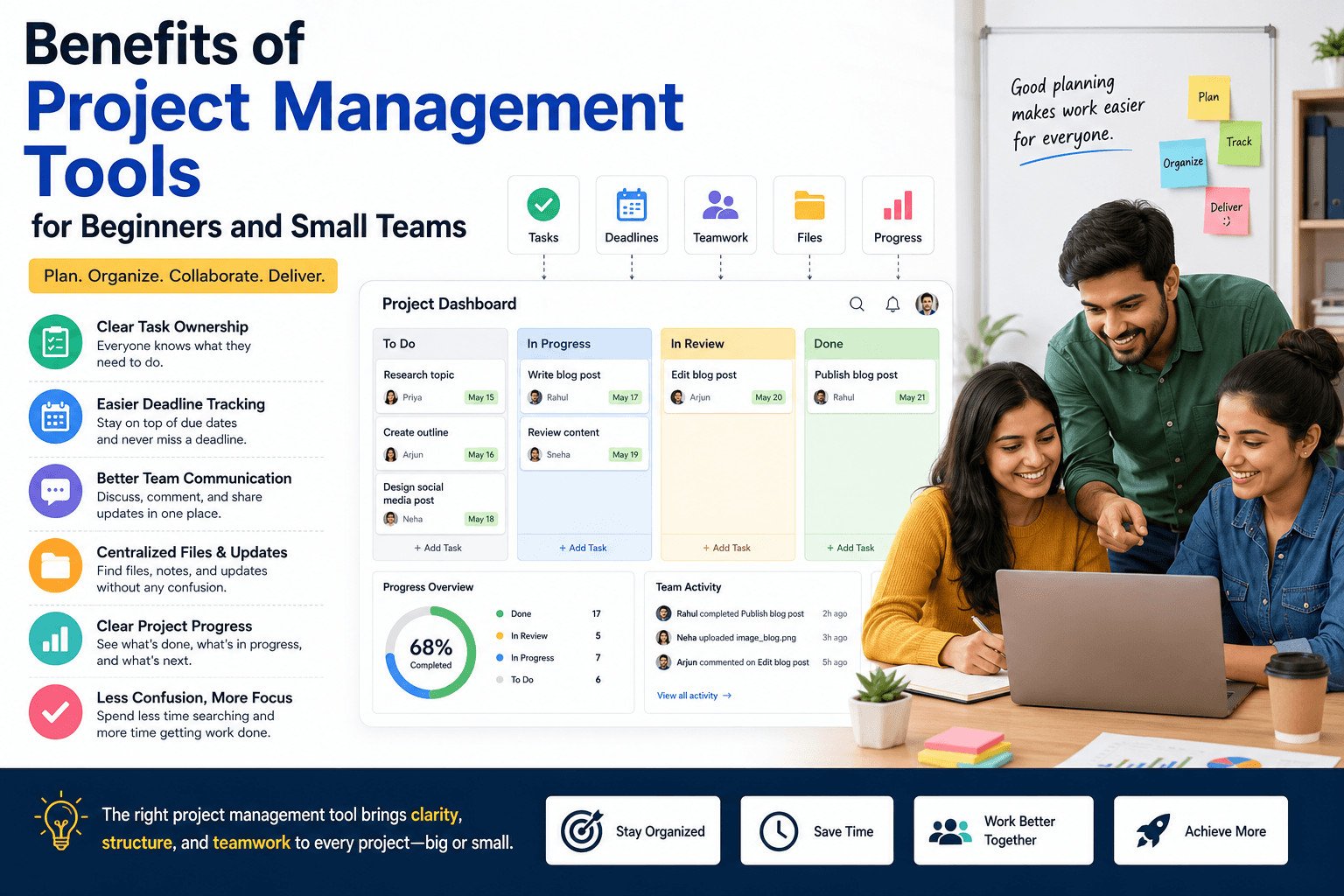
The biggest benefits of project management tools are simple. They help beginners and small teams keep tasks, due dates, files, updates, and progress in one clear place.
Small teams do not usually struggle because people are lazy. They struggle because work is scattered.
One task is in a chat. Another is buried in email. A deadline is saved in someone’s calendar. A file is sitting on one person’s laptop. Everyone may be working, but nobody sees the full picture.
Project management tools help teams plan, assign, track, and finish work. For beginners, freelancers, students, remote workers, and small business owners, they make daily work easier to follow.
The main benefits of project management tools include:
- Clear task ownership
- Easier deadline tracking
- Fewer missed follow-ups
- Better team communication
- Faster access to files and updates
- Clearer project progress
- Less confusion during daily work
To see why these benefits matter, start with the problem most small teams face before they use any system.
Table of Contents
Why Small Teams Need a Simple Project Management System
Small teams often move fast. That becomes a problem when nobody has one clear place to check the work.
At first, managing tasks through WhatsApp, email, notes, spreadsheets, or memory may feel fine. It can work when there are only a few tasks. But once more clients, projects, or deadlines are added, details become harder to track.
Work gets missed because it is spread across too many places.
A client update may be delayed because nobody knows who owns it. A social media post may go out late because the image is not ready. A customer follow-up may be forgotten because it is buried in a chat.
Imagine a small design team creating a flyer for a local business. The client sends feedback by email. The designer discusses edits on WhatsApp. The deadline comes up during a phone call. The final file stays on one person’s laptop.
Everyone is working, but nobody can quickly answer:
What is done?
What is late?
Who needs to act next?
A simple project management system puts these details in one place.
A task owner, also called an assignee in some tools, is the person responsible for completing a task. A due date shows when the task should be finished. A status shows where the task stands, such as not started, in progress, or done.
Without these basics, small teams waste time asking simple questions instead of finishing the work.
Once those basics are visible, the next improvement is easier to see: people stop guessing what to do next.
Useful article: https://sagaaro.com/7-best-project-management-tools/
Key Benefit: Everyone Can See the Next Task
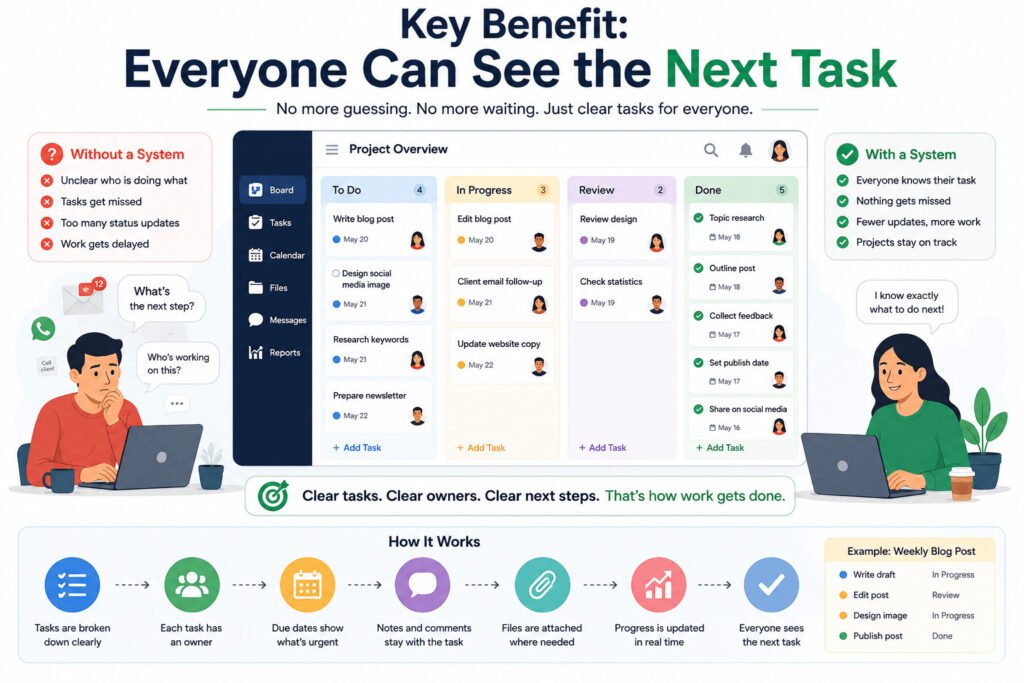
One of the most useful benefits of project management tools is that each person can see what they need to do next.
Small teams often know the final goal, but not the next action. That is where delays start. People wait for updates, repeat questions, or work on the wrong thing.
A project management tool breaks work into smaller tasks. A task is one clear piece of work, such as writing a blog post, sending a quote, designing an image, calling a client, or reviewing a document.
In many tools, a task can include:
- Owner
- Due date
- Notes
- Files
- Comments
- Status
This changes how the team works each day.
Team members do not need to ask, “What should I do now?” They can check their assigned tasks. The team does not need to guess who is handling something. The owner is visible. Nobody has to wonder whether work is finished. The status shows where it stands.
For example, a small team may create a weekly blog post. One person writes the draft. Another edits it. Someone creates the image. Another person publishes it.
Without a clear system, the post may sit unfinished because nobody knows whether editing is done or the image is ready.
With a project management tool, each step is visible. The writer marks the draft as done. The editor sees it is ready. The designer attaches the image. The publisher knows when to post.
The team spends less time asking for updates and more time finishing tasks.
For beginners and small teams, this matters more than advanced features. The real value is simple: everyone can see what needs to happen next.
But tasks are only one part of the work. Teams also lose time when deadlines, files, and instructions are stored in different places.
How Project Management Tools Keep Tasks, Deadlines, and Files Together
When tasks, due dates, and files are kept in one place, the team stops hunting for basic information.
Small delays often start with simple problems. Someone cannot find the latest file. Another person is unsure when the work is due. A task looks finished, but someone else is still waiting for an update.
A project management tool connects the task with the details needed to finish it.
A task shows what needs to be done. A due date shows when it should be finished. A file attachment keeps the related document, image, spreadsheet, or brief beside the task.
That means the team does not need to search old emails, chat threads, or computer folders every time they need something.
Imagine a small business preparing a product launch. The team needs a product description, price list, website image, email announcement, and social media post.
Without one shared place, the image may sit in a designer’s folder. The price list may live in a spreadsheet. The final product description may be buried in an email thread. The launch can still be delayed, even when everyone is working.
With a project management tool, each task can hold its own due date, notes, and files. The email writer can find the product description. The social media person can use the correct image. The owner can see what is finished and what still needs work.
This gives the team a clearer view of the project.
The tool does not do the work for the team. It keeps the work easier to see, update, and finish.
That same idea works for many types of beginners, even when their work looks different.
Benefits of Project Management Tools for Freelancers, Students, and Small Teams
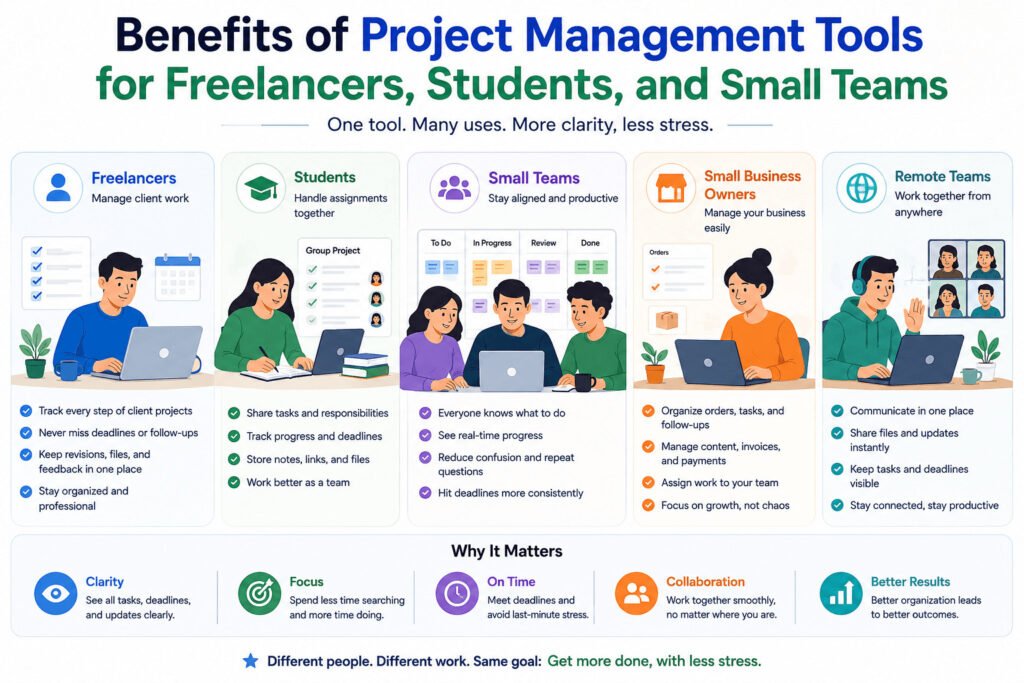
Different beginners use project management tools in different ways.
A freelancer may use one to manage client work. Instead of keeping requests in email and delivery dates in a notebook, they can create tasks for each step: send proposal, write first draft, make revisions, and send final file.
That helps the freelancer avoid late replies and missed delivery dates.
A small business owner may use a tool to manage orders, content ideas, supplier follow-ups, invoices, or staff tasks. Instead of relying only on memory, the owner can check what needs attention.
A student group can use the same kind of tool for assignments. One student handles research. Another writes the draft. Another prepares slides. Someone checks the final work before submission.
A startup founder might use a simple board to track product fixes, landing page updates, investor follow-ups, and customer feedback.
A remote team can use a project management tool to keep tasks, comments, due dates, and progress visible when people are not working in the same room.
Progress means how far the work has moved. It can be as simple as not started, working on it, or finished.
For example, a small online shop may prepare for a weekend sale. The owner needs product photos, prices, website updates, customer emails, and social media posts ready before Friday.
Without a clear system, one person may finish the photos while another waits for prices. The email may be delayed because the website update is not ready.
With a project management tool, each task has an owner and a due date. Everyone can see what is ready and what is blocking the sale.
For beginners, that is the main value. A freelancer, student group, online shop, startup, and remote team can all use the same basic method: list the work, assign owners, add due dates, and track what is done.
Still, there is one important limit. A tool can show the plan, but it cannot create a clear plan for the team.
Common Mistake: Expecting the Tool to Fix Bad Planning
A project management tool can help a team stay organized. It cannot fix unclear planning by itself.
Many beginners sign up for a tool, create a few boards or lists, and expect work to become easier. But unclear tasks stay unclear, even inside a good tool.
Before using any project management tool, the team still needs to answer four basic questions:
What needs to be done?
Who owns it?
When is it due?
What information does the person need before starting?
Without those answers, the team may still miss deadlines.
Imagine a small marketing team creating a flyer for an event. They add one task called “finish flyer.” But nobody decides who writes the text, who designs the layout, who checks the details, or when the final version is due.
The task exists, but the plan is weak.
A better setup breaks the work into smaller steps:
- Write flyer text
- Design first draft
- Review event details
- Make final edits
- Send the file for printing
Each step needs an owner and a due date.
Now the tool shows the actual work people need to finish, not just a vague task name.
Small teams should also avoid using too many features at the start. Many tools include boards, lists, calendars, labels, automations, reports, and dashboards. Beginners do not need all of them on the first day.
An automation is a rule that does a small action automatically. For example, a tool may move a task to “Done” when someone marks it complete. This can help later, but it is not the first thing beginners need.
Start with tasks, owners, due dates, notes, and status. Add more only when the team needs it.
The tool should help people see the work, update it, and finish it. It should not become another place where unfinished plans sit.
A simple before-and-after view makes this easier to understand.
Before and After Using a Project Management Tool
Without a project management tool, tasks may be spread across emails, chats, notebooks, spreadsheets, and memory.
With a project management tool, the team can see tasks, owners, due dates, files, comments, and progress in one place.
Here is the simple difference:
| Without a project management tool | With a project management tool |
|---|---|
| Tasks are scattered across messages | Tasks are listed in one place |
| People ask who is responsible | Each task has an owner |
| Deadlines are easy to forget | Due dates are visible |
| Files are hard to find | Files stay attached to tasks |
| Updates are repeated in chats | Progress can be checked directly |
| Small problems are noticed late | Blocked tasks are easier to spot |
This does not mean every team needs a complex tool. It means small teams need a clear way to see the work before it becomes a problem.
So before comparing tool features, it helps to step back and ask what problem you are actually trying to solve.
How to Start Using a Project Management Tool Without Overcomplicating It
Before choosing a project management tool, name the problem you want to fix.
Many beginners compare too many apps too early. They look at Trello, Asana, ClickUp, monday.com, Notion, Basecamp, Zoho Projects, and other tools before they know what their team actually needs.
That makes the decision harder.
Start with one question: what is causing the most trouble right now?
Are tasks being forgotten? Are deadlines unclear? Are files hard to find? Are people asking the same questions again and again? Are client requests getting lost in chats or emails?
Your answer should guide the tool you choose.
For example, a small team that creates weekly blog posts may not need advanced reporting or complex planning. They need to know which article is being written, who is editing it, whether the image is ready, and when the post should be published.
A simple board may be enough. The columns could be:
- Ideas
- Writing
- Editing
- Ready to Publish
- Published
The team does not need every feature on day one. They need one clear place to see the work and move each task forward.
Start with the basics:
- Task name
- Owner
- Due date
- Status
- Notes
- Related files
Once the team uses those every week, add more features only when they solve a real problem.
The real benefits of project management tools show up in simple daily habits: assigning tasks, checking due dates, sharing files, and seeing what still needs work.
The right tool depends on how your team works. Look at your daily problems first. Then choose the simplest tool that helps your team track those problems every week.
Related article: https://www.zoho.com/projects/project-management/benefits-of-project-management-software.html
FAQs About the Benefits of Project Management Tools
What are the main benefits of project management tools?
The main benefits of project management tools are clearer task ownership, better deadline tracking, easier file sharing, improved team communication, and a clearer view of project progress.
Are project management tools useful for small teams?
Yes. Project management tools can help small teams keep tasks, due dates, files, and updates in one place. This is useful when work is spread across chats, emails, spreadsheets, or memory.
Do beginners need a project management tool?
Beginners do not always need a complex tool, but they do need a clear system. A simple project management tool can help beginners track what needs to be done, who owns each task, and when work is due.
What is the difference between task management and project management?
Task management focuses on individual pieces of work, such as writing a draft or sending an email. Project management looks at the bigger picture, including tasks, deadlines, people, files, and progress across the whole project.
Can freelancers use project management tools?
Yes. Freelancers can use project management tools to track client projects, revisions, invoices, deadlines, and follow-ups. This helps them avoid missed tasks and late replies.
What should a beginner track first in a project management tool?
A beginner should start with the basics: task name, owner, due date, status, notes, and related files. These are enough to manage simple work without making the tool confusing.
Are free project management tools enough for small teams?
Free project management tools can be enough for many small teams, especially when they only need task lists, boards, due dates, comments, and file attachments. Paid plans may be useful later if the team needs more users, reporting, automations, or advanced permissions.