If you are comparing Notion vs ClickUp, do not start with the feature list.
Start with a simpler question: how does your team actually work?
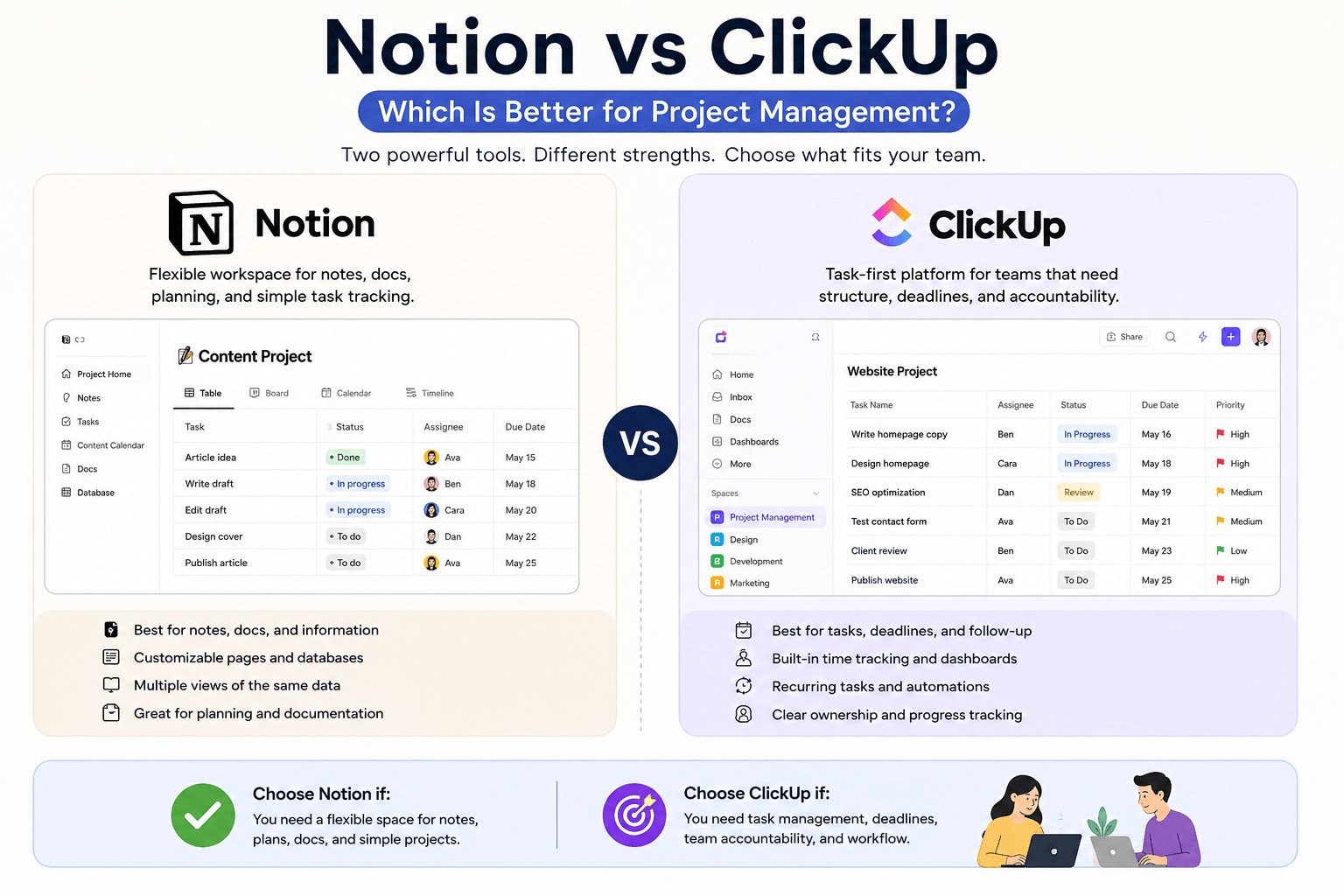
Both tools can help with project management, but they feel different in daily use. Notion is usually easier for notes, docs, project pages, planning, and simple task tracking. ClickUp is usually easier when your team needs assigned tasks, due dates, statuses, reminders, dashboards, and clearer follow-up.
For beginners and small teams, that difference matters more than having every possible feature.
Table of Contents
Notion vs ClickUp: Quick Answer for Beginners
Choose Notion if your team needs one flexible place for notes, documents, project plans, content calendars, meeting notes, and simple task tracking.
Choose ClickUp if your team needs a more structured way to assign tasks, set deadlines, track progress, manage review stages, and repeat the same workflow each week.
A simple way to think about it:
Notion is usually better when project information is scattered. ClickUp is usually better when tasks, deadlines, and responsibilities are unclear.
| What your team needs | Better fit |
|---|---|
| Notes and documents | Notion |
| Simple project planning | Notion |
| Content ideas and briefs | Notion |
| Team documentation | Notion |
| Assigned tasks | ClickUp |
| Due dates and task status | ClickUp |
| Progress tracking | ClickUp |
| Repeated workflows | ClickUp |
| Client project tracking | ClickUp |
| Multi-step content production | ClickUp |
That quick answer is useful, but it does not explain why the tools feel so different once your team starts using them. To understand that, look at how each tool is built.
Notion vs ClickUp: The Real Difference for Project Management
Notion works like a flexible workspace.
You can create pages for project notes, meeting notes, content plans, task lists, client details, and internal documents. Notion databases can show the same information in different views, such as a table, list, board, calendar, gallery, or timeline. Each database item can also work as its own page, which makes it useful for storing deeper project details.
ClickUp is more task-first.
Most work in ClickUp starts as a task. A task can include the work details, the person responsible, the deadline, comments, files, and the current stage of the work. ClickUp also supports docs, attachments, comments, and recurring tasks, which helps teams track work from start to finish.
The difference is simple:
Notion is usually better for flexible planning and project information. ClickUp is usually better for task management and follow-up.
Imagine a small team creating blog content.
In Notion, the team can save article ideas, write briefs, collect research links, track publish dates, and store notes in one workspace. This works well when the main problem is planning and keeping information easy to find.
In ClickUp, the same team can create tasks for writing, editing, image creation, SEO review, and publishing. Each task can have an assignee, deadline, status, comments, and files. This works better when the main problem is tracking each step until the article is finished.
If your team keeps asking, “Where are the notes?” Notion may be the better fit.
If your team keeps asking, “Who is doing this?” or “Why is this late?” ClickUp may be the better fit.
This difference becomes clearer when you look at the type of work your team handles most often.
Choose Notion If You Need Notes, Docs, and Simple Planning
Choose Notion when project details are scattered.
Notion works well for notes, documents, ideas, briefs, research, plans, and simple project tracking. It can also handle tasks and projects with fields such as status, assignee, due date, project links, grouping, and progress tracking.
This makes Notion useful when your work needs thinking before action.
For example, a content team may need article ideas, keyword notes, writing briefs, image instructions, publishing checklists, and meeting notes. Notion can keep these items together, so the team does not waste time searching through chats, emails, and random files.
A Notion database is a collection of items that can be shown in different views. For a content calendar, you might view the same information as a table, board, calendar, or timeline.
One article idea can include the title, writer, keyword, status, publish date, notes, and brief.
Notion is also useful for team documentation. Documentation simply means written information your team returns to later. This can include client notes, project rules, brand guidelines, meeting decisions, or step-by-step processes.
The weak point is task control.
Notion can manage task owners, due dates, and project status. But if your team needs strict follow-up, reminders, approvals, and detailed progress checks, you may need to build the system more carefully.
So Notion works best when your main problem is scattered project information. But when the problem is less about finding information and more about getting work finished on time, ClickUp becomes more useful.
Choose ClickUp If You Need Tasks, Deadlines, and Accountability
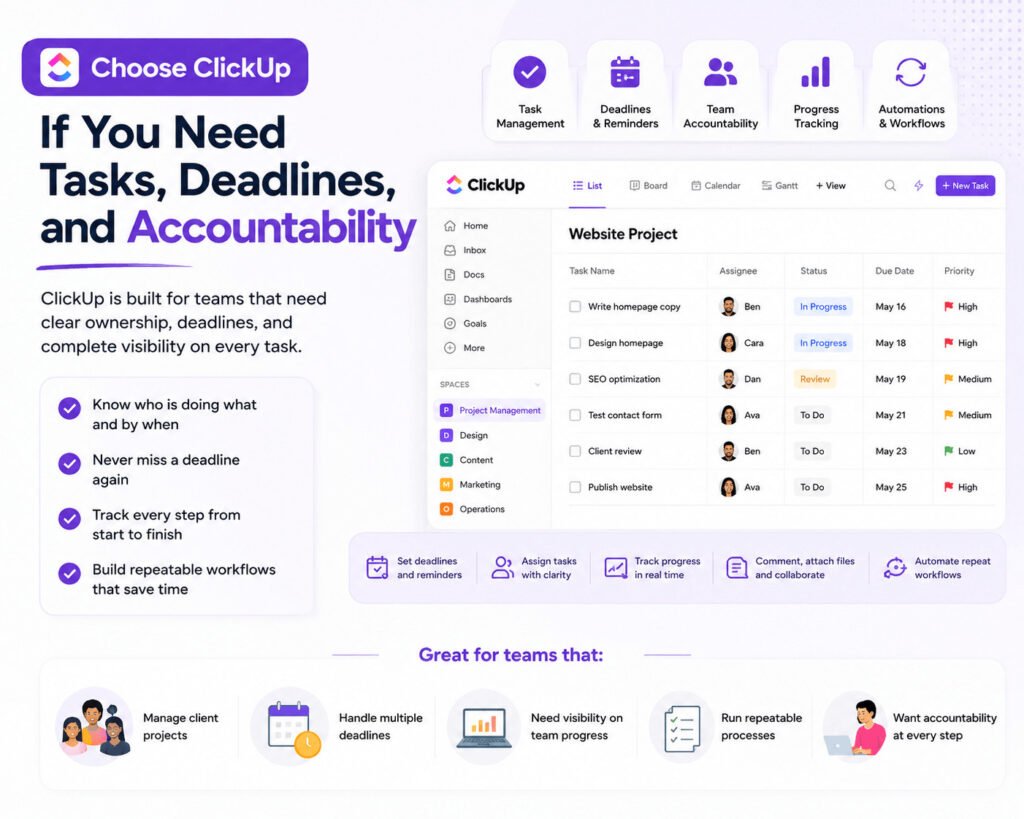
Choose ClickUp when tasks, owners, and deadlines are unclear.
ClickUp is built around tasks. A task can include an assignee, due date, priority, comments, files, and other work details. ClickUp also supports attachments, task comments, docs connected to tasks, and recurring tasks for repeated work.
An assignee is the person responsible for a task.
A status shows where the task stands. Simple examples are “To Do,” “In Progress,” “Review,” and “Done.”
This matters when several people work on the same project. Without a clear task system, small jobs get missed, deadlines slip, and people spend time asking who owns what.
Picture a small agency building a client website.
The project may include writing website copy, designing pages, reviewing images, checking SEO, testing forms, and getting client approval.
In ClickUp, each step can become a task with an assignee, deadline, status, comments, and files. The manager can check overdue tasks, review stages, and unfinished work without asking every person separately.
ClickUp also works well for repeated work. If your team publishes content every week, sends monthly reports, or handles regular client requests, recurring tasks can help the team repeat the same steps without rebuilding the task list each time.
The weak point is setup.
If your team only needs notes, simple planning, or a light content calendar, ClickUp may feel too detailed. Beginners can spend too much time adjusting views, statuses, and settings instead of doing the work.
That is why the best choice is not always the tool with more options. Many beginners get stuck because they compare features before they understand their real problem.
The Mistake Beginners Make When Comparing Notion and ClickUp
Many beginners compare Notion and ClickUp by feature lists only.
That sounds logical. One tool has dashboards. Another has databases. One has templates. Another has recurring tasks.
But more features do not always mean a better fit.
A feature is simply something a tool can do. The problem is that many small teams choose features they may never use.
A content team may choose ClickUp because it has more project management options. But if the team only needs article ideas, briefs, notes, and publish dates, ClickUp may feel heavier than needed.
The opposite can also happen.
A small agency may choose Notion because it looks clean and flexible. At first, it works well for project notes and client details. Later, the team may need task owners, due dates, reminders, approvals, and progress tracking. Notion can still work, but the team may need to build a stronger task system.
The better question is not, “Which tool can do more?”
Ask this instead:
Which tool solves the problem we face every week?
If your team keeps losing project information, Notion may be the better answer.
If your team keeps missing deadlines or asking who is responsible, ClickUp may be the better answer.
Software only helps when people use it. A powerful tool that feels confusing becomes another app your team avoids. A simple tool that cannot support your real workflow creates new problems later.
Before choosing, write down your top three project problems.
Are your notes scattered? Are tasks unclear? Are deadlines missed? Are follow-ups forgotten?
That list will tell you more than a long comparison table.
Once you know the problem, the comparison becomes easier. The next step is to match each tool to the kind of work your team actually does.
Notion vs ClickUp by Real Work Scenario
The easiest way to compare Notion vs ClickUp is to look at real work situations.
For content calendars
Notion is often better when the main job is planning.
You can collect article ideas, add keywords, write briefs, save research links, and organize publishing notes. This works well for bloggers, creators, and small teams that need a clear planning space.
ClickUp is often better when the content calendar has many steps and several people involved.
For example, one person writes the article, another edits it, another creates the image, and another publishes it. ClickUp makes it easier to assign each step, set deadlines, and track status.
For client projects
ClickUp may be easier when client work needs task owners, due dates, approvals, comments, and follow-up.
A website project may include design, copywriting, SEO checks, testing, client review, and final publishing. ClickUp can show what is finished, what is late, and what is waiting for review.
Notion can still help with client work, especially for project briefs, meeting notes, brand guidelines, and content drafts. But if the team needs stronger follow-up, ClickUp usually fits better.
For project notes and documentation
Notion is usually easier for project notes and documentation.
It gives your team a clean place for meeting notes, client instructions, brand rules, project details, and internal processes.
ClickUp also has Docs, and those Docs can be connected to tasks or specific areas of the workspace. But for teams that mainly need a simple place to write and organize information, Notion may feel more natural.
For small team operations
The better choice depends on how complex the work is.
If your team mainly needs shared notes, simple planning, and stored information, Notion may be enough.
If your team repeats the same tasks each week and needs reminders, progress tracking, and clear responsibility, ClickUp is more practical.
For team communication
Both tools can support comments and updates.
But neither tool should automatically replace live chat or meetings unless your team agrees on how updates will be handled.
These scenarios show that the answer can change by workflow. But some teams may still wonder if they should avoid choosing and use both tools instead.
Can You Use Notion and ClickUp Together?
Yes, you can use Notion and ClickUp together.
But each tool needs a clear job.
A common setup is simple: use Notion for project information and ClickUp for project tasks.
Notion can hold notes, documents, briefs, research, meeting notes, and decisions. ClickUp can manage action items, deadlines, assignees, review stages, and progress.
For example, a small agency could use Notion to store client details, brand guidelines, meeting notes, website copy, and project briefs.
Then the same agency could use ClickUp to assign tasks such as:
- Design homepage
- Write service page
- Review SEO
- Test contact form
- Send draft to client
This setup can work because everyone knows where each type of information belongs.
The risk is duplication.
Duplication means the same information appears in two places. If a deadline sits in both Notion and ClickUp, someone has to update both. If one date changes and the other does not, the team may follow the wrong deadline.
That is how tools create extra work.
Beginners should usually start with one tool. Add the second tool only when the first tool leaves a clear gap.
Using both can work, but only when the team knows exactly what belongs in Notion and what belongs in ClickUp.
At this point, the decision should be clearer: choose based on the work your team repeats most often, not the tool that looks more powerful.
Notion vs ClickUp Final Verdict: Which Should You Choose?
Choose Notion if your team needs a clear place to plan, write, and organize project information.
It fits work that depends on notes, documents, ideas, research, meeting records, content plans, and simple project tracking. It can also support tasks, due dates, assignees, statuses, and project views when the workflow is not too complex.
Choose ClickUp if your team needs stronger task management.
It fits work that depends on assigned tasks, due dates, task status, comments, attachments, recurring tasks, docs, and progress tracking.
A freelance writer may prefer Notion for article planning, research, and client notes.
A small marketing team with writers, editors, designers, and managers may prefer ClickUp because every task needs an owner, deadline, and review stage.
Neither tool is best for everyone.
Notion gives you more control over how your workspace is built, but that can become messy without clear rules.
ClickUp gives you more built-in task structure, but that can feel heavy if your team only needs simple planning.
Before choosing, write down your three biggest project problems:
- Are notes scattered?
- Are tasks unclear?
- Are deadlines missed?
- Are client updates hard to track?
- Are team members unsure what to do next?
Pick Notion if information is your main problem.
Pick ClickUp if action and accountability are your main problems.
The best project management tool is the one your team can understand, use every week, and trust during real work.
To know more about Productivity:https://sagaaro.com/what-are-productivity-tools-for-beginners/
FAQs About Notion vs ClickUp
Is Notion better than ClickUp for project management?
Notion is better if your project management mostly depends on notes, docs, planning pages, content calendars, and simple task tracking. It is a good fit when your team needs one place to organize project information. ClickUp is better if your team needs stronger task ownership, deadlines, review stages, recurring tasks, and progress tracking.
Is ClickUp easier than Notion for beginners?
ClickUp is not always easier for beginners. It can be useful, but the number of views, settings, task options, and workflow choices may feel heavy at first. Notion may feel easier if you only need notes, simple planning, and a basic content calendar. ClickUp may feel easier once your team needs clear task assignments and deadlines.
Can Notion replace ClickUp?
Notion can replace ClickUp for simple project management. For example, a freelancer, student, blogger, or small team can use Notion to track tasks, store notes, plan content, and manage project details. But if your team needs detailed task follow-up, reminders, approvals, recurring work, and progress dashboards, ClickUp may be a better fit.
Can ClickUp replace Notion?
ClickUp can replace Notion if your team wants tasks, docs, comments, files, and project tracking in one workspace. But if your main need is writing, organizing notes, building project pages, and storing flexible documentation, Notion may feel cleaner and easier to use.
Which is better for small teams, Notion or ClickUp?
Notion is better for small teams that need shared notes, project docs, content planning, and simple task tracking. ClickUp is better for small teams that need task owners, deadlines, review stages, client project tracking, and repeated workflows. The better choice depends on what your team struggles with most often.
Which is better for a content calendar, Notion or ClickUp?
Notion is better for a simple content calendar with ideas, keywords, briefs, publish dates, and notes. ClickUp is better when content production has many steps, such as writing, editing, design, SEO review, approval, and publishing. Small teams can start with Notion and move to ClickUp when follow-up becomes harder.
Should I use Notion and ClickUp together?
You can use Notion and ClickUp together, but only if each tool has a clear role. A simple setup is to use Notion for notes, docs, briefs, and decisions, then use ClickUp for tasks, deadlines, owners, and progress tracking. Avoid copying the same deadlines, tasks, or updates into both tools.