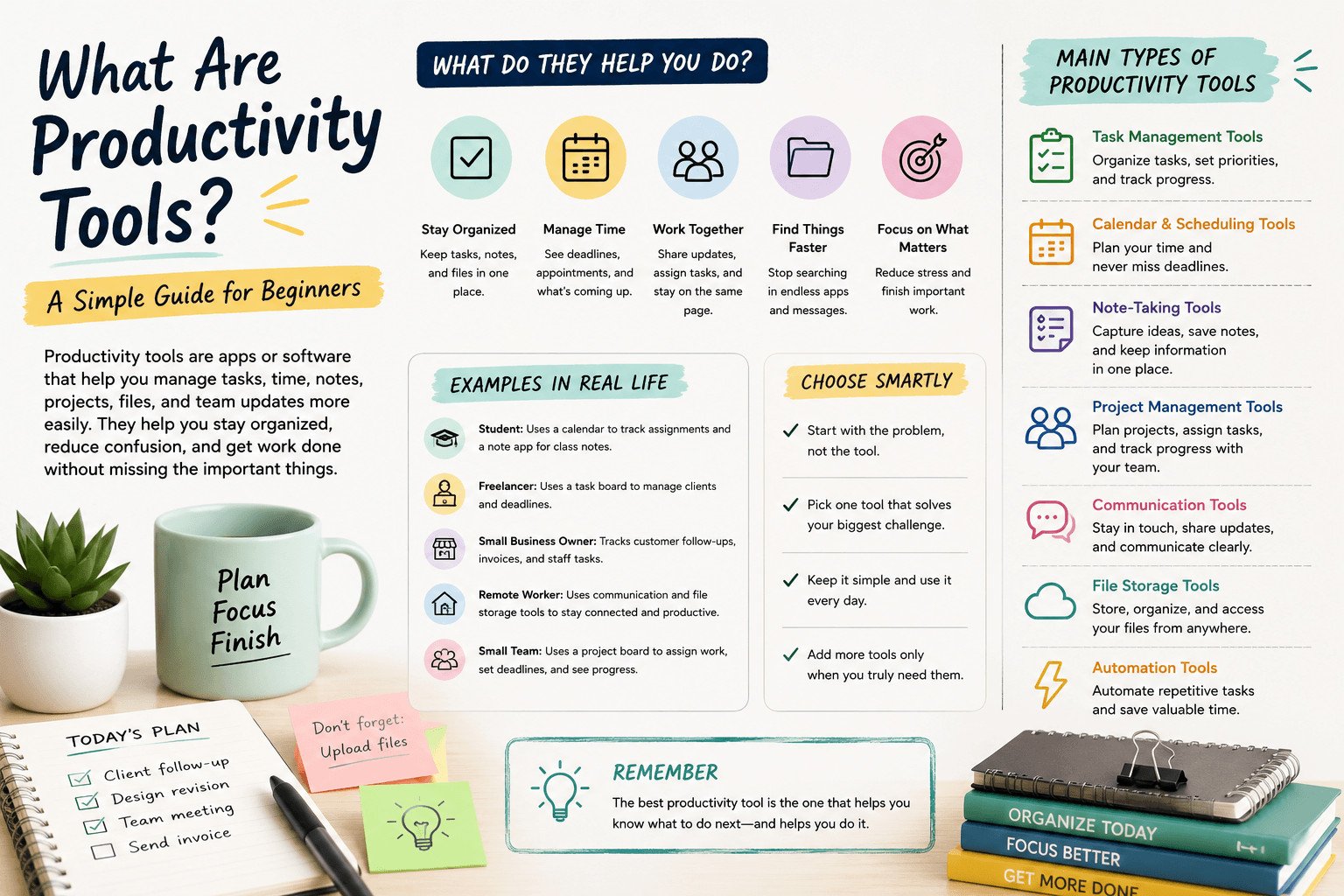
What are productivity tools? Productivity tools are apps or software that help you manage tasks, time, notes, projects, files, and team updates in a clearer way.
For beginners, the goal is not to use more apps. The goal is to know what needs to be done, when it is due, where the information is stored, and who is responsible.
A good productivity tool gives you a place to write things down, track progress, find information, and stay on top of daily work without keeping everything in your head.
Before choosing any tool, it helps to understand what these tools actually do.
Table of Contents
What Are Productivity Tools in Simple Terms?
Productivity tools are digital tools that help people organize work and finish tasks with less confusion.
They can include to-do list apps, calendars, note-taking apps, project management tools, team chat tools, file storage systems, and automation tools.
But the tool itself is not the main point.
The main point is what the tool helps you do.
If you forget small tasks, a task management tool helps you write them down, add a due date, and mark them as done. If you miss deadlines, a calendar helps you see what is coming next. If your team keeps asking the same questions, a shared project board can show who is doing what.
Good productivity tools help answer simple questions:
What needs to be done?
Who is responsible?
When is it due?
Where is the information?
What has already been finished?
These questions matter in real work. A missed customer follow-up can lose a sale. A forgotten invoice can delay payment. A lost file can waste time. A confused team member may repeat work someone else already finished.
That is why productivity tools are useful for students, freelancers, small business owners, remote workers, and small teams.
For example, a freelance designer may work with three clients at the same time. One client asks for a logo revision. Another needs a social media design. A third is waiting for final files.
Without a clear system, those requests can get mixed up.
A simple task board can help. The designer can create columns such as “New Requests,” “In Progress,” “Waiting for Feedback,” and “Completed.” Now the work is easier to see, and the designer knows what needs attention next.
The best productivity tool is not always the most advanced one. The best tool is the one you can use every day without making your work harder.
Once you understand the basic idea, the next step is to look at the everyday problems these tools are built to solve.
What Do Productivity Tools Help You Do?
Productivity tools help people deal with small daily problems before they turn into missed deadlines, lost files, late replies, or repeated work.
Most people do not lose time because they are lazy. They lose time because tasks are scattered, deadlines are unclear, files are hard to find, or messages are spread across too many places.
Forgotten tasks are one common problem.
A business owner may speak with a customer in the morning and promise to send a quote. Then calls, messages, and admin work take over. By evening, the quote is forgotten.
A simple task tool can prevent this. The owner adds the quote as a task, sets a due date, and checks it later.
Missed deadlines create another problem.
Deadlines are easy to miss when they only stay in someone’s memory or inside a long message thread. A calendar or reminder app shows what is due today, this week, and later.
A reminder is simply an alert that tells you about something before it is too late.
Lost information also slows people down.
Many people save notes in different places: phone notes, emails, WhatsApp messages, notebooks, and random documents. Later, they waste time searching for details.
A note-taking tool gives them one place to save ideas, meeting notes, links, and instructions.
Team communication can also break down.
When a small team works through scattered messages, people miss updates. One person may think a task is done while another is still waiting for feedback.
A project management tool can show the task, the person responsible, the deadline, and the current status.
Imagine a small online store preparing a weekend sale. One person updates prices. Another creates social media posts. Another checks stock.
Without a shared system, the team may repeat work or forget a key step.
With a simple project board, every task is listed in one place. The owner can see what is done, what is late, and what still needs attention.
That is the real value of productivity tools. They help people stop guessing and work from clear information.
These problems are common, but they do not all need the same solution. That is why it helps to know the main types of productivity tools.
Main Types of Productivity Tools for Beginners
There are many types of productivity tools, but beginners do not need to learn every category at once.

Start by looking at the problem each tool solves.
| If your problem is… | Use this type of productivity tool |
|---|---|
| You forget tasks | Task management tool |
| You miss deadlines | Calendar or reminder tool |
| Your notes are scattered | Note-taking app |
| Your team is confused | Project management tool |
| Your files are hard to find | File storage tool |
| Your updates get lost | Communication tool |
| You repeat the same small task often | Automation tool |
A task management tool helps you manage things you need to do. This can be a simple to-do list with checkboxes, due dates, and priorities. People use these tools for daily tasks, client follow-ups, study assignments, and personal reminders.
A calendar or scheduling tool helps you manage time. It shows meetings, deadlines, appointments, and important dates in one place. This turns “I need to remember this” into something you can see.
A note-taking tool helps you save information. You can use it for ideas, meeting notes, research, class notes, links, instructions, and checklists. Instead of keeping details in random places, you have one place to return to.
A project management tool helps when work has several steps or involves more than one person. It can show tasks, owners, deadlines, progress, files, and comments. This is useful for small teams, freelancers, and business owners who need to track work from start to finish.
A communication tool helps people talk and share updates. Email, team chat, and video meeting tools fit here. The goal is to keep conversations clear so people know what changed, what needs action, and who should respond.
A file storage tool helps you save and share documents, images, spreadsheets, and other files. This matters when people need access to the same materials without sending files again and again.
An automation tool helps with repeated work. Automation simply means setting up a tool to do a small task automatically, such as sending a reminder, moving a task to another list, or saving a form response in a spreadsheet.
For example, a small team creating weekly blog posts may use a project board for article ideas, a calendar for publishing dates, a note app for research, and file storage for drafts and images.
The goal is not to use every type of tool immediately.
Start with the area causing the most trouble. If deadlines are the issue, start with a calendar. If tasks are being forgotten, start with a task tool.
The right tool should show you what to do next, when it is due, and where the needed information is stored.
Knowing the tool types helps, but there is another side beginners often miss: using the wrong tool can create more work.
For more: https://sagaaro.com/productivity-tools-explained/
Common Mistakes Beginners Make With Productivity Tools
Productivity tools can help, but the wrong setup can slow you down.
This often happens when the tool is too complex for the problem. If you only need a simple to-do list, a full project platform with dashboards, reports, and advanced settings may be too much.
Then the tool becomes another task.
You spend time setting up boards, changing views, creating labels, testing features, and watching tutorials. At some point, you are managing the tool instead of doing the work.
Too many tools can cause the same problem.
A beginner might use one app for tasks, another for notes, another for reminders, another for files, and another for team messages. This may look organized, but it can spread important information across too many places.
App switching, also called context switching, means moving between different apps, tasks, or conversations during the day.
For example, you may check a task board, open email, search for a file, then reply to a team message. Each move forces you to stop, find your place, and refocus.
Notifications can also hurt focus.
If every tool sends alerts, your day fills with pings, reminders, comments, and updates. Some reminders are useful. Too many make it harder to stay with one task.
Imagine a freelancer using five tools for client work. Client notes are in one app. Deadlines are in another. Files are in a third. Messages are in email. Tasks are on a separate board.
When a client asks for an update, the freelancer has to check several places before answering. That wastes time and increases the risk of missing something.
The problem is not always the tool. The problem is choosing tools without a clear reason.
A good productivity tool should reduce how much you need to remember, search for, or explain again. If it adds more steps, more confusion, or more places to check, it may not be the right tool for your current needs.
For beginners, simple is usually better. Start with one problem, choose one tool, and add more only when there is a clear reason.
That leads to the most important decision: how do you choose your first tool without getting pulled into too many options?
How to Choose the Right Productivity Tool as a Beginner
Start with one question: what problem are you trying to fix?
Many beginners search for the “best” tool before they understand their own needs. That can lead to wasted time, unused apps, and more confusion.
Name the main issue first.
Are you forgetting tasks? Missing deadlines? Losing notes? Struggling to track client work? Finding it hard to know what your team is doing?
Your answer should guide your choice.
If tasks are being forgotten, start with a simple task management tool. If deadlines are the problem, start with a calendar or reminder app. If notes are scattered across notebooks, emails, and phone messages, start with a note-taking tool. If several people are working on the same project, a basic project board may help.
Do not choose a tool only because it is popular.
A popular tool can still be wrong for you if it takes too long to set up or feels hard to use every day. For beginners, daily use matters more than advanced features.
Avoid starting with too many tools at once.
One tool used well is better than five tools you rarely open. Test one tool for one or two weeks. Then ask: does this help me see my work more clearly?
For example, a small business owner may keep forgetting customer follow-ups. They do not need a complex system on day one. A simple task list with customer names, follow-up dates, and short notes may be enough.
Each morning, they check the list and see who needs a reply, quote, invoice, or update. That small habit can protect sales, improve customer service, and reduce last-minute stress.
When choosing your first productivity tool, look for three things: easy setup, clear daily use, and a direct link to your biggest problem.
The right tool should make your next action easier to see. If it makes work feel heavier, choose something simpler.
The same idea applies to different people in different ways. A student, freelancer, remote worker, and small team may all need productivity tools, but not the same setup.
Productivity Tools Examples for Students, Freelancers, and Small Teams
Real situations make productivity tools easier to understand.
A student may only need a calendar to track assignment deadlines, exam dates, and class schedules. A note-taking app can keep lecture notes, research, and study plans in one place.
This gives the student one place to check before exams or deadlines.
A freelancer often manages several clients at once. They need a clear way to track tasks, deadlines, files, and follow-ups. A simple task board can show which projects are new, which are in progress, and which are waiting for client feedback.
A small business owner may use productivity tools to manage customer requests, staff tasks, invoices, appointments, and stock checks. Without a clear system, small tasks can disappear during a busy day.
Remote workers often need tools because they do not always get face-to-face updates. A communication tool helps them stay in touch with teammates. A shared project tool shows what has been completed and what still needs work.
Small teams need a shared place where everyone can see task owners, deadlines, and progress.
For example, a small marketing team can use a project board to assign a blog post, social posts, images, and final review. Each task has an owner, deadline, and status such as “To Do,” “In Progress,” or “Done.”
This gives the team a clearer way to work.
The main lesson is simple: different people need different tools. A student, freelancer, business owner, and small team should not copy the same setup.
The best choice depends on whether they mainly manage assignments, clients, staff tasks, files, or team updates.
After you understand what fits your situation, the next step is not to build a perfect system. It is to start small and make the tool part of your daily routine.
Read this article to know more:https://buffer.com/resources/productivity-tools/
Start With One Productivity Tool, Then Add More Later
Keep your first setup simple.
Many beginners think they need a full system right away: task boards, calendars, notes, reminders, file storage, team chat, and reports. That usually creates more work than it removes.
A better approach is to start with one tool and one habit.
Choose the area that causes the most problems in your daily work. If you forget tasks, start with a task list. If you miss deadlines, start with a calendar. If your notes are scattered, start with a note-taking app. If your team is unclear about responsibilities, start with a shared project board.
A tool only helps when you use it regularly.
For example, a freelancer who forgets client follow-ups can start with a simple task list. Every time a client asks for something, the freelancer adds it with a short note and due date. Each morning, they check the list before opening email or social media.
That habit helps the freelancer see today’s client work before other messages distract them.
It can also help prevent missed replies, late invoices, forgotten revisions, and unhappy clients. The freelancer does not need a complicated setup. They need a clear place to see what needs attention today.
After that habit becomes normal, they can add more tools only when there is a real need. Later, they may add file storage for client documents or a calendar for project deadlines.
A productivity system is the set of tools and habits you use to manage your work. It does not need to be advanced. It needs to help you stay clear, organized, and consistent.
For beginners, the goal is not to use the most tools. The goal is to reduce confusion and make daily work easier to manage.
Now that you understand what productivity tools are, the next step is choosing one simple tool that solves your biggest daily problem. Start by comparing beginner-friendly tools for task management, time management, project planning, note-taking, and team communication.
FAQ: Productivity Tools for Beginners
What are productivity tools?
Productivity tools are apps or software that help people organize tasks, manage time, save notes, track projects, communicate with others, and find work information more easily.
What are examples of productivity tools?
Examples of productivity tools include task management apps, calendars, note-taking apps, project management tools, team communication tools, file storage tools, and automation tools.
Why are productivity tools important?
Productivity tools are important because they help people remember tasks, track deadlines, find files, follow up with customers, and see team progress without relying only on memory or scattered messages.
What is the best productivity tool for beginners?
The best productivity tool for beginners depends on the problem. If you forget tasks, start with a task tool. If you miss deadlines, start with a calendar. If your notes are scattered, start with a note-taking app.
Can productivity tools make you less productive?
Yes. Productivity tools can make work harder if they are too complex, send too many notifications, or spread your tasks, notes, files, and messages across too many apps.
Do beginners need more than one productivity tool?
Not at first. Most beginners should start with one tool that solves one clear problem. After that tool becomes part of their daily routine, they can add another tool if they truly need it.