
Most people do not need more apps. They need a clearer way to manage tasks, notes, deadlines, files, and communication.
In this productivity tools explained guide, you will learn what these tools do, which types beginners should know, and how to choose one without making work more complicated.
The goal is not to use the newest app. The goal is to fix a real problem in the way you work.
Table of Contents
What Are Productivity Tools?
Productivity tools are apps or systems that help people organize tasks, notes, deadlines, files, communication, and projects.
They help you see what needs to be done, when it is due, where important information is stored, and who is responsible for the next step.
A productivity tool can be simple. It might be a to-do list, a calendar, a notes app, a project board, or a team communication tool.
Used well, these tools can reduce confusion. Used poorly, they can create more work.
That is why beginners should start with the problem first, not the app. Before choosing any tool, it helps to understand why work becomes messy in the first place.
for more intro: https://sagaaro.com/what-are-productivity-tools-for-beginners/
Why Daily Work Feels Messy Without a Simple System
Work feels messy when important details live in too many places.
One task is in an email. Another is in a WhatsApp message. A deadline is written in a notebook. A file is saved on one person’s laptop. A customer request was mentioned during a call but never written down.
At first, this may feel normal. Over time, it creates real delays.
People start asking the same questions again and again:
“Who is handling this?”
“When is it due?”
“Where is the file?”
“Did anyone reply to the client?”
These questions waste time because the answer is not easy to find.
For a student, this can mean missing an assignment deadline. For a freelancer, it can mean forgetting to follow up with a client. For a small business, it can mean losing track of orders, payments, or customer messages.
The problem is not always laziness. Often, there is no clear system.
A system simply means one reliable place where tasks, notes, dates, and updates are stored. Without it, people depend too much on memory. Memory helps, but it is not enough when work becomes busy.
Imagine a small team creating weekly blog posts. One person writes the article. Another edits it. Someone else creates the image.
If the team tracks everything through scattered messages, one step can easily get missed. The writer may think the editor has started. The editor may be waiting for the image. The publisher may not know the final version is ready.
That kind of confusion slows the whole team down.
A useful productivity tool gives everyone one clear place to see what needs to be done, who owns the task, and which deadline comes next. But that does not mean every tool works the same way. Different tools solve different problems.
Productivity Tools Explained: What They Actually Do
Productivity tools give tasks, notes, deadlines, files, and updates one clear place to live.
They do not do the work for you. They help you see what needs to be done, when it is due, and where important information is stored.
A productivity tool might help you:
- Write down tasks before you forget them
- Set reminders for deadlines and meetings
- Keep notes and files in one place
- Track the progress of a project
- Share updates with a team
Some tools are made for one person. Others are made for teams.
A student may use a notes app to organize lecture notes and a calendar to track exam dates. A freelancer may use a task tool to manage client work. A small team may use a project board to see who is writing, editing, designing, or publishing each piece of work.
A project board is a visual place where tasks are shown in columns such as “To Do,” “In Progress,” and “Done.” This makes progress easier to see without asking for updates all day.
This matters in daily work.
When tasks are written in one visible list, people do not have to rely only on memory. When deadlines are easy to see, people can plan earlier. When files and notes are stored in one place, less time is spent searching. When each task has a clear owner, fewer people need to ask who is responsible.
Imagine a small business handling customer orders. Without a tool, orders may be tracked through messages, paper notes, and memory. With a simple task tool, each order can have a customer name, deadline, status, and assigned person.
The tool will not fix every problem. But it can reduce confusion and help people finish work with fewer missed steps.
Once you understand what these tools do, the next step is easier: group them by the kind of problem they help you solve.
5 Main Types of Productivity Tools Beginners Should Know
Productivity tools are easier to understand when you group them by the problem they solve.
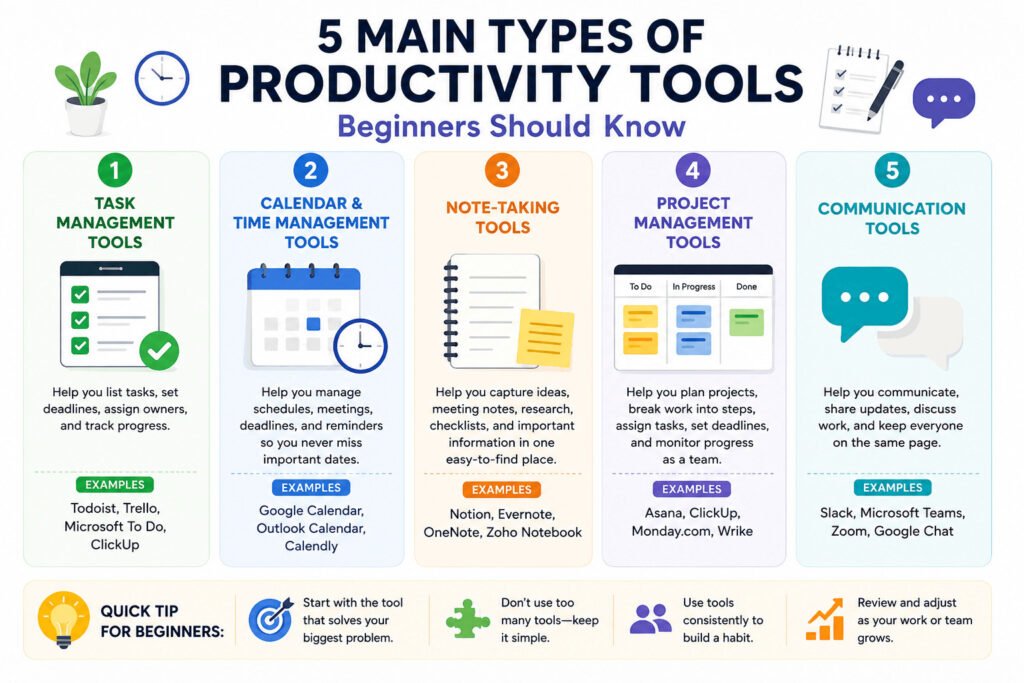
The five main types of productivity tools are:
- Task management tools
- Calendar and time management tools
- Note-taking tools
- Project management tools
- Communication tools
Each one helps with a different part of daily work.
Task management tools help you list work, set deadlines, and track progress. A task can be simple: “send invoice,” “finish assignment,” or “reply to client.” These tools help when small but important tasks keep getting forgotten.
Calendar and time management tools help you manage meetings, deadlines, reminders, and daily schedules. They are useful when you need to see what is due today, this week, or this month.
Note-taking tools help you store ideas, meeting notes, research, checklists, and important details in one place. Notes lose value when they are spread across notebooks, phone apps, emails, and screenshots.
Project management tools help when work has several steps or several people involved. A project is a group of tasks connected to one goal. For example, publishing a blog post may include research, writing, editing, image creation, final checks, and publishing.
Communication tools help people discuss work, share updates, and keep messages easier to follow. They are useful for remote workers and small teams that cannot always talk face-to-face.
Picture a freelancer managing three clients. A task tool tracks client work. A calendar shows deadlines and calls. A note app stores client details. A communication tool keeps messages in one place.
You do not need every type of tool at once. The better approach is to look at your biggest work problem and choose the tool that fits it.
How to Choose the Right Productivity Tool for Your Problem
The easiest way to choose a productivity tool is to look at what slows you down.
Do not start with, “Which tool is the best?”
Start with, “What problem do I need to fix?”
Here is a simple way to match the problem to the right type of tool:
| Problem | Best tool type | Simple example |
|---|---|---|
| You forget tasks | Task management tool | To-do list or task board |
| You miss deadlines | Calendar tool | Calendar reminders |
| Your notes are scattered | Note-taking tool | Notes app or document hub |
| Team updates are unclear | Project management tool | Shared board with task owners |
| Messages get lost | Communication tool | Team chat or shared inbox |
If you forget small tasks, use a task management tool. Write the task, add a deadline, and mark it complete when finished.
If you miss deadlines or meetings, use a calendar tool. A calendar shows what is coming next and reminds you before important dates.
If your notes are scattered across notebooks, phone apps, screenshots, and email drafts, use a note-taking tool. Keep useful information in one place so you can find it later.
If your team is confused about who is doing what, use a project management tool. It can show tasks, owners, deadlines, and progress in one shared space. An owner is the person responsible for finishing a task.
Imagine a small business handling customer orders through WhatsApp. At first, this may work. But as orders increase, messages get buried. Staff may forget who paid, which order is ready, or who needs delivery.
The business may not need a complex setup. A simple task board with clear columns may be enough:
“New Order”
“Preparing”
“Ready”
“Delivered”
That small change can help the team see order status faster and avoid asking the same questions repeatedly.
If the problem is simple, the tool should be simple too. This is where many beginners make the opposite mistake: they choose a tool that is bigger than the problem.
Read this article: https://upslide.com/blog/6-steps-to-select-the-best-productivity-tool/
The Common Mistake That Makes Productivity Tools Waste Time
Many beginners waste time with productivity tools because they choose popular apps before knowing what they actually need.
A tool may look modern or full of useful features. But if it does not solve the real issue, it becomes another thing to manage.
That is how productivity tools can waste time.
People spend hours setting up boards, folders, templates, reminders, tags, and dashboards. A dashboard is a screen that shows important information in one place. It can help, but only when the information is useful.
Trouble starts when the setup becomes bigger than the work.
Imagine a small team managing weekly social media posts. They choose a project tool with many views, labels, comments, reports, and automatic actions.
But the team only needs to know three things:
What post is being created?
Who is responsible?
When should it be published?
Instead of helping, the tool creates extra admin work. People now update statuses, move cards, add labels, check notifications, and learn features they do not need.
That time could have gone into writing, editing, designing, or publishing.
This does not mean productivity tools are bad. It means the wrong tool, or too many tools, can make simple work harder.
Start with one question:
What problem are we trying to fix?
If tasks are being forgotten, start with a task list. If deadlines are missed, use a calendar. If notes are scattered, choose one place for notes. If team updates are unclear, use a shared board.
A useful tool should make the next step easier to see, not give everyone more admin work.
When the tool fits the problem, the benefit becomes much clearer. It saves time not by doing the work for you, but by removing the small delays around the work.
How Productivity Tools Save Time in Daily Work
Productivity tools can save time when they reduce small delays during normal work.
Most time is not lost in one big mistake. It disappears in small moments: searching for a file, asking who is responsible, checking a deadline, rewriting the same note, or trying to remember what was discussed last week.
A good tool keeps important work details in one place.
For a student, this might mean keeping assignments, exam dates, and study notes together. Instead of checking different notebooks or messages, the student can see what needs attention first.
For a freelancer, it can mean tracking client tasks, deadlines, invoices, and follow-ups. This lowers the risk of forgetting a client request or sending work late.
For a remote worker, a shared task list or project board can show what is being worked on, what is finished, and what still needs review.
For a small team, the value can be even clearer. When everyone can see task owners, deadlines, and progress, fewer people need to ask for updates.
Imagine a small team publishing one blog post every week. Without a tool, the writer may send the draft by email. The editor may leave comments in another file. The designer may not know when the image is needed.
With a simple project board, each step is visible: research, writing, editing, image creation, final check, and publishing. Each task has one owner and one deadline.
The tool does not write, edit, or publish the post. People still do the work.
But it removes confusion around the next step. That is where productivity tools can save real time.
The key is to begin with a setup you can actually use every day. A simple habit beats a complicated system that nobody keeps updated.
How to Start Using Productivity Tools Without Overcomplicating Work
Start small.
You do not need many apps, boards, calendars, templates, and reports. For most beginners, that creates more confusion. A simple tool used every day is better than a powerful tool nobody understands.
Choose one problem to fix first.
If you forget tasks, use a basic to-do list. If you miss deadlines, use a calendar. If your notes are hard to find, choose one note-taking tool. If your team is unclear about responsibilities, use a shared task board.
Build the habit before adding more features.
A habit is something you do regularly without needing to think too much about it. Checking your task list every morning can become a habit. Adding new tasks as soon as they appear can also become a habit.
Imagine a freelancer managing three clients. They may not need a complex project management tool at first. A simple task list with client names, deadlines, and follow-up reminders may be enough.
When the workload grows, they can add a calendar, file storage, or a shared board.
Small teams should follow the same rule. Do not introduce five tools at once. Pick one place where everyone can see tasks, owners, and deadlines. Use it consistently. Then decide what is still missing.
Productivity tools work best when they support how people already work. They should not force everyone into a complicated system.
Start with one clear problem. Choose one simple tool. Use it every day. Then choose the next tool only when you actually need it.
Before choosing your first tool, it helps to answer a few common beginner questions.
FAQs About Productivity Tools
What are productivity tools in simple words?
Productivity tools are apps or systems that help you organize work. They can help you manage tasks, track deadlines, store notes, share updates, and see what needs to happen next.
What are examples of productivity tools?
Examples include to-do list apps, calendars, note-taking apps, project boards, file storage tools, and team communication apps. Common examples include Google Calendar, Trello, Notion, Microsoft To Do, Asana, Slack, and Microsoft Teams.
How do productivity tools save time?
Productivity tools can save time by keeping tasks, notes, deadlines, and updates in one clear place. This reduces time spent searching for information, asking repeated questions, or trying to remember what needs to be done.
Which productivity tool should beginners start with?
Beginners should start with the tool that solves their biggest problem. Use a task tool if you forget tasks, a calendar if you miss deadlines, a note app if information is scattered, and a project board if team responsibilities are unclear.
Are productivity tools useful for students and freelancers?
Yes. Students can use them to track assignments, exam dates, and study notes. Freelancers can use them to manage client tasks, deadlines, invoices, and follow-ups.
Can using too many productivity tools waste time?
Yes. Too many tools can create extra work if people spend more time updating apps than doing the actual work. It is better to start with one simple tool and add more only when needed.