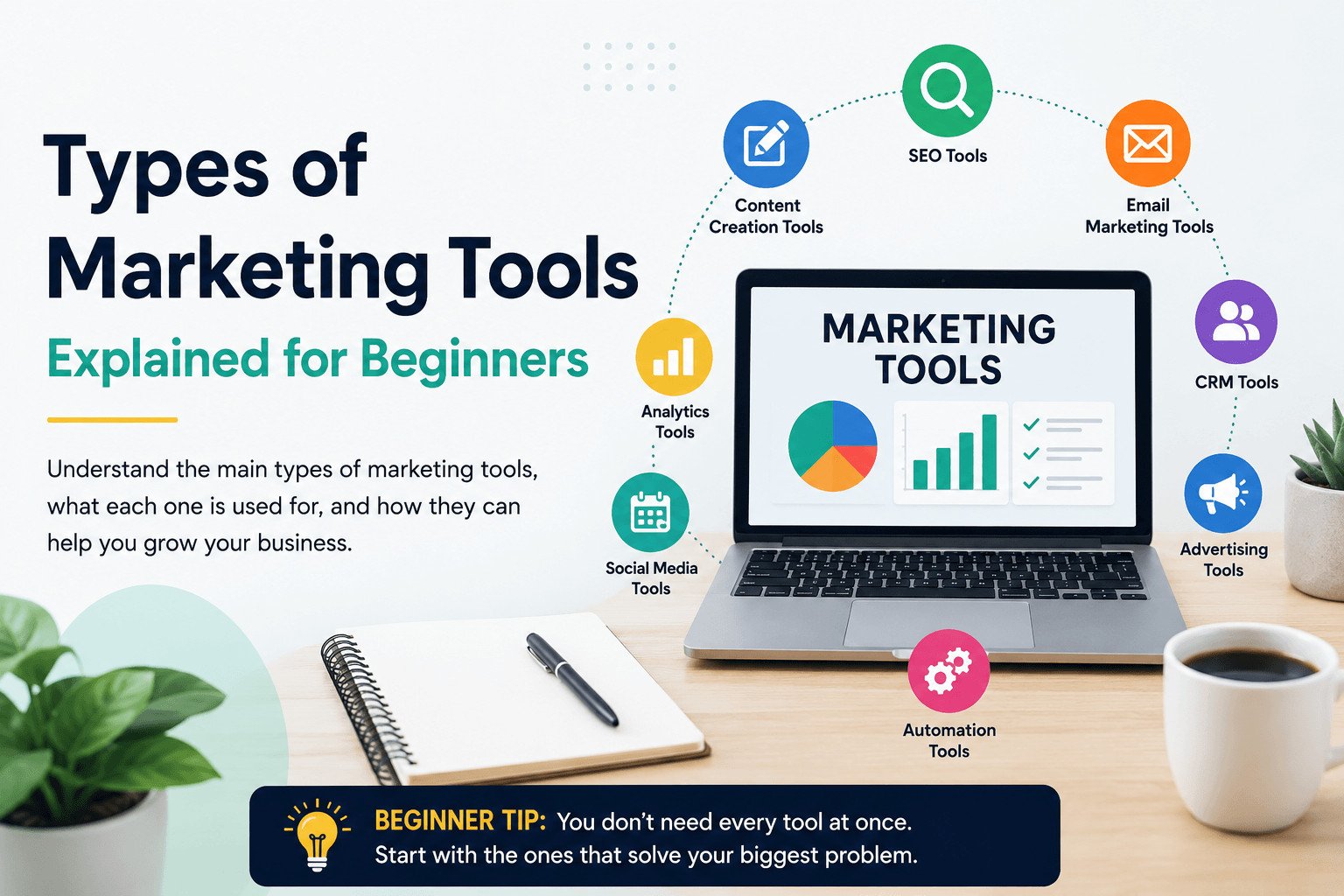
Marketing tools can feel confusing when every platform claims it can help your business grow. But beginners do not need every tool. They need to understand what each type of tool does, what problem it solves, and when it is worth using.
This guide explains the main types of marketing tools by the job they help you do, so you can choose tools based on real needs instead of popular names.
Table of Contents
What Are Marketing Tools?
Marketing tools are apps, platforms, or systems that help businesses create content, reach customers, track results, manage leads, send messages, and run campaigns.
Some tools help you design posts. Some help people find your website on Google. Others help you send emails, schedule social media posts, track customer conversations, or measure what is working.
The goal is not to use as many tools as possible. The goal is to use the right tool for the task in front of you.
For example, a small business owner who wants more local customers may need an SEO tool to understand what people search for. A freelancer who forgets client follow-ups may need a simple CRM or spreadsheet. A content creator who posts often may need a design tool and a scheduling tool.
Start with the problem first. Then choose the tool.
Once you understand that, the different types of marketing tools become much easier to separate.
Read more introduction: https://sagaaro.com/what-are-marketing-tools-a-simple-beginners-guide/
The Main Types of Marketing Tools and What They Do
Different types of marketing tools help with different parts of marketing. Here is a simple way to understand them.
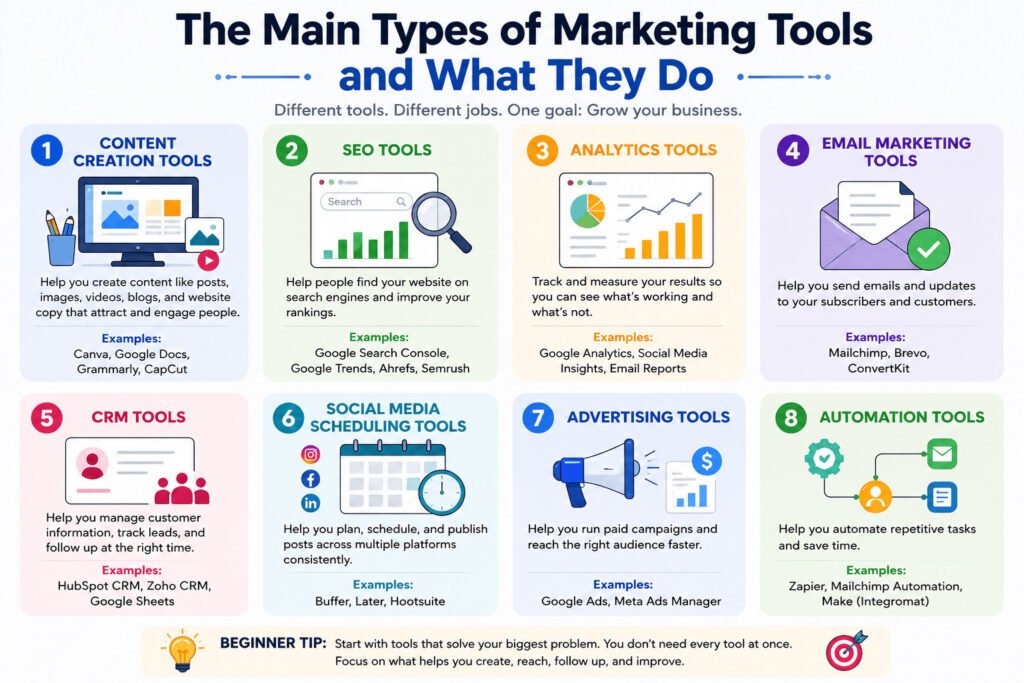
| Marketing job | Tool type to use | Simple examples |
|---|---|---|
| Create posts, images, and videos | Content creation tools | Canva, Google Docs, phone video editors |
| Help people find your website | SEO tools | Google Search Console, Google Trends, Semrush |
| Track what is working | Analytics tools | Google Analytics, social media insights, email reports |
| Send updates to customers | Email marketing tools | Mailchimp, Brevo, ConvertKit |
| Track leads and follow-ups | CRM tools | HubSpot CRM, Zoho CRM, Google Sheets |
| Plan social media posts | Social media scheduling tools | Buffer, Later, Hootsuite |
| Run paid campaigns | Advertising tools | Google Ads, Meta Ads Manager |
| Handle repeated tasks | Automation tools | Zapier, email workflows |
This table does not mean you need all these tools at once. It simply shows what each category is for.
Most beginners should start with tools that cover four basic jobs: create, publish, follow up, and measure.
But before you choose any tool, it helps to pause and ask one simple question: what job are you actually trying to get done?
Read more: https://www.salesforce.com/blog/small-business/types-of-marketing/
How to Choose Marketing Tools by Business Task
Beginners often choose marketing tools by brand name. That is the wrong place to start.
A popular tool may not fix your current problem. Before choosing one, ask: What marketing task do I need help with?
Do you need to create better social media posts? Help more people find your website? Send emails to customers? Track leads and follow-ups? Check which content brings results?
Each task needs a different type of tool.
Content creation tools help you make graphics, videos, blog drafts, and social media posts. SEO tools help you understand what people search for online. Email marketing tools help you send messages to people who have signed up to hear from you. CRM tools help you store customer details, track conversations, and remember follow-ups.
CRM means customer relationship management. In simple terms, it is a place to keep customer names, messages, notes, and next steps.
Imagine a small bakery that wants more birthday cake orders. The owner may think they need “marketing software,” but the real tasks are clearer.
They need to post cake photos, collect customer messages, follow up with people who ask for prices, and check which posts bring attention.
That bakery may need a design tool, a social media scheduler, a simple customer tracker, and basic reporting. It does not need ten advanced platforms.
Start with the task first. This keeps your choices simple and helps you avoid paying for tools you are not ready to use.
Beginner takeaway: The best marketing tool is not the most famous one. It is the one that fixes the problem costing you time, leads, or sales right now.
The first task many beginners need help with is creating something people can actually see, read, or watch.
Content Creation Tools for Posts, Videos, and Website Copy
Content creation tools help you make the materials people see before they decide to trust your business.
These materials can include blog posts, social media images, short videos, product photos, newsletters, graphics, and website copy. The tools do not replace your ideas. They help you turn those ideas into something clear and usable.
For many beginners, this is the first type of marketing tool to learn. Most marketing starts with content. People need to see what you offer, understand it, and remember it before they buy.
A design tool can help you create posters, Instagram posts, banners, or product images. A writing tool can help you draft blog posts, captions, and emails. A video tool can help you cut clips, add text, or prepare short videos for social media.
Imagine a freelance fitness coach who wants more clients. At the start, they may not need advanced marketing software. They need simple content that shows their advice, training style, and results.
They could use a design tool for workout tips, a writing tool for short captions, and a basic video editor for exercise clips. Over time, that content helps people understand the service, trust the coach, and remember the offer.
The business impact is simple: clear content shows what you sell, answers common questions, and gives people a reason to contact you.
Common examples include Canva for simple designs, Google Docs for writing, Grammarly for checking text, and phone video editors for short clips.
Do not create content just to stay busy. Each piece should explain your offer, answer a customer question, show proof, or move someone closer to taking action.
Beginner takeaway: Use content creation tools when you need to make posts, videos, emails, or website copy that explain your business clearly.
Good content gives people something useful to read or watch. The next step is helping them find it.
SEO Tools That Help People Find Your Website
Creating content is not enough. People also need a way to find it.
SEO tools help with this. SEO means search engine optimization. In simple terms, SEO means improving your website so people can find it when they search online.
SEO tools help you find the words people search for, check which pages get traffic, and spot website problems that may hurt search performance.
A keyword is the word or phrase someone types into Google, such as “best budget laptop” or “wedding photographer near me.” A ranking is where your page appears in the search results.
Imagine a small cleaning business that wants more local customers. The owner may write a page called “Cleaning Services,” but that title is too broad.
An SEO tool may show that people search for phrases like “home cleaning service in Bristol” or “end of tenancy cleaning near me.” That information helps the business write pages that match real searches.
The business impact is clear: better search visibility can bring unpaid visitors when your page matches what people search for. It does not guarantee traffic, but it gives your content a better chance to be found.
Beginner-friendly SEO tools include Google Search Console, Google Trends, Ubersuggest, Ahrefs, and Semrush. Some are free, while others are paid.
Do not write a page for every keyword you find. Start with the searches that match your product, service, or audience question.
Beginner takeaway: Use SEO tools when you want to understand what people search for and create pages that match those searches.
Once people start finding your content, you need to know what happens next. That is where many beginners miss important clues.
Analytics Tools That Show What Is Working
Many beginners create posts, send emails, and test social media platforms. Then they forget to check whether any of that work brings results.
Analytics tools solve this problem.
Analytics means data that shows what is happening. In marketing, analytics tools can show how many people visit your website, where they come from, which pages they read, and what actions they take.
Without this information, you are mostly guessing.
A business may post every day and still not know which posts bring website visitors. A blogger may publish ten articles and not know which one gets traffic from Google. A freelancer may run an ad and not know whether anyone clicked, signed up, or asked for a price.
That creates waste. You may keep repeating work that brings little value while ignoring the actions that bring attention, leads, or sales.
Imagine a small online store selling handmade bags. The owner posts on Instagram, writes blog posts, and sends emails. Sales still do not grow.
Analytics may show that most visitors come from one blog post about “how to choose a travel bag,” while Instagram brings likes but few website visits. The owner can then write more useful blog content, improve the product page linked from that article, and spend less time on posts that do not lead anywhere.
Beginner-friendly reporting tools include Google Search Console, social media insights, email reports, website dashboard data, and Google Analytics.
For many beginners, it is easier to start with simple reports first. Check social media insights, email reports, or Google Search Console. Add Google Analytics when you are ready to track website actions in more detail.
Do not track every number. Start with four questions:
- Where do visitors come from?
- Which content gets attention?
- What gets clicks?
- What leads to messages, sign-ups, or sales?
Those answers help you choose your next move.
Beginner takeaway: Use analytics tools when you want to stop guessing and see which marketing actions bring results.
When you know what brings attention, the next question is what you do with that attention. For many businesses, the answer is follow-up.
Email Marketing and CRM Tools for Customer Follow-Up
Getting attention is only the first step. After that, you need a simple way to keep the conversation going.
Email marketing tools and CRM tools help with this.
Email marketing tools help you send messages to people who have agreed to hear from you. These messages can include newsletters, product updates, offers, event reminders, or useful tips.
A small business can send a weekly email to customers instead of depending only on social media posts. Many social platforms rank feeds, so followers may not see every post in simple time order. Email gives you a more direct way to reach people who already showed interest.
CRM tools help you store customer details, track conversations, and remember follow-ups.
This can be simple. You record who asked for a price, who needs a reply, who already bought something, and who may buy later.
Imagine a freelance web designer who receives five client messages in one week. One person asks for a portfolio. Another asks about pricing. A third says they may be ready next month.
Without a tracking system, the designer can forget who needs what. With a simple CRM, they can record each name, contact detail, request, and next step. That makes follow-up easier and reduces lost opportunities.
Beginner-friendly examples include Mailchimp, Brevo, ConvertKit, HubSpot CRM, Zoho CRM, and Google Sheets for a basic start.
Do not collect email addresses and then send random messages. Ask for permission, keep useful records, and send messages people expect.
Beginner takeaway: Use email marketing and CRM tools when you need to keep track of interested people and follow up at the right time.
After you have content, visibility, and follow-up in place, some tools can help you publish more consistently, reach selected audiences, and reduce repeated manual work.
For Guide read this article: https://www.salesforce.com/marketing/email/crm/
Social Media, Advertising, and Automation Tools
Some marketing tools help you reach more people and handle repeated tasks without doing everything by hand.
These tools usually fall into three groups: social media scheduling tools, advertising tools, and automation tools.
Social Media Scheduling Tools
Social media scheduling tools let you prepare posts in advance and choose when they go live. This helps small businesses stay active online without posting manually every day.
These tools can help you plan posts for Instagram, Facebook, LinkedIn, X, TikTok, or Pinterest. You can prepare a few posts at once instead of rushing each morning.
Examples include Buffer, Later, Hootsuite, and built-in scheduling features inside some social platforms.
Advertising Tools
Advertising tools help you pay to show your message to selected groups of people.
Google Ads can show ads on Google Search and other placements, depending on the campaign type. Meta Ads Manager can help businesses create and manage ads across Meta platforms such as Facebook and Instagram.
Audience settings can include location, demographics, interests, or behaviors, depending on the platform, campaign type, and policy limits.
Paid ads can help you reach people faster, but they do not guarantee sales. They work best when your offer is clear, your audience is specific, and your landing page explains the next step clearly.
Automation Tools
Automation tools help with repeated tasks. Automation means setting up a rule so something happens automatically.
For example, when someone joins your email list, they can receive a welcome email without you sending it manually. When someone fills out a form, their details may be added to a spreadsheet or CRM.
Imagine a small online clothing store. The owner may use a social media scheduler to plan product posts for the week. They may use Meta Ads Manager to promote a new collection in their city. They may also use an email tool to send a discount code to new subscribers.
The business impact is practical: these tools help the owner post on schedule, reply sooner, and avoid forgetting new leads.
Examples include Buffer, Later, Hootsuite, Meta Ads Manager, Google Ads, Mailchimp, Brevo, and Zapier.
Do not start with paid ads or automation before your offer is clear. These tools can help, but they cannot fix weak messaging, poor content, or a product people do not understand.
Beginner takeaway: Use scheduling, advertising, and automation tools after you know what you want to say, who you want to reach, and what action you want people to take.
By this point, the list of tool types may still feel long. So the practical question is not “Which tools exist?” It is “Which ones should I start with?”
Best Marketing Tools to Start With as a Beginner
Beginners do not need a large marketing setup. Starting small helps you learn what works before you spend money on advanced tools.
A simple beginner marketing stack should cover four jobs:
- Create content
- Publish or schedule posts
- Follow up with customers
- Measure results
For content, use Canva, Google Docs, or a simple video editor. These help you create posts, blog drafts, product images, or short videos.
For social media, use Buffer, Later, or the built-in scheduling features inside platforms like Facebook or LinkedIn. These help you post more consistently without staying online all day.
For customer communication, start with an email tool such as Mailchimp or Brevo. If you handle leads, quotes, or client follow-ups, use a simple CRM or Google Sheets to track names, messages, and next steps.
For results, start with simple reports first. Use social media insights, email reports, Google Search Console, or Google Analytics when you are ready for deeper website tracking.
Imagine a new freelance designer. They do not need ten platforms on day one. They could start with Canva for visuals, LinkedIn scheduling for posts, Google Sheets for leads, and Google Search Console for portfolio search performance.
That setup covers the basics: create, publish, follow up, and measure.
Add advanced tools later. SEO tools help when you start writing regular website content. Paid advertising tools help after you know what you sell, who you want to reach, and what action you want people to take. Automation tools help when repeated tasks take too much time.
Start with the tool that fixes the problem costing you the most time, leads, or sales right now. Once that problem is clear, choosing the right marketing tool becomes much easier.
Before we finish, here are quick answers to common beginner questions about marketing tools.
FAQs About Types of Marketing Tools
What are marketing tools?
Marketing tools are apps, platforms, or systems that help businesses create content, reach customers, track leads, send messages, run campaigns, and measure results.
What are the main types of marketing tools?
The main types of marketing tools are content creation tools, SEO tools, email marketing tools, social media tools, CRM tools, analytics tools, advertising tools, and automation tools. Each type helps with a different marketing task.
Which marketing tools should beginners use first?
Beginners should start with one content creation tool, one social media tool, one email or customer communication tool, one simple customer tracking tool, and one analytics tool. This covers the basics: create, publish, follow up, and measure.
Do small businesses need paid marketing tools?
Not always. Many small businesses can start with free or low-cost tools such as Google Search Console, Google Trends, Google Sheets, social media insights, and basic design tools. Paid tools become more useful when you have clear tasks, regular marketing work, or a growing customer list.
What is the difference between SEO tools and analytics tools?
SEO tools help you find what people search for and improve your website’s search visibility. Analytics tools help you see what happens after people visit your website, such as which pages they read, where they came from, and what actions they take.
What is the difference between email marketing tools and CRM tools?
Email marketing tools help you send messages to subscribers or customers. CRM tools help you track customer details, conversations, leads, and follow-ups. Many businesses use both because email helps with communication, while CRM helps with organization.
Can I start marketing with free tools?
Yes. A beginner can start with free tools for writing, design, search research, social media posting, customer tracking, and basic reporting. The key is to build a simple system before paying for advanced software.
How many marketing tools does a beginner need?
Most beginners only need a few tools at first. Start with one tool to create content, one to publish or schedule, one to track customers, and one to measure results. Add more tools only when a real problem appears.
Final Thoughts
The main types of marketing tools are easier to understand when you connect them to real tasks.
If you need to create posts, use content creation tools. If you want people to find your website, use SEO tools. If you want to know what is working, use analytics tools. If you need to follow up with customers, use email marketing or CRM tools. If you want to promote, schedule, or reduce repeated work, use social media, advertising, or automation tools.
You do not need every platform at once.
Start with the tool that solves your biggest current problem. Then add more tools only when your work becomes harder to manage by hand.