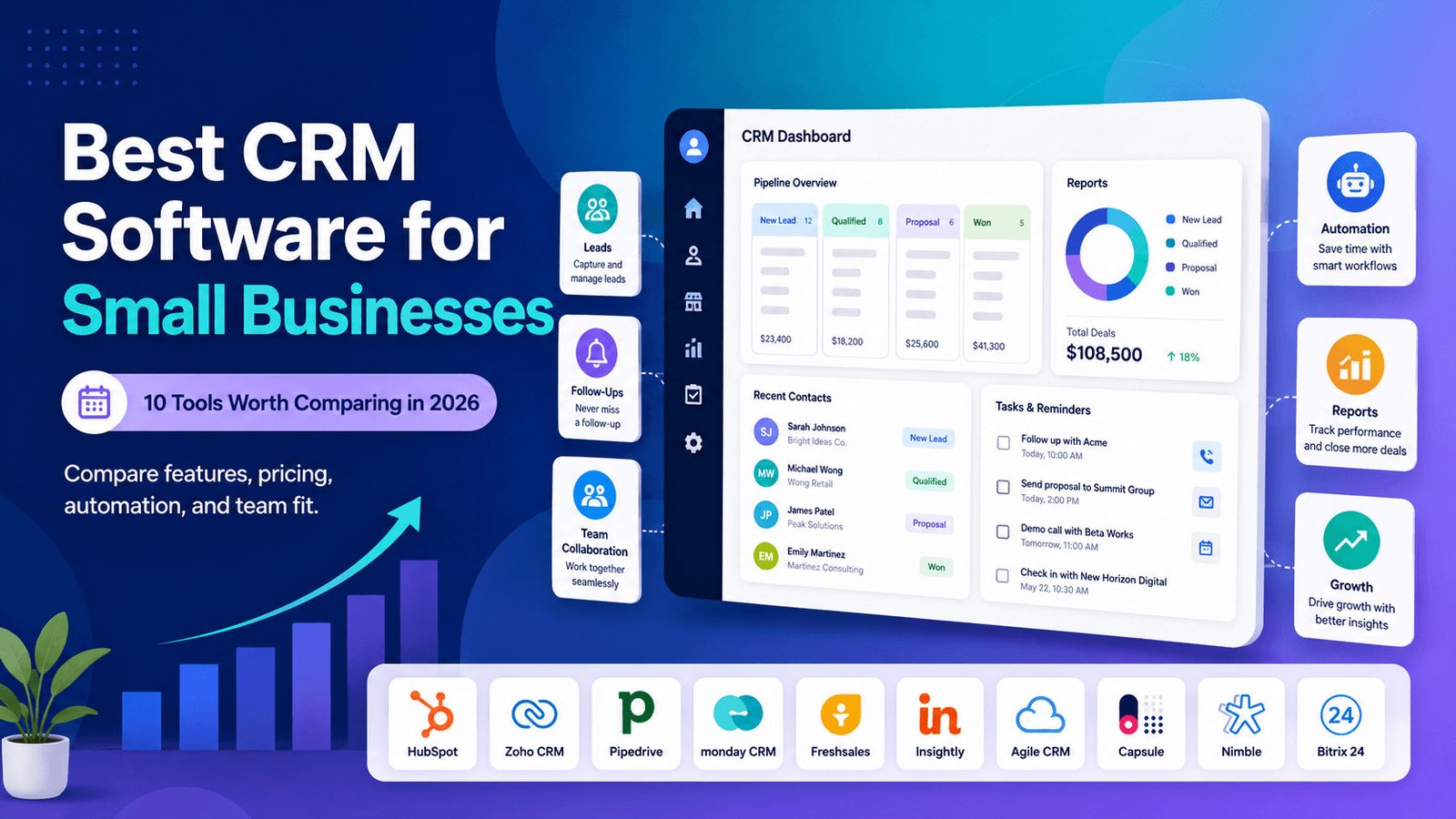
Finding the best CRM software for small businesses takes more than comparing feature lists.
You need to know what the software will cost as your team grows, which useful tools require paid upgrades, and whether staff will update the system every day.
This guide compares 10 small-business CRM platforms by pricing structure, free-plan limits, setup work, sales features, and business fit.
Pricing and plan details were checked on July 14, 2026. Providers may change prices, limits, and promotional offers, so confirm the final cost before subscribing.
To make the first decision easier, start with the strongest option for each common business need.
Table of Contents
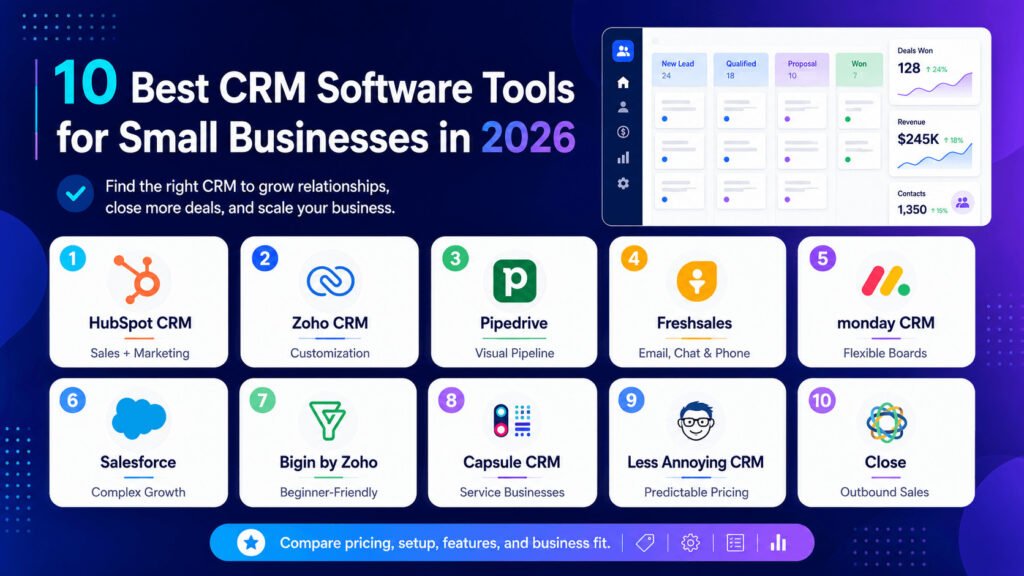
Best CRM Software for Small Businesses: Quick Picks
These are the strongest options for common small-business needs:
- Best for combining sales and marketing: HubSpot CRM
- Best for customization: Zoho CRM
- Best visual sales pipeline: Pipedrive
- Best for email, chat, and phone tools: Freshsales
- Best for flexible sales boards: monday CRM
- Best for businesses expecting complex growth: Salesforce
- Best simple CRM for beginners: Bigin by Zoho
- Best for consultants and service businesses: Capsule CRM
- Best for predictable pricing: Less Annoying CRM
- Best for outbound sales teams: Close
These recommendations are starting points, not universal winners. A CRM that suits a five-person sales team may be too expensive or complicated for a freelancer.
Before comparing individual products, it helps to understand what a CRM should actually do in day-to-day work.
Read also: https://sagaaro.com/best-cheap-crm-software-for-small-businesses-2026/
What is small-business CRM software?
Customer relationship management software stores customer details, tracks leads and potential sales, records conversations, and reminds staff about follow-ups.
It gives your team one place to answer practical questions:
- Who last contacted this customer?
- What did the customer ask for?
- Has someone sent the proposal?
- When should the next follow-up happen?
- Which deals are close to completion?
A CRM becomes especially useful when customer information is scattered across spreadsheets, email inboxes, messaging apps, and personal notes.
Once that information needs to be shared across a team, the differences between CRM platforms become more important. The table below shows where each option fits.
Small-Business CRM Comparison: Free Plans, Pricing, and Best Uses
The table below shows how the 10 CRM tools differ.
| CRM | Best for | Free option | Pricing point to check | Setup level | Main limitation |
|---|---|---|---|---|---|
| HubSpot CRM | Sales and marketing in one system | Up to 2 users | Promotional prices and paid Hub upgrades | Easy to moderate | Costs can rise as needs grow |
| Zoho CRM | Custom sales processes | Up to 3 users | Features vary widely by edition | Moderate | Requires configuration |
| Pipedrive | Visual pipeline management | Trial only | Email and extra products may require upgrades | Easy to moderate | Marketing and projects may cost extra |
| Freshsales | Sales across several communication channels | Up to 3 users | Calling, AI, and add-on usage | Easy to moderate | Advanced tools sit on higher plans |
| monday CRM | Flexible visual boards | Trial available | Minimum seat groups | Moderate | Small teams may pay for unused seats |
| Salesforce | Businesses expecting complex needs | 2 licences on Free Suite | Large jump from Starter to Pro | Moderate | Higher plans can be expensive |
| Bigin by Zoho | Freelancers and beginners | 1 user | Record limits and edition differences | Easy | May become limited as the team grows |
| Capsule CRM | Consultants and service businesses | Up to 2 users | Contact and pipeline limits | Easy | Limited advanced marketing automation |
| Less Annoying CRM | Simple, predictable pricing | 30-day trial | $15 per user plus tax | Easy | Fewer advanced sales tools |
| Close | Outbound calling and follow-up | Trial only | Calls, SMS, numbers, and AI usage | Moderate | Expensive for simple inbound sales |
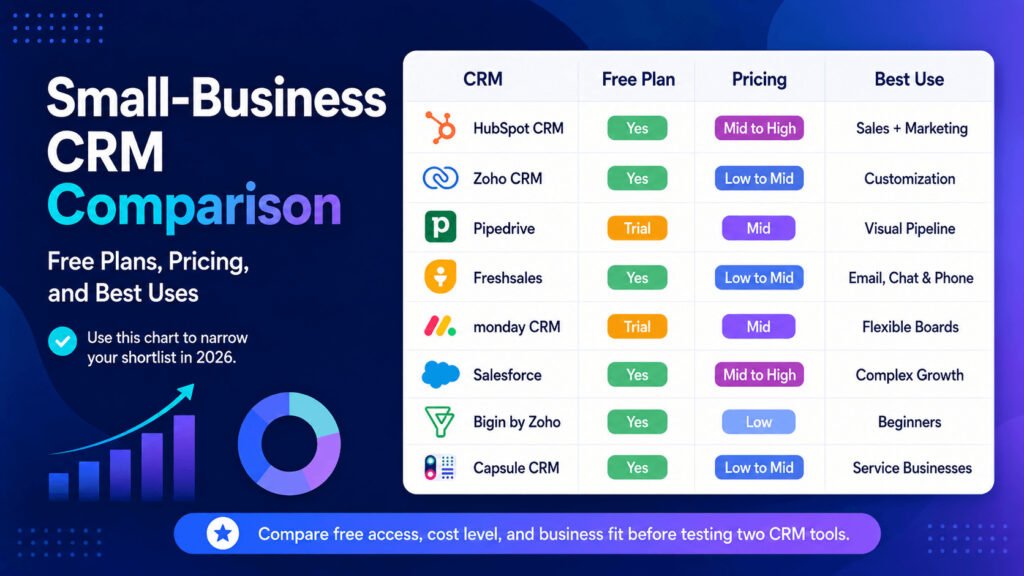
HubSpot’s free CRM currently supports up to two users and 1,000 contacts. Zoho CRM and Freshsales offer free editions for teams of up to three users.
Salesforce Free Suite includes two licences, while Bigin’s free plan is limited to one user and 500 records. Capsule’s free plan supports two users and 250 contacts.
Do not choose a CRM only because it has a free plan. Check whether the free version supports your full team, connects to email, stores enough contacts, and includes the reports you need.
The table gives a quick view, but it does not explain how the tools were judged. The next section covers the practical criteria behind the recommendations.
How We Compared the Best Small-Business CRM Software
This comparison focuses on five areas that affect small businesses after they sign up.
1. Real cost
Many CRM platforms charge per user. Others use minimum seat groups, paid add-ons, or usage fees for calls and text messages.
The cheapest plan may also exclude useful features such as email syncing, workflow automation, multiple pipelines, or detailed reports.
2. Setup work
A CRM must be prepared before it becomes useful.
Someone may need to:
- Import and clean contact records
- Create sales stages
- Connect email accounts
- Set user permissions
- Build reminders or automated rules
- Train the team
A simple CRM with one pipeline may take only a few hours to prepare. A heavily customized system with messy data and several integrations can take much longer.
3. Daily usability
Staff should be able to find contacts, record calls, update deals, set follow-up dates, and see overdue tasks without searching through several menus.
A long feature list has little value when common tasks feel difficult.
4. Business fit
A freelancer may only need contact records and reminders.
An outbound sales team may need calling, text messages, email sequences, lead assignment, and team reporting.
5. Future limits
A CRM may work today but become unsuitable when:
- More users join the team
- The company needs several pipelines
- Automation limits become restrictive
- Managers need stronger access controls
- Add-ons push the total cost beyond the budget
These criteria make the product differences easier to see. Some tools focus on simplicity, while others trade a longer setup process for more control.
10 Best CRM Software Tools for Small Businesses in 2026
1. HubSpot CRM
Best for: Small businesses that want connected sales, marketing, and customer-service tools
Free plan: Yes, for up to two users
Setup: Easy to moderate
HubSpot CRM combines contact management, deal tracking, email connections, meeting scheduling, forms, and tools from HubSpot’s wider sales, marketing, and customer-service platform.
Its free CRM currently supports up to two users and 1,000 contacts. It can also connect with Gmail and many Outlook accounts, helping small teams save customer emails without copying each conversation manually.
HubSpot sometimes displays a discounted Starter price alongside a higher standard price. Check whether the advertised amount is temporary, requires annual billing, or changes at renewal.
The main concern is the cost of growth. Advanced sales automation, reporting, marketing contacts, and customer-service features may require separate paid Hubs or higher plans.
Choose HubSpot if: You want sales and marketing tools connected in one system.
Consider another CRM if: You expect to need advanced features but want a predictable long-term cost.
HubSpot offers a broad connected platform. Zoho CRM takes a different approach by giving businesses more control over how the system works.
2. Zoho CRM
Best for: Growing teams that need customization
Free plan: Yes, for up to three users
Setup: Moderate
Zoho CRM helps businesses manage leads, contacts, deals, reports, workflow rules, and mobile sales activity.
Its free edition supports up to three users and includes leads, deals, workflows, reports, and mobile access.
A workflow rule tells the CRM to complete an action after a specific event.
For example, the system could assign a website enquiry to a salesperson, create a follow-up task two days later, or alert a manager when a deal reaches a certain value.
Zoho gives businesses more control over fields, sales stages, permissions, and automated rules than many simpler CRMs. That control also creates more setup work.
The number of editions can make pricing difficult to compare. Some tools are only available on higher plans, and local taxes may increase the displayed price.
Choose Zoho CRM if: Your sales process needs custom fields, rules, reports, and access controls.
Consider another CRM if: You want a system that works with very little configuration.
Teams that do not need that level of customization may prefer a CRM built around a simpler visual process.
3. Pipedrive
Best for: Teams that manage sales through a visual pipeline
Free plan: No permanent free plan; a trial is available
Setup: Easy to moderate
Pipedrive is centred on visual deal management.
A sales pipeline shows each potential sale moving through stages such as:
- New enquiry
- Contacted
- Meeting booked
- Proposal sent
- Negotiation
- Won or lost
Salespeople can move deals between stages and quickly see which prospects need attention.
Pipedrive currently offers four main plans: Lite, Growth, Premium, and Ultimate. A 14-day trial is also available.
The main pricing risk is that a business may need more than the basic CRM. Email features, lead capture, marketing campaigns, project work, or website-visitor tracking may require a higher plan or an additional product.
Pipedrive can be an effective sales pipeline tool without covering every part of marketing, customer support, and project delivery.
Choose Pipedrive if: Your team follows a clear sales process and wants to see every active deal at a glance.
Consider another CRM if: You need marketing, customer support, and project tools in one subscription.
Pipedrive keeps the sales process focused. Freshsales adds more communication tools for teams that work across email, chat, and phone.
4. Freshsales
Best for: Small teams using email, chat, and phone communication
Free plan: Yes, for up to three users
Setup: Easy to moderate
Freshsales combines contact management, deal tracking, Kanban views, email templates, live chat, phone tools, and AI-assisted features.
Its free plan supports up to three users and includes email templates, built-in phone capability, live chat, and weekday support. Paid plans currently start from $9, although billing terms and regional pricing may differ.
“Built-in phone” means staff can manage calls from inside the CRM. It does not mean all numbers, minutes, or destinations are free.
Before choosing Freshsales for phone-heavy work, check:
- Whether local numbers are available
- The cost per minute
- Whether call recording is included
- Which plan supports the phone features you need
Freshworks also sells add-ons for extra AI sessions and document tools used to create quotes, contracts, and similar files.
Choose Freshsales if: Your team wants sales records and several communication channels in one system.
Consider another CRM if: You only need basic contacts, tasks, and reminders.
Freshsales provides a more ready-made communication setup. monday CRM gives teams more freedom to build their own visual structure.
5. monday CRM
Best for: Teams that want flexible visual sales boards
Free plan: A trial is available; confirm current CRM-specific free access
Setup: Moderate
monday CRM uses boards, columns, dashboards, and connected records to track leads, contacts, deals, tasks, and sales activity.
Teams can adjust the boards to match their process.
For example, a marketing agency could track new enquiries, discovery calls, proposals, contracts, and project handovers across connected boards.
The main concern for very small teams is billing.
monday.com uses groups of seats instead of always charging for the exact number of active users. Plans begin with three seats and then move into larger groups.
A four-person team may need to pay for five seats, while a six-person team may need to buy ten.
Pricing also depends on the billing country, payment period, selected plan, and taxes. Additional AI usage may cost extra after included credits run out.
Choose monday CRM if: Your team wants to build a visual system around its own sales process.
Consider another CRM if: You have one or two users and do not want to pay for unused seats.
That flexibility suits teams willing to design their own setup. Salesforce is more suitable when the business expects its processes to become much more complex over time.
6. Salesforce Free Suite and Starter Suite
Best for: Businesses expecting more complex sales and service processes
Free plan: Free Suite includes two licences
Setup: Moderate
Salesforce now offers small businesses several entry points.
Free Suite includes two user licences. Starter Suite costs $25 per user per month, while Pro Suite starts at $100 per user per month and requires annual billing and a contract.
Salesforce uses the term opportunity for a potential sale. Other CRM tools may call the same record a deal.
Starter Suite combines sales, customer service, marketing, commerce, and Slack features. It may suit a company that wants a simple starting point but expects to build more advanced processes later.
The weakness is the jump between plans. A team may start comfortably on Free Suite or Starter Suite, then face a much higher cost when it needs the automation and customization available in Pro Suite.
Third-party apps and integrations may also charge separate fees.
Choose Salesforce if: Your business expects to build more advanced sales, service, and reporting processes.
Consider another CRM if: You need a simple platform with low administration and smaller price increases between plans.
Not every small business needs that much room to expand. Bigin offers a lighter option for teams that simply want to move beyond spreadsheets.
7. Bigin by Zoho
Best for: Freelancers and small teams moving away from spreadsheets
Free plan: Yes, for one user
Setup: Easy
Bigin is a simpler CRM from Zoho.
It focuses on contacts, pipelines, tasks, follow-ups, and customer communication without including the full range of Zoho CRM’s advanced settings.
The free plan supports one user and up to 500 records. Paid plans start from $7, while the Express and Premier editions raise the storage limits to 50,000 and 100,000 records.
A record may be a contact, company, deal, or another stored item. Check how Bigin counts records because the business may reach the limit before it has 500 customers.
Bigin is designed to be faster and easier to set up than the full Zoho CRM. Businesses can also move to Zoho CRM later if they need more advanced tools.
Choose Bigin if: You need a simple first CRM for contacts, enquiries, and follow-ups.
Consider another CRM if: Several people need free access or you already require detailed reports and complex workflow rules.
Bigin focuses mainly on simple pipeline work. Capsule adds project and client-management features that may suit service businesses more closely.
8. Capsule CRM
Best for: Consultants, agencies, freelancers, and service businesses
Free plan: Yes, for up to two users and 250 contacts
Setup: Easy
Capsule CRM focuses on contact records, deals, tasks, emails, calendars, sales pipelines, and project work.
Its free plan supports two users, 250 contacts, five custom fields, and one sales pipeline. Businesses can also test paid plans for 14 days without entering card details.
A custom field stores information that matters to a specific business.
For example, a consultant might create fields for service type, expected start date, budget, and referral source.
Paid plans can support multiple sales pipelines. This is useful when a business sells different services through separate processes, such as monthly retainers and one-time website projects.
Capsule is not mainly designed for advanced marketing automation. Businesses running large or complex email campaigns may need another marketing tool or an integration.
Choose Capsule if: You want a clean CRM that connects contacts, sales work, and client projects.
Consider another CRM if: Advanced marketing campaigns are a central requirement.
Capsule balances simplicity with project work. Less Annoying CRM goes further toward simplicity by using one plan and one predictable price.
9. Less Annoying CRM
Best for: Very small teams that want simple, predictable pricing
Free plan: No permanent free plan; a 30-day trial is available
Setup: Easy
Less Annoying CRM uses one price instead of dividing features across several tiers.
It currently costs $15 per user per month, plus applicable tax. There is no long-term contract, and users can cancel at any time.
The subscription includes:
- Unlimited contacts and companies
- Unlimited pipelines
- Task management
- Email logging
- Mobile access
- User permissions
- 25GB of file storage per user
The monthly cost is easy to calculate:
- One user: $15
- Three users: $45
- Five users: $75
Taxes may increase the final amount.
The trade-off is that Less Annoying CRM focuses on core CRM work rather than complex AI tools, advanced automation, or enterprise-level reporting.
Choose Less Annoying CRM if: You want basic contact and pipeline management without comparing several plans.
Consider another CRM if: Your team needs advanced automation, built-in calling, or detailed forecasting.
That simple pricing works well for basic sales tracking. Close serves a different type of team—one that spends much of the day contacting leads directly.
10. Close
Best for: Outbound sales teams that call, email, and text leads
Free plan: No permanent free plan; a trial is available
Setup: Moderate
Close combines CRM records with email, calling, text messaging, pipeline management, reporting, and AI sales tools.
Its Solo plan is limited to one user and 10,000 leads. It currently costs $19 per month when paid monthly or $9 per month with annual billing. Automated workflows are not included.
The Essentials plan adds team collaboration, forms, email, calling, SMS, a shared inbox, and task management. Automated workflows and the power dialer are available on the higher Growth plan.
The subscription is not the full cost. Calls, text messages, phone numbers, and some AI usage have separate or usage-based charges.
This pricing can make sense for an outbound team that would otherwise need separate CRM, phone, SMS, and email-sequence products.
It is harder to justify for a service business that receives only a few enquiries each week.
Choose Close if: Your team regularly contacts a high number of leads through calls, emails, and text messages.
Consider another CRM if: Most customers contact you first and your follow-up process is simple.
The product reviews show what each platform does well. The next step is to calculate what using it may cost beyond the advertised subscription.
Hidden CRM Costs Small Businesses Should Check
The monthly subscription is only one part of the cost.
Before buying, review the following areas.
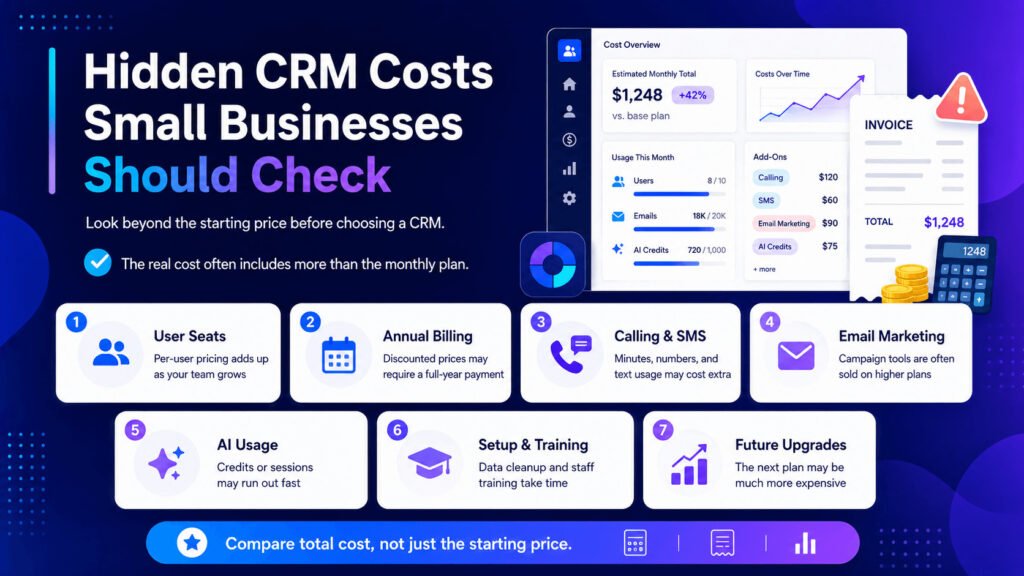
1. User seats
Most CRM platforms charge for each user.
A tool that costs $20 per person would cost:
- $20 for one user
- $60 for three users
- $100 for five users
Seat minimums can make the total less predictable. monday CRM, for example, sells plans in groups of seats.
2. Annual billing
A low advertised price may require payment for a full year.
Check:
- The monthly price
- The annual price
- The renewal cost
- Whether you can cancel early
- Whether unused time is refundable
3. Calling and text messages
A CRM may include phone or SMS tools but still charge for minutes, numbers, message segments, registration, or international use.
Close, for example, charges for calling and SMS usage separately from the seat subscription.
4. Email marketing
Connecting a personal inbox is not the same as sending marketing campaigns.
A CRM may let salespeople email individual leads but require another plan or product for newsletters, automated campaigns, or large contact lists.
5. AI usage
Some plans include a limited number of AI credits or sessions.
Once the allowance is used, the business may need to buy more credits or move to a higher plan.
6. Setup and training
Someone must import contacts, remove duplicates, build pipelines, create rules, and train staff.
Poorly organized data can turn a simple migration into several days of manual cleanup.
7. Future upgrades
The current plan may work for two users but become too limited when the business adds another salesperson, needs several pipelines, or wants stronger reports.
Check the cost of the next likely plan before committing.
For example, imagine a five-person company comparing two CRMs.
The first costs $12 per user but requires paid email and reporting add-ons. The second costs $18 per user and includes both.
The second CRM may cost less overall once the team adds the tools it actually needs.
Once the full cost is clear, choosing between the final options becomes much easier.
How to Choose the Best CRM for Your Small Business
Use the following process to build a shortlist.
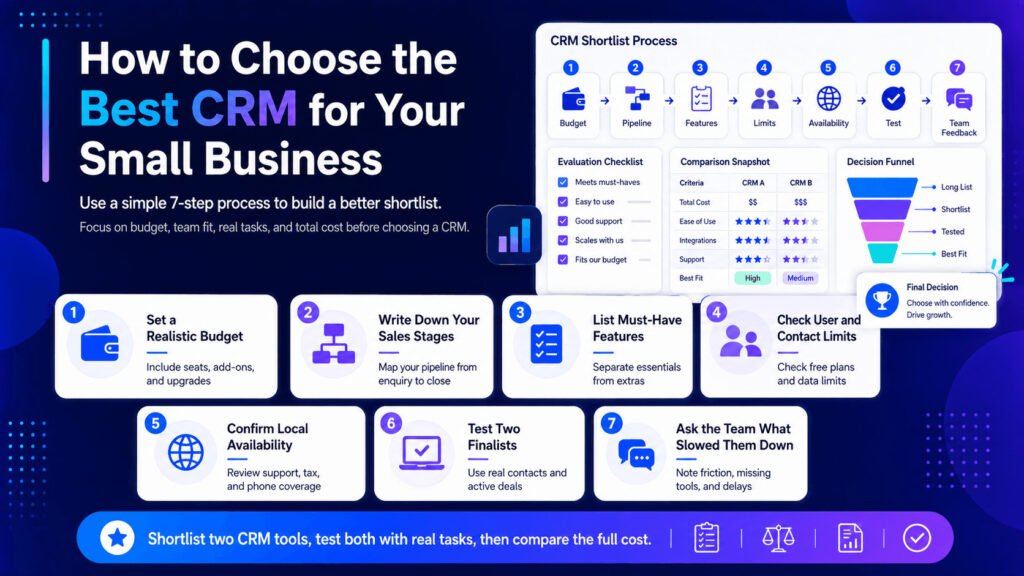
1. Set a realistic monthly budget
Include user seats, taxes, add-ons, calling, text messaging, and possible future upgrades.
Do not compare only the lowest advertised prices.
2. Write down your sales stages
Keep the stages simple.
A service business might use:
- New enquiry
- Contacted
- Consultation booked
- Quote sent
- Follow-up
- Won or lost
3. List the features you must have
Separate essential tools from optional ones.
Your essential list might include:
- Contact records
- Email connection
- Task reminders
- Lead assignment
- Mobile access
- One sales pipeline
- Basic reporting
- Data export
4. Check user and contact limits
A free CRM is not useful if the plan supports two people but your team has four.
Also check how the provider counts contacts, leads, companies, deals, and other records.
5. Confirm local availability
Businesses outside North America and Europe should check whether:
- Local phone numbers are available
- SMS works in their country
- The vendor accepts their payment method
- Support is available during local working hours
- Prices include or exclude tax
6. Test two finalists
Do not start six trials at once.
Choose two CRM tools and test them with the same tasks:
- Import 20 real contacts
- Create five active deals
- Connect an email account
- Assign tasks to staff
- Set follow-up dates
- Run a basic report
- Export the records
7. Ask the team what slowed them down
Record:
- What felt easy
- Which tasks required help
- What was missing
- Which features required an upgrade
- Whether staff would use the system every day
The best CRM is not the one with the longest feature list. It is the one your team can afford, understand, and update consistently.
Even after following those steps, a few practical questions often remain. The answers below cover the most common ones.
Frequently Asked Questions About Small-Business CRM Software
What is the best CRM software for a small business?
The best choice depends on how the business sells.
HubSpot suits teams that want sales and marketing tools together. Zoho CRM offers more customization, while Pipedrive focuses on visual pipeline management.
Bigin and Capsule work well for simpler needs. Close is designed for outbound sales teams that make frequent calls and send regular follow-ups.
What is the best free CRM for a small business?
HubSpot supports two free users, while Zoho CRM and Freshsales support up to three.
Salesforce Free Suite includes two licences, Bigin supports one free user, and Capsule supports two users with a 250-contact limit.
The best free option depends on your team size, contact volume, email needs, and reporting requirements.
How much does CRM software cost for a small business?
CRM software may be free or cost hundreds of dollars per user each month.
The final amount depends on the plan, number of users, billing period, add-ons, contact limits, calling fees, SMS usage, AI credits, taxes, and setup work.
Is CRM software worth it for a small business?
A CRM becomes useful when the business starts missing follow-ups, several people handle leads, or customer information is stored in different places.
A solo business with only a few active customers may still manage with a spreadsheet. The need for a CRM grows as the number of contacts, conversations, and team members increases.
What is the easiest CRM for beginners?
Bigin, Capsule, and Less Annoying CRM are practical options for beginners because they focus on core contact, pipeline, and task management.
Ease of use still depends on how the system is configured. Even a simple CRM can become confusing when the team creates too many fields, stages, and rules.
Can a small business use a spreadsheet instead of a CRM?
Yes, especially when one person manages a small number of leads.
Spreadsheets become harder to maintain when several people update customer information, conversations are stored separately, or staff need automatic reminders and lead assignments.
What features should a small-business CRM include?
Most small businesses should look for:
- Contact and company records
- Deal or opportunity tracking
- Tasks and reminders
- Email integration
- Mobile access
- Basic reports
- Data import and export
- User permissions
- Connections to essential business tools
Calling, SMS, AI, marketing automation, and sales forecasting are useful only when they match the sales process.
How many CRM tools should a business test?
Test two serious candidates.
Use the same contacts, deals, tasks, and reports in both systems. This makes it easier to compare speed, usability, missing features, and total cost.
With those questions answered, the final decision should come down to fit rather than feature count.
Final Recommendation
The best CRM software for small businesses depends on what the team needs to do each day.
Choose HubSpot CRM when sales and marketing need to work in one connected system. Consider Zoho CRM for customization or Pipedrive for clear visual sales tracking.
Look at Bigin, Capsule, or Less Annoying CRM when ease of use and predictable costs matter more than advanced features.
Choose Close when calling, email, and text outreach sit at the centre of the sales process. Consider Salesforce when the business expects to develop more complex sales and customer-service operations.
Before subscribing, select two finalists and test them with real customer records and active deals. Compare the complete cost—not only the starting price—and choose the system your team can update without adding unnecessary work.